

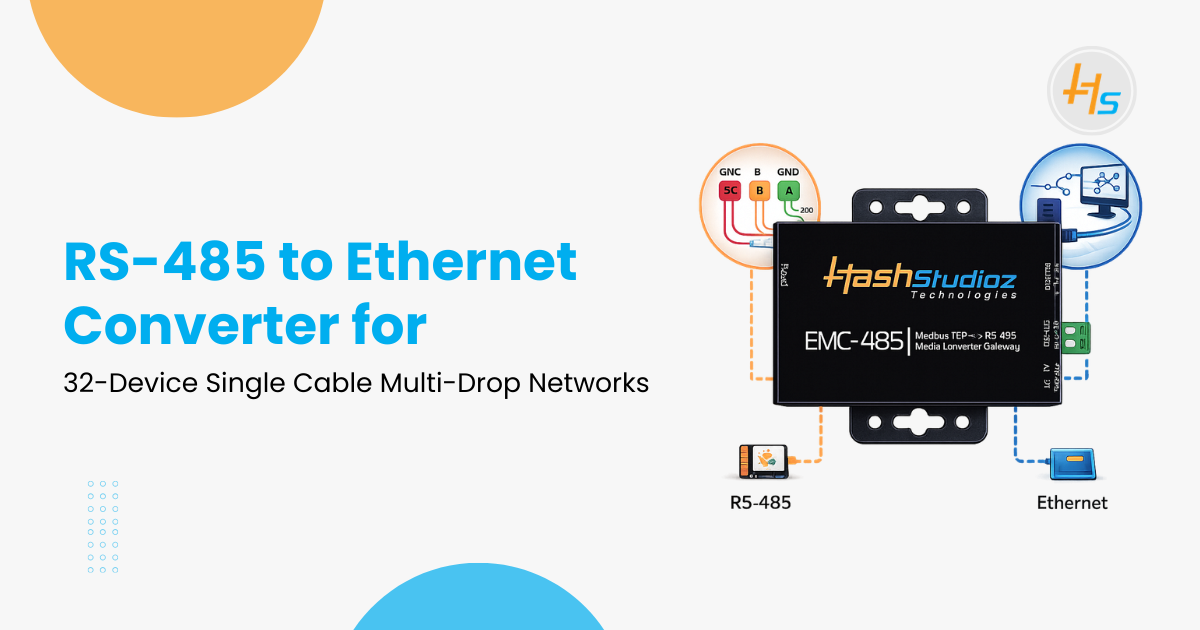
Factories still rely on RS-485 communication networks to connect PLCs, sensors, meters, and industrial controllers. A typical RS-485 network can support up to 32 devices on a single cable, with communication distances reaching 1,200 meters at lower data speeds.
However, modern industrial environments increasingly depend on Ethernet networks for faster communication and centralized data management. An RS-485 to Ethernet Converter bridges this gap by allowing legacy serial devices to communicate over TCP/IP networks.
Table of Contents
Industrial data shows why these converters remain important
- Industrial automation is growing at about 9% annually through 2026.
- Nearly 70% of legacy factory systems still rely on RS-485 communication.
- Modbus RTU operates on about 60% of factory floors worldwide.
- Ethernet adoption in new manufacturing plants has reached 85%.
- The industrial converter market is expected to exceed $500 million by 2025.
By deploying RS-485 to Ethernet converters, companies can reduce wiring costs by up to 40% and extend the life of existing equipment. This article explains the technology, wiring methods, protocols, and deployment strategies used to implement multi-drop industrial networks.
RS-485 Multi-Drop Communication Basics
RS-485 uses differential signaling to transmit data through two wires known as A+ and B- lines. These signals are resistant to electrical noise because interference affects both wires equally and cancels out.
Key characteristics include:
- Supports multi-drop communication, where one master device communicates with multiple slave devices.
- Maximum 32 devices can share a single bus.
- Uses termination resistors at both ends of the cable to prevent signal reflection.
- Works best with 120-ohm impedance twisted-pair cables, commonly 22–24 AWG.
RS-485 communication speeds range from 300 bps to 10 Mbps, but longer distances require lower speeds. For example, 9600 bps can reliably reach 1,200 meters.
How Ethernet Networks Differ
Ethernet networks operate differently from serial communication systems. They support higher speeds and modern networking features.
Key differences include:
- Ethernet speeds range from 10 Mbps to 1 Gbps or higher.
- Devices connect through network switches in a star topology.
- Communication relies on IP addresses and TCP/IP protocols.
- Supports thousands of devices within segmented networks using VLANs.
While Ethernet provides scalability and speed, RS-485 remains widely used due to its simplicity and reliability in industrial environments.
How an RS-485 to Ethernet Converter Works
An RS-485 to Ethernet Converter acts as a bridge between a serial communication bus and an Ethernet network.
The basic workflow is:
- An RS-485 master sends a request to a device.
- The converter receives the serial data.
- It packages the data into a TCP/IP packet.
- The Ethernet network transmits the packet to the destination.
- The response follows the same path back to the RS-485 network.
These converters typically support multiple modes such as:
- Modbus RTU to Modbus TCP gateway
- Serial tunneling through TCP or UDP
- Protocol conversion for ASCII or other serial standards
Devices keep their original RS-485 addresses, usually between 1 and 32, while the converter maps communication to Ethernet ports.
Wiring a Single Cable Multi-Drop Network
A standard RS-485 multi-drop network uses one twisted pair cable connecting all devices in a daisy-chain layout.
Typical layout example:
Device 1 → Device 2 → Device 3 → … → Converter → Ethernet Switch
Important wiring rules include:
- Install 120-ohm termination resistors at the first and last devices.
- Avoid star wiring, which can cause signal reflections.
- Keep branch connections shorter than 10 cm.
- Ground cable shielding properly to reduce noise.
Converters often include bias resistors that stabilize signals when the network is idle.
Modbus Protocol Conversion
Many industrial systems use Modbus RTU over RS-485. Ethernet networks often rely on Modbus TCP.
An RS-485 to Ethernet converter translates between these protocols by converting the message format.
Virtual COM Port Communication
Many converters provide virtual COM port functionality.
This feature allows legacy software to communicate with RS-485 devices over Ethernet as if they were connected to a local serial port.
For example:
- Windows may display the converter as COM3 or COM4.
- Industrial software sends data through the COM port.
- The converter transfers that data through TCP/IP to the RS-485 network.
Linux systems can use tools such as socat to create virtual serial connections.
How Growing Businesses Replace 10+ Tools With a Single Odoo ERP
Web Configuration Interface
Most modern converters include a built-in web interface that allows administrators to configure settings easily.
Common configuration options include:
- Baud rate (9600 to 115200)
- Data bits and parity settings
- Slave address ranges
- TCP/IP network configuration
- Timeout settings
- Firmware upgrades
The interface usually runs on port 80 and allows administrators to monitor network status in real time.
DIN Rail Installation
Industrial converters are typically designed for DIN rail mounting, which simplifies installation inside control cabinets.
Basic installation steps:
- Mount the converter on a 35 mm DIN rail.
- Connect RS-485 wires to A+ and B- terminals.
- Attach shield ground wires.
- Supply 12V or 24V DC power.
- Connect Ethernet using an RJ45 cable.
LED indicators display power, network activity, and serial communication status.
Benefits of Galvanic Isolation
Many industrial converters include galvanic isolation to protect equipment.
Benefits include:
- Prevents ground loop damage.
- Protects against electrical surges and voltage spikes.
- Provides up to 1500V isolation between serial and Ethernet circuits.
Isolation improves reliability in environments with heavy machinery and electrical noise.
Performance with 32 Devices
When 32 devices share a single RS-485 bus:
- The master polls each device sequentially.
- Typical polling cycles occur every 100 milliseconds.
- Converters buffer messages to avoid communication delays.
Modern converters can process thousands of requests per second with minimal latency.
Industrial Use Cases
RS-485 to Ethernet converters support many industrial devices, including:
- PLC controllers
- Temperature and humidity sensors
- Energy monitoring meters
- HVAC control systems
- Elevator monitoring systems
These devices often communicate using Modbus registers that SCADA systems read continuously.
Troubleshooting Multi-Drop Networks
RS-485 multi-drop networks allow multiple devices to communicate over a single cable. However, configuration or wiring issues can cause communication problems. Identifying the cause helps maintain stable data transmission in industrial environments.
1. No Device Response
A common issue is when devices fail to respond to the master request. This often occurs due to missing or incorrect termination resistors. RS-485 networks require 120-ohm termination resistors at both ends of the cable to prevent signal reflections. Also check cable connections and ensure the A+ and B- lines are connected correctly. The network should follow a daisy-chain topology, not a star configuration.
2. Corrupted or Unreadable Data
If devices respond but the data appears incorrect, verify the communication parameters. All devices must use the same baud rate, parity, data bits, and stop bits. For example, many systems use 9600, 8-N-1 settings. Electrical noise can also corrupt signals, so use shielded twisted-pair cables and keep wiring away from high-voltage equipment.
3. Address Conflicts
Each device on the RS-485 network must have a unique slave address. Duplicate addresses cause response conflicts. Check device settings through DIP switches or software tools and assign each device a different address.
4. Network Connectivity Issues
When using an RS-485 to Ethernet converter, verify Ethernet connectivity. Check the cable, confirm the IP address configuration, and test the connection by pinging the converter’s IP address. Correct network settings ensure proper communication with monitoring systems.
Proper wiring, correct settings, and stable network configuration help maintain reliable RS-485 communication.
Real-World Factory Example
A textile manufacturing plant uses 28 PLC-controlled weaving machines. Each machine communicates through RS-485.
Engineers installed a central RS-485 to Ethernet converter connected to a SCADA system.
Results included:
- Real-time monitoring of machine performance
- Faster fault detection
- Improved production planning
The entire deployment required two days of configuration and testing, with a return on investment within six months.
Power and Security Considerations
Converters usually operate within a 9–36V DC power range and consume less than 500 mA.
Security features may include:
- Password-protected web access
- IP filtering
- Firmware authentication
- VPN support for remote access
These features help protect industrial networks from unauthorized access.
Future-Ready Industrial Networks
RS-485 to Ethernet converters ensure compatibility between legacy devices and modern systems.
They allow integration with:
- SCADA platforms
- Manufacturing Execution Systems (MES)
- Cloud platforms such as AWS IoT
- Enterprise resource planning (ERP) software
This approach enables factories to modernize operations without replacing existing equipment.
Enhance Industrial Connectivity with RS-485 to Ethernet Converter Solutions
Choosing the right RS-485 to Ethernet Converter solution is essential for businesses that want to connect legacy serial devices with modern Ethernet networks. From integrating PLCs, sensors, meters, and controllers to enabling seamless communication with SCADA and monitoring systems, industries need a reliable and scalable connectivity solution for efficient operations and real-time data access.
At HashStudioz, we help organizations implement advanced RS-485 to Ethernet Converter solutions that simplify network integration, extend the life of existing equipment, and enable smooth communication across industrial systems.
Partner with our experienced team to build a robust industrial communication infrastructure that improves device connectivity, enhances operational visibility, and supports long-term digital transformation across your manufacturing and automation environments.
Conclusion
An RS-485 to Ethernet Converter provides a practical solution for connecting legacy industrial devices to modern networks. With support for 32 devices on a single cable, these converters maintain reliable serial communication while enabling integration with Ethernet infrastructure.
They simplify wiring, reduce installation costs, and allow factories to monitor equipment in real time. With features such as Modbus protocol conversion, isolation protection, and web-based configuration, converters help organizations modernize industrial operations without major system upgrades.
FAQs:
1. What is an RS-485 to Ethernet Converter?
An RS-485 to Ethernet Converter connects RS-485 serial devices such as PLCs, sensors, and meters to Ethernet networks, enabling communication through TCP/IP systems like SCADA or industrial monitoring platforms.
2. How many devices can be connected on an RS-485 multi-drop network?
A standard RS-485 network supports up to 32 devices on a single cable using a multi-drop configuration where one master communicates with multiple slave devices.
3. What is the maximum distance supported by RS-485 communication?
RS-485 communication can reach up to 1200 meters at lower baud rates such as 9600 bps, making it ideal for large industrial environments.
4. What protocols are commonly used with RS-485 to Ethernet converters?
Most converters support Modbus RTU to Modbus TCP conversion, allowing legacy RS-485 devices to communicate with modern Ethernet-based industrial systems.
5. Where are RS-485 to Ethernet converters commonly used?
They are widely used in industrial automation, manufacturing plants, energy monitoring systems, building management systems, and IoT environments to integrate serial devices with modern networks.