

Planning a Microsoft 365 tenant-to-tenant migration? This guide breaks down the full migration timeline, key phases, common delays, and best practices enterprises need to move securely with minimal disruption.
Mergers, acquisitions, and tenant consolidation projects often look simple on paper. In reality, 85% of Microsoft 365 migrations face delays due to complexity. Typical timelines range from 4 weeks (small) to 40 weeks (enterprise), where 76% fail due to poor planning. Even one missed dependency creates downtime, mail flow breaks, and user disruption.
That is why building a clear Microsoft 365 Tenant-to-Tenant Migration Timeline is such an important part of the process. A well-structured M365 Migration Timeline helps enterprises understand each phase of the move. It also helps teams estimate Tenant Migration Duration and build a practical Microsoft 365 Migration Plan.
For organizations evaluating Microsoft 365 Migration Services, timeline planning is often what separates a controlled migration from a costly and disruptive one.
Table of Contents
What Is Microsoft 365 Tenant-to-Tenant Migration?
Microsoft 365 Tenant-to-Tenant Migration is the process of moving users, mailboxes, files, and collaboration tools from one Microsoft 365 tenant to another. A tenant is essentially your organization’s cloud environment. It contains all your users, apps, data, permissions, and security settings.
More than $230 billion was spent globally on cloud migration projects in 2024, and this figure is expected to grow to over $800 billion by 2029. This shows how essential cloud migration projects, including tenant-to-tenant migrations, have become for enterprises.
Why Do Enterprises Need Tenant Consolidation?
Enterprises often end up managing multiple tenants due to mergers, acquisitions, or organizational restructuring. Multiple tenants can create:
- Duplicate user accounts
- Confusing licensing
- Fragmented collaboration across Teams, SharePoint, and OneDrive
- Security and compliance challenges
Consolidating tenants reduces these issues, simplifies management, and improves user experience.
Real-World Use Cases
Some common scenarios where tenant-to-tenant migration is required include:
- Mergers and Acquisitions: Combine IT systems and unify users into a single tenant.
- Corporate Restructuring: Align departments or subsidiaries under one tenant.
- Brand or Regional Consolidation: Standardize collaboration and licensing across global offices.
Tenant-to-tenant migration is not just an IT task. It ensures business continuity while moving critical data and users safely.
Microsoft 365 Migration Timeline Overview
A typical Microsoft 365 Tenant-to-Tenant Migration can take anywhere from 2 to 12 weeks, depending on the organization’s size, data volume, and complexity. While small businesses with a few hundred users may complete migration in just a couple of weeks. Large enterprises with thousands of users, hybrid environments, and heavy SharePoint or OneDrive data may need several months.
A high-level migration timeline usually includes the following phases:
Phases of a Microsoft 365 Migration Timeline
- Assessment & Planning – Understand tenant environments, map users, and identify risks.
- Preparation & Setup – Verify domains, configure identities, and prepare the target tenant.
- Pilot Migration – Test the migration process with a small group of users.
- Full Migration Execution – Move all mailboxes, OneDrive, SharePoint, and Teams data.
- Coexistence & Transition – Maintain mail flow and collaboration during the migration.
- Post-Migration Optimization – Validate data, resolve issues, and fine-tune the environment.
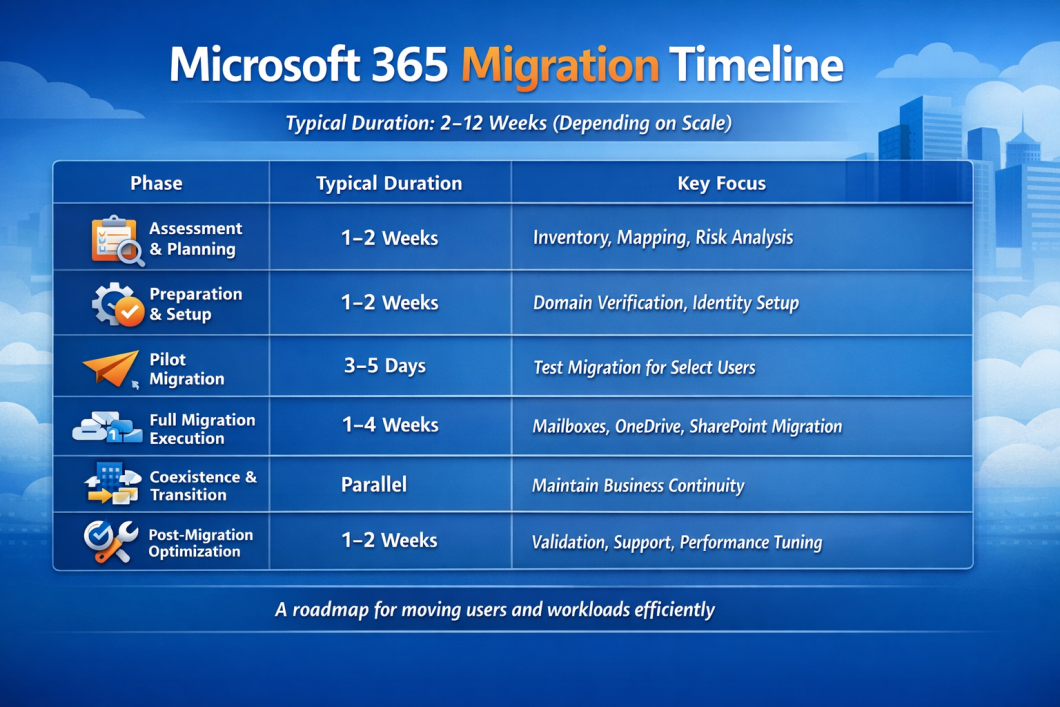
This M365 Migration Timeline gives enterprises a roadmap for moving users and workloads efficiently while minimizing disruption.
Phase-Wise Timeline Breakdown
A detailed Microsoft 365 Tenant-to-Tenant Migration Timeline ensures every step is clear and predictable. Breaking the migration into phases reduces risk and improves efficiency.
Phase 1: Assessment & Planning (1–2 Weeks)
IT teams analyze existing tenants, map users, and identify risks. They document dependencies and plan workloads. This phase sets the foundation for a smooth migration.
Phase 2: Preparation & Setup (1–2 Weeks)
Domains are verified, user identities configured, and Azure AD set up. Teams prepare the target tenant and ensure all permissions and policies are in place.
Phase 3: Pilot Migration (3–5 Days)
A small group of users migrated first. This tests the process, uncovers issues, and validates migration tools. Early success ensures confidence for the full migration.
Phase 4: Full Migration Execution (1–4 Weeks)
All mailboxes, OneDrive files, SharePoint sites, and Teams data are migrated. Teams monitor progress and resolve errors in real time. Communication remains active to avoid downtime.
Phase 5: Coexistence & Transition (Parallel Phase)
Mail flow, Team chats, and collaboration continue without interruption. Users operate in both environments while the final data migration completes.
Phase 6: Post-Migration Optimization (1–2 Weeks)
IT teams validate data integrity, optimize performance, and provide support. Policies and configurations are tuned to ensure security and compliance.
Factors That Affect Your Microsoft 365 Tenant-to-Tenant Migration Timeline
Planning a smooth Microsoft 365 Tenant-to-Tenant Migration Timeline requires understanding the key factors that can impact the process. Each organization’s M365 Migration Timeline will differ, depending on complexity and scale:
- Number of Users – More users mean more mailboxes, permissions, and accounts to migrate. Larger organizations will see a longer Tenant Migration Duration compared to smaller teams.
- Data Volume – The size of emails, archives, and shared files directly affects how long your migration takes. High data volume can extend your Microsoft 365 Migration Timeline significantly.
- Complexity (Hybrid vs Cloud) – Organizations with hybrid environments, combining on-premises and cloud systems, face additional steps such as directory syncing and legacy application handling. Pure cloud-to-cloud migrations are usually faster.
- Tools Used – The choice of migration tools or Microsoft 365 Migration Services can make a big difference. Automated solutions speed up the process, while manual approaches may lengthen your Tenant Migration Duration.
- Compliance Requirements – Industries with strict regulatory needs, like finance, healthcare, or government, require careful data handling, auditing, and validation, which can extend your M365 Migration Timeline.
By factoring these elements into your Microsoft 365 Migration Plan, you can set realistic timelines, minimize downtime, and ensure a successful tenant-to-tenant migration.
Tools Used in Microsoft 365 Migration
Choosing the right tools is a crucial part of any Microsoft 365 Migration Plan. The tools you select can impact speed, reliability, and the overall Tenant Migration Duration. Generally, organizations rely on two main types of tools:
1. Native Tools
Microsoft provides built-in migration solutions for tenant-to-tenant moves. These tools are tightly integrated with Microsoft 365 and require no extra software.
- Pros: Secure, cost-effective, fully supported by Microsoft, no extra licensing needed.
- Cons: Limited automation, fewer advanced features, and can be slower for large-scale migrations.
2. Third-Party Tools
Third-party migration tools offer specialized features and automation for complex scenarios. Examples include tools for bulk mailbox migration, detailed reporting, and hybrid environment support.
- Pros: Faster migrations, robust error handling, advanced reporting, better for large enterprises.
- Cons: Additional cost, may require training, and some tools need ongoing maintenance.
Choosing between native and third-party solutions depends on your organization’s size, complexity, compliance needs, and desired M365 Migration Timeline. Often, enterprises combine both approaches to balance cost, control, and efficiency.
Best Practices to Accelerate Your Microsoft 365 Migration
Speeding up a Microsoft 365 Tenant-to-Tenant Migration Timeline doesn’t mean cutting corners. It means following smart, proven strategies. Here are the key best practices to keep your M365 Migration Timeline on track:
1. Use Phased Migration
Break your migration into smaller, manageable stages. Start with pilot groups, then gradually move to larger teams. Phased migration reduces risks, minimizes downtime, and helps ensure a smooth Tenant Migration Duration.
2. Enable Coexistence
Set up temporary coexistence between your source and target tenants so users can continue working without interruption. Email routing, calendar sharing, and document access remain seamless during the migration, keeping business operations running smoothly.
3. Automate Processes
Leverage automation tools to handle repetitive tasks like mailbox moves, permission mapping, and reporting. Automation not only accelerates migration but also reduces human error. This improves the efficiency of your Microsoft 365 Migration Plan.
4. Work With Experts
Partner with experienced migration specialists or certified Microsoft 365 Migration Services. Experts can anticipate challenges, recommend the best tools, and optimize your Microsoft 365 Tenant-to-Tenant Migration Timeline. It ensures your project stays on schedule.
Following these best practices ensures a faster, safer migration, keeping both your IT team and users happy throughout the transition.
Real-World Example: Tenant-to-Tenant Migration in Action
To illustrate how a well-planned Microsoft 365 Migration Plan works, consider this mini case study:
Client: A mid-sized enterprise with 1,200 users and 5 TB of email and SharePoint data.
Challenge: Consolidate two Microsoft 365 tenants post-merger, minimize downtime, and meet compliance requirements.
Migration Timeline
| Phase | Duration | Key Activities |
| Assessment & Planning | 1 week | Analyze users, data volume, and compliance needs |
| Pilot Migration | 3 days | Migrate a small test group of 50 users, validate tools |
| Full Migration | 2 weeks | Phased migration of remaining users, enable coexistence |
| Post-Migration Support | 1 week | Validate data integrity, train users, finalize cleanup |
Results
- Migration completed in 4 weeks with zero critical downtime
- 95% of users migrated seamlessly during business hours
- Automated processes reduced manual work by 60%
- Compliance and auditing requirements were fully met.
This example shows how a structured M365 Migration Timeline, combined with best practices and the right tools, can make a complex Microsoft 365 Tenant-to-Tenant Migration smooth, efficient, and low-risk.
Why Choose HashStudioz for Microsoft 365 Migration
When it comes to a seamless Microsoft 365 Tenant-to-Tenant Migration, choosing the right partner makes all the difference. Here’s why enterprises trust HashStudioz:
- Expertise & Proven Success – Our certified migration specialists have completed hundreds of tenant-to-tenant migrations, consistently delivering on time and within budget.
- Advanced Tools & Automation – We use a mix of Microsoft native tools and trusted third-party solutions. This helps speed up migration, reduce manual work, and ensure greater accuracy.
- Zero Downtime, Zero Data Loss – Our phased migration approach, automated workflows, and coexistence setup ensure that your business stays fully operational throughout the migration. Data integrity is always guaranteed.
- Enterprise-Grade Security & Compliance – HashStudioz follows strict security protocols and compliance standards. This gives enterprises peace of mind during the entire Tenant Migration Duration.
With HashStudioz, your Microsoft 365 Migration Plan is executed efficiently, securely, and with minimal disruption. That makes a complex migration process smoother and more predictable.

Conclusion
A successful Microsoft 365 Tenant-to-Tenant Migration requires careful planning, the right tools, and proven best practices. A successful migration starts with understanding the factors that affect your M365 Migration Timeline. With the right tools, phased migration, coexistence, and automation, organizations can ensure a smoother and lower-risk transition.
Partnering with experts like HashStudioz ensures your Microsoft 365 Migration Plan is executed with zero downtime and zero data loss.
Our enterprise-grade security measures keep your Tenant Migration Duration predictable and efficient.
Whether you’re consolidating tenants after a merger or optimizing your Microsoft 365 environment, following these strategies will make your migration faster, safer, and stress-free.
 Vipin Pachauri
  Prithvi Singh
  Manvendra Kunwar