

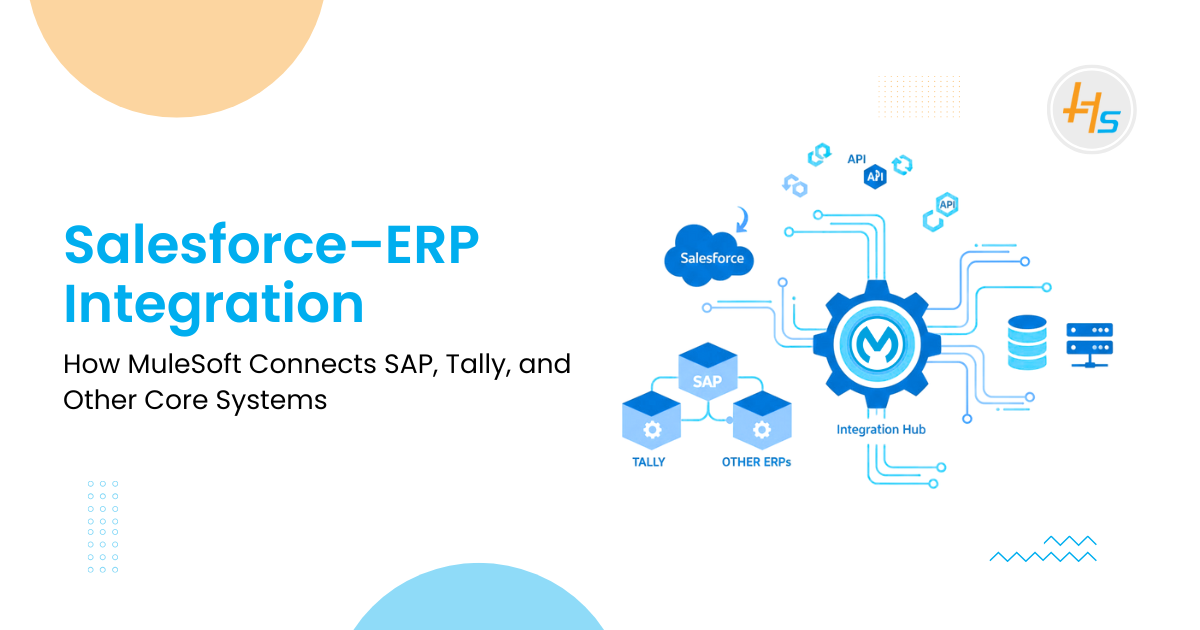
Many businesses use Salesforce to manage customers, leads, and deals. They also use ERP and accounting systems like SAP, Tally, Oracle, or Microsoft Dynamics to run finance, billing, and operations.
These systems often work separately and do not share data, which creates gaps, delays, and manual work.
This article explains how MuleSoft connects Salesforce with these ERP systems. It shows how this integration helps businesses run smoothly, avoid errors, and keep all teams aligned.
In simple terms, it is about building one connected system where sales, finance, and operations work with the same information.
Table of Contents
Why Businesses Need Salesforce–ERP Integration
When Salesforce and ERP systems are not connected, teams work in silos. Sales knows one version of the information, while finance sees another. This leads to confusion and slows down business processes.
Companies face issues like:
- Manual data entry
- Duplicate records
- Incorrect pricing or product details
- Delayed invoices and payments
- Poor customer experience
ERP systems handle billing, payments, taxes, and inventory. Salesforce manages quotes and customer updates. To get a complete picture of the business, both systems must share data in real time.
Challenges When Connecting Salesforce to ERP Systems
Connecting Salesforce to ERP systems is not simple. Each ERP tool works differently, uses different formats, and follows its own rules.
Some of the common challenges include:
- Salesforce uses modern APIs, while ERP systems may use older protocols
- Data formats do not match (JSON vs XML vs IDoc)
- Systems follow different timing, speeds, and workflows
- Manual data transfer leads to errors
- No single place to monitor or manage integrations
These challenges create delays, inaccurate reports, and customer dissatisfaction.
How MuleSoft Solves These Integration Problems
Most integration issues happen because Salesforce and ERP systems behave like two people speaking different languages.
MuleSoft steps in as the translator, coordinator, and traffic controller making sure every system understands the other.
Below is a problem–solution format that explains MuleSoft’s role clearly:
1. Systems do not communicate naturally
Salesforce speaks APIs and JSON. ERP systems like SAP, Tally, or Oracle speak older formats. They cannot talk directly.
How MuleSoft solves it:
- Converts data into the correct format
- Handles JSON, XML, CSV, flat files, IDoc, and more
- Makes Salesforce and ERP “understand” each other instantly
2. Manual work causes errors
Teams export data, send Excel sheets, or type the same info twice. This slows down billing and increases mistakes.
How MuleSoft solves it:
- Creates automated data flows
- Moves information without human involvement
- Ensures both systems are always in sync
3. Each ERP tool works differently
SAP, Tally, Oracle, and Dynamics each have their own rules. Connecting each one manually becomes a long project.
How MuleSoft solves it:
- Offers ready connectors for popular ERP tools
- Reduces custom coding
- Cuts implementation time drastically
4. No single place to manage integrations
Custom scripts, point-to-point APIs, and manual workflows are hard to maintain.
How MuleSoft solves it:
- Provides a central integration platform
- Offers dashboards for monitoring, alerts, and logs
- Makes updates easy without breaking the entire system
5. Security becomes a challenge
Multiple systems exchanging financial data must be secured.
How MuleSoft solves it:
- Provides built-in security layers
- Supports OAuth, TLS, IP filtering, and API policies
- Ensures safe data exchange across all systems
6. Integrations fail under heavy load
High-volume companies struggle when systems exchange thousands of records daily.
How MuleSoft solves it:
- Handles large-scale data movement
- Offers queues, retries, and error handling
- Keeps the process stable even during peak load
In simple terms, MuleSoft removes the “friction” between Salesforce and ERP systems. It gives the business one connected pipeline where data moves smoothly, safely, and without delays.
Salesforce NetSuite Integration: How to Automate Lead-to-Cash Processes
Key Integration Flows Every Business Should Implement
When Salesforce connects with ERP systems through MuleSoft, not everything needs to be integrated at once.
But there are certain flows that deliver the highest value and solve the biggest daily challenges. These flows create a smooth path from sales to finance and keep the business running without delays or confusion.
Below are the most important integration flows, written in a clean “What it does → Why it matters” format:
1. Quote to Order Sync
What it does: A quote created in Salesforce automatically becomes an order inside the ERP system.
Why it matters:
– No manual re-entry.
– No copy–paste mistakes.
– Finance can start billing faster.
2. Invoice Updates Back to Salesforce
What it does: Invoices generated in ERP appear instantly in Salesforce.
Why it matters:
– Sales teams know exactly what was invoiced, when, and for how much.
– Customer conversations become smoother and more accurate.
3. Payment Status Sync
What it does: When a customer pays (or delays payment), ERP pushes the status back to Salesforce.
Why it matters:
– Sales teams can follow up correctly.
– Finance does not need to explain payment status again and again.
4. Product and Pricing Updates
What it does: ERP product lists, prices, and stock levels sync into Salesforce.
Why it matters:
– Sales teams always quote correct prices.
– No mistakes in discounts or product availability.
5. Customer Information Sync
What it does: Customer records stay consistent between Salesforce, ERP, Tally, and other systems.
Why it matters:
– Billing issues are reduced.
– Delivery errors drop.
– Support teams get accurate details instantly.
6. Contract and Subscription Flow
What it does: Renewals, upgrades, and cancellations move from Salesforce to ERP.
Why it matters:
– ERP can bill correctly.
– Revenue recognition becomes accurate.
– Recurring revenue stays predictable.
7. Inventory and Stock Visibility
What it does: ERP stock levels are shown inside Salesforce.
Why it matters:
– Sales teams avoid overselling.
– Customers get realistic timelines.
When these integration flows are in place, Salesforce no longer works alone. It becomes part of a connected ecosystem that supports the entire business from quoting to billing to payments.
Traditional integrations are fragile and hard to maintain.One system change can break everything.
MuleSoft is better because it offers:
- Reusable APIs
- Faster development
- Built-in security
- Central monitoring
- Ready-made connectors
- Easy scaling
- Less custom code
This makes MuleSoft ideal for companies that want stable, long-term integrations.
How MuleSoft Connects GDS Systems (Amadeus, Sabre) With Booking Platforms
How MuleSoft Works Behind the Scenes
Most people see MuleSoft as just an “integration tool,” but it does far more than move data. It creates a structured, reliable system where every application communicates in an organized way. Think of MuleSoft as a three-layer engine working silently in the background.
1. System Layer – Talking to Each Application
This layer connects directly with Salesforce, SAP, Tally, Oracle, and other systems.
It knows how each system speaks API, XML, JSON, IDoc, file drops, or database queries. It extracts and updates data without disturbing the system.
Purpose: Create clean access points so every system can talk without confusion.
2. Process Layer – Applying the Business Logic
This layer decides how data should flow.
For example:
- When a quote becomes an order
- When an invoice should sync
- When a payment is updated
- What to do if a system is down
It handles routing, transformations, validations, and rules.
Purpose: Make sure data moves correctly, safely, and in the right order.
3. Experience Layer – Serving the Right Users
This layer prepares the information for the users or applications that need it. Salesforce might need customer info in one format. A mobile app might need only order status. An analytics system may want everything in bulk.
Purpose: Deliver the right data to the right system in the right format.
What Happens in Real Time
- When Salesforce sends an update: MuleSoft catches it → transforms it → sends it to ERP → waits for the ERP response → pushes the update back to Salesforce.
- When ERP updates an invoice: MuleSoft reads the event → cleans the data → updates Salesforce immediately.
All of this happens in seconds without manual work.
Why This Matters
This multi-layer design ensures:
- No duplicate coding
- No tight coupling between systems
- Smooth scaling when new apps join
- Easy maintenance
- Faster development
- Secure and trackable data flow
MuleSoft turns a messy set of disconnected systems into a clean, coordinated network.
Why MuleSoft Is Better Than Traditional Integrations
Traditional point-to-point integrations are fragile and hard to maintain. One system change can break everything.
MuleSoft is better because it offers:
- Reusable APIs
- Faster development
- Built-in security
- Central monitoring
- Ready-made connectors
- Easy scaling
- Less custom code
This makes MuleSoft ideal for companies that want stable, long-term integrations.
HashStudioz Delivers Integration You Can Trust
At HashStudioz, integration is not just a technical exercise. We treat it as a business transformation where Salesforce, ERP, Tally, SAP, and finance systems operate as one connected unit.
Our approach is practical, visual, and built around real-world business workflows.
The process breaks down into:
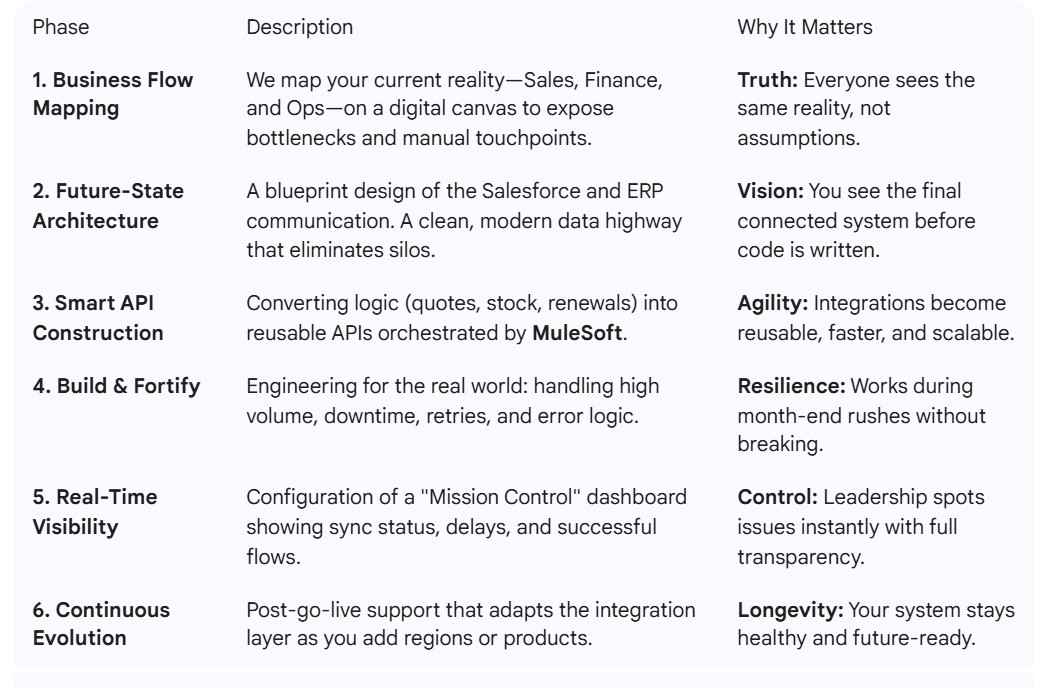
1. How HashStudioz Delivers These Integrations
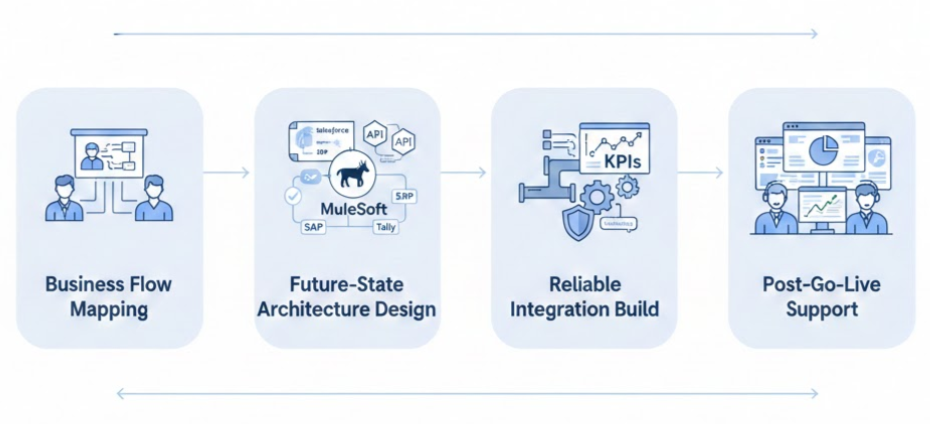
Our integrations are designed for clarity, consistency, and long-term reliability. Whether you use SAP, Tally, Oracle, Microsoft Dynamics, or a custom ERP.
We ensure Salesforce remains perfectly synced with your business.
Real-Life Examples / Use Cases
1. Salesforce + SAP
A manufacturing company automated quotes-to-orders and invoice syncing. Billing became faster and mistakes dropped sharply.
2. Salesforce + Tally
A retail business synced payments and stock updates. Sales teams saw accurate availability and payment status in real time.
3. Salesforce + Oracle ERP
A service company automated subscription updates. Revenue recognition became more accurate and reporting improved. These examples show how integration improves operations and financial clarity.
Partner with HashStudioz for Seamless Salesforce–ERP Integration
Ready to unify your business systems and eliminate data silos? With MuleSoft, you can seamlessly connect Salesforce with ERP platforms like Tally, SAP, Oracle, Microsoft Dynamics, and custom legacy systems and HashStudioz is here to help you make it happen.
What HashStudioz Offers
- MuleSoft Integration Services – API-led integration between Salesforce, ERP, CRM, billing, HRMS, and custom applications.
- Salesforce–ERP Connector Development – Custom connectors for Tally, SAP, Oracle, and legacy systems.
- API Design & Management – Designing, developing, and managing secure APIs on Anypoint Platform.
- Data Migration & Synchronization – Real-time or scheduled syncing of customer data, invoices, orders, financials, and more.
- Custom Workflow Automation – Automate processes such as order-to-cash, procure-to-pay, inventory updates, and reporting.
- Cloud & On-Premise Integration – Connect cloud apps with legacy on-premise ERP systems.
- End-to-End Consulting & Support – Strategy, architecture design, deployment, monitoring, and ongoing support.
Connect with HashStudioz today and transform the way your business manages data, automates workflows, and delivers better customer experiences.
Conclusion
Connecting Salesforce with ERP systems through MuleSoft does more than streamline data, it transforms how a business operates. Workflows become faster, numbers stay accurate, and every team finally works from the same real-time truth.
This is the foundation of a modern, connected enterprise.
– Less manual effort.
– Fewer errors.
– Stronger decisions.
– Happier customers.
With the right approach and a partner like HashStudioz, companies can build an integration layer that is stable today and scalable for tomorrow. It’s not just about connecting systems. It’s about creating a business that runs smarter, faster, and confidently toward growth.
FAQs
1. How does MuleSoft connect Salesforce with ERP systems like SAP or Tally?
MuleSoft uses APIs and pre-built connectors to integrate Salesforce with ERP systems quickly and securely.
2. Can MuleSoft integrate Salesforce with Tally?
Yes. MuleSoft can connect to Tally using APIs, database connectors, or file-based integrations.
3. Is real-time sync possible between Salesforce and SAP?
Yes. MuleSoft enables real-time, scheduled, or batch data synchronization.
4. What are the benefits of using MuleSoft for Salesforce–ERP integration?
It offers faster integration, better data accuracy, centralized management, and scalability.
5. Do I need coding skills to use MuleSoft?
Minimal coding is required; MuleSoft provides a low-code, drag-and-drop interface.
 Aparna Kashyap