


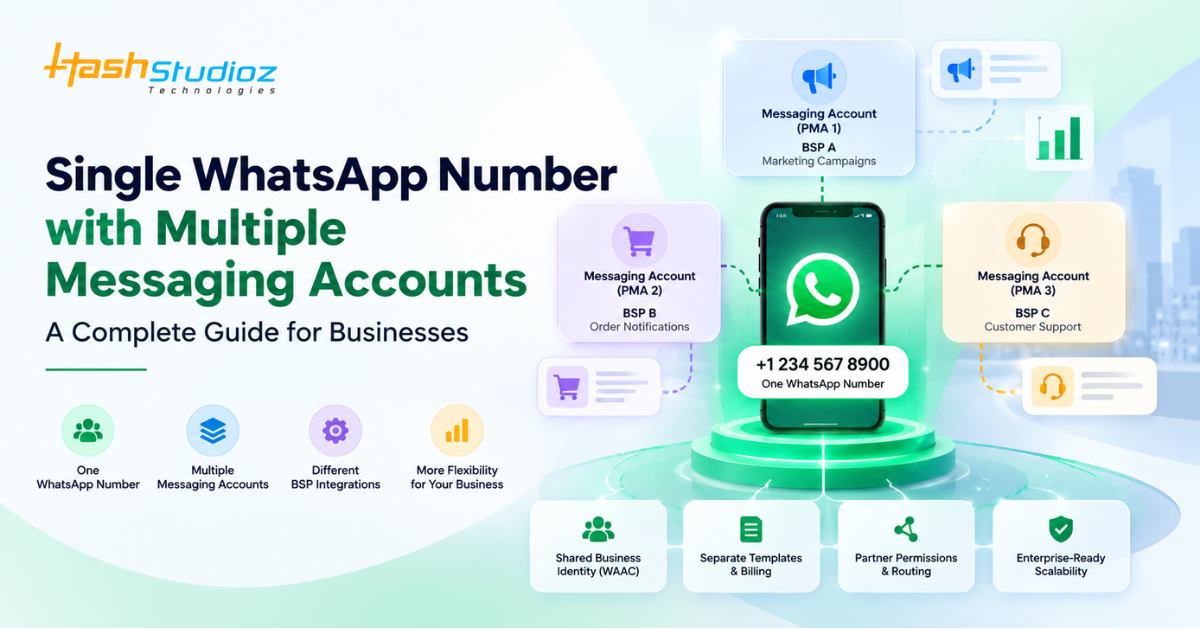
Can one WhatsApp number be connected to multiple Business Solution Providers (BSPs)? Yes. Meta’s WhatsApp Account Model Evolution (WAME) allows businesses to associate one WhatsApp Account (WAAC) with multiple partner-specific Messaging Accounts (PMAs). Each connected partner can manage its own messaging operations, templates, and billing configuration while the business retains a shared phone number.
WhatsApp has become an important communication channel for businesses managing customer inquiries, marketing campaigns, order notifications, and customer support. However, companies using multiple messaging providers have traditionally struggled to manage different communication workflows through a single business number.
Meta’s WhatsApp Account Model Evolution, introduced in September 2026, changes this architecture. It separates phone number management from partner-specific messaging operations, giving businesses more flexibility when connecting marketing platforms, CRM systems, customer support applications, and other messaging solutions.
Under this model, the WhatsApp Account manages the business phone number and identity, while separate Messaging Accounts manage partner-specific messaging configurations.
In this guide, we explain how the new WhatsApp account structure works, how businesses can connect multiple BSPs, what changes for developers, and how organizations can prepare their existing WhatsApp Business API integrations.
Table of Contents
1. What Is WhatsApp Account Model Evolution (WAME)?
WhatsApp Account Model Evolution (WAME) is Meta’s updated account architecture for the WhatsApp Business Platform. It separates the phone number and business identity from messaging-related configurations such as templates and billing.
Previously, a WhatsApp Business Account (WABA) combined phone numbers, message templates, payment configurations, and partner-specific settings within one account structure. This arrangement created challenges for businesses that wanted to work with multiple BSPs simultaneously. Each provider generally required its own account arrangement, making it difficult to manage different communication workflows through one business number.
Meta addresses this limitation by introducing two separate account types:
- WhatsApp Account (WAAC): Manages the business phone number and associated business identity.
- Messaging Account (PMA): Manages partner-specific messaging operations, including templates and billing.
The new architecture allows businesses to connect multiple messaging partners to the same WhatsApp Account while maintaining separate operational configurations.
For example, an eCommerce company can use one provider for promotional campaigns, another for order notifications, and a third for customer support. Customers can continue interacting with the same business phone number.
2. Old WhatsApp Business Account Model vs. New Account Model
The most important difference between the old and new WhatsApp account structures is how Meta separates business identity from messaging operations.
Traditional WhatsApp Business Account Structure
Previously, a WABA contained several assets and configurations:
- Business phone numbers
- Business profile information
- Approved message templates
- Payment and billing settings
- Partner-specific configurations
When businesses wanted to connect different BSPs, they generally needed separate account arrangements. This could result in multiple phone numbers for different communication activities.
For example, a retail company might maintain one number for marketing, another for order notifications, and a third for customer support. This arrangement could fragment customer conversations and increase the effort required to manage multiple integrations.
New WhatsApp Account Structure
With WhatsApp Account Model Evolution, Meta separates the business phone number from partner-specific messaging operations.
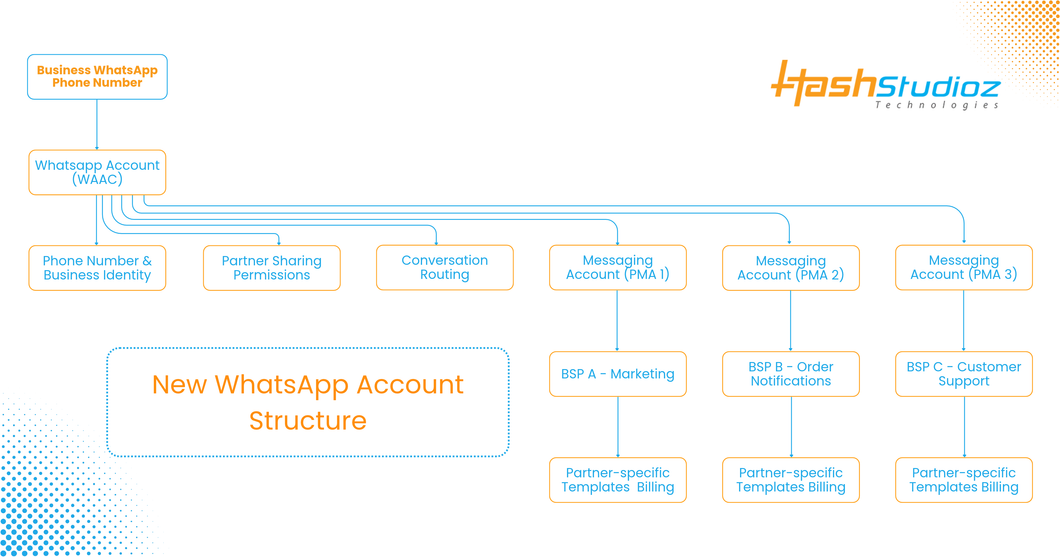
A WhatsApp Account (WAAC) represents the business identity associated with its phone number. Multiple partner-specific Messaging Accounts (PMAs) can be associated with that WAAC, allowing different providers to manage their assigned messaging activities.
For example, an eCommerce business can use:
- BSP A: Marketing campaigns and promotional communication.
- BSP B: Order confirmations and shipping notifications.
- BSP C: Customer support and service conversations.
Each partner has its own Messaging Account, while customers continue interacting with the business through the same WhatsApp phone number.
Each Messaging Account maintains its own templates and billing configuration. Partner permissions and conversation routing determine how the connected integrations operate.
This architecture separates the shared business identity from individual messaging operations, making multi-provider integration more flexible.
Architecture diagram: The following diagram illustrates how one WhatsApp Account can be associated with multiple partner-specific Messaging Accounts.
3. Old vs. New WhatsApp Account Structure
| Feature | Traditional WABA | New WAAC + PMA |
| Phone number management | Within WABA | Within WAAC |
| Business identity | Associated with WABA | Associated with WAAC |
| Multiple partner integrations | More restrictive | Multiple partner-specific PMAs |
| Message templates | Within WABA | Separate per PMA |
| Billing configuration | Within WABA | Separate per PMA |
| Partner configuration | Account-based | Partner-specific |
| Conversation routing | Traditional account structure | Dedicated routing controls |
One important technical detail: the existing WABA ID is retained as the Messaging Account ID (PMA ID). Meta introduces the WhatsApp Account as a separate account identity.
4. What Changes in the WhatsApp Account Structure?
The biggest change introduced by Meta’s WhatsApp Account Model Evolution is the separation of business phone number management from partner-specific messaging operations. Instead of managing everything within one traditional WABA structure, businesses can now use a shared WhatsApp Account (WAAC) with multiple partner-specific Messaging Accounts (PMAs).
Here are five important changes businesses should understand.
1. Centralized Phone Number Management
The WhatsApp Account manages the business phone number and its associated identity. Businesses can share this account with multiple supported messaging partners without creating a separate phone number for every integration.
2. Separate Messaging Accounts for Partners
Each connected partner can have its own Messaging Account. This allows businesses to assign different providers to marketing, transactional notifications, and customer support workflows.
3. Independent Message Template Libraries
Each Messaging Account maintains its own message templates. Templates created under one PMA should not be assumed to appear automatically in another. Businesses must manage template creation, approval, and usage across the relevant accounts.
4. Separate Billing Configurations
Each PMA maintains its own payment and billing configuration. This helps businesses track messaging expenses associated with different providers and communication activities. However, separate billing does not automatically reduce Meta’s messaging charges.
5. Partner Permissions and Conversation Routing
Businesses can share their WhatsApp Account with multiple partners, but each partner does not automatically receive unrestricted access to every conversation. Partner permissions and routing configurations determine how messaging activities and service conversations are handled.
5. Understanding WAAC and PMA: How Do They Work?
To understand Meta’s new WhatsApp Business API architecture, businesses and developers must understand the responsibilities of both account types.
1. WhatsApp Account (WAAC)
A WhatsApp Account represents the business-facing identity associated with its WhatsApp phone number.
It acts as the central account for managing the phone number and sharing access with different messaging partners.
Its primary responsibilities include:
- Managing the business phone number.
- Maintaining the associated business identity.
- Controlling partner access and sharing permissions.
- Managing conversation routing between connected partners.
- Supporting multiple Messaging Accounts associated with the same business number.
For example, a healthcare company can use its official WhatsApp number for appointment reminders, patient inquiries, and administrative notifications through different integrations.
The WAAC provides a shared phone number for these communication activities.
2. Messaging Account (PMA)
A Messaging Account handles the operational requirements of a particular messaging integration.
Each partner receives its own Messaging Account when connected to the business’s WhatsApp Account.
Its primary responsibilities include:
- Managing approved message templates.
- Maintaining payment and billing configurations.
- Managing partner-specific messaging operations.
- Supporting relevant webhook subscriptions and messaging analytics.
For example, a company working with two BSPs can maintain separate Messaging Accounts:
- PMA 1: Marketing messages and campaign templates.
- PMA 2: Customer support messaging and service operations.
Both Messaging Accounts can be associated with the same WAAC.
This separation also ensures that one partner’s payment configuration does not automatically become available to another partner.
6. How Can One WhatsApp Number Work with Multiple BSPs?
Multi-BSP integration is one of the most important capabilities introduced through WAME.
A Business Solution Provider helps companies access and integrate WhatsApp Business Platform capabilities into their existing applications and business systems.
Previously, businesses could face difficulties when they wanted different providers for marketing, customer support, and transactional messaging.
The new account model makes these arrangements more flexible.
Practical Example: Managing Multiple WhatsApp Integrations in an Enterprise
Consider an eCommerce and retail company that processes hundreds of orders daily, runs promotional campaigns, and manages a high volume of customer support inquiries. The company uses different technology providers for marketing automation, order management, and customer communication.
Instead of maintaining separate WhatsApp numbers for each activity, the business can use one WhatsApp Account (WAAC) connected to multiple partner-specific Messaging Accounts.
| Business Requirement | Integration Partner | Responsibility |
| Marketing automation | BSP A | Promotional campaigns and approved marketing templates |
| Order management | BSP B | Order confirmations, payment updates, and delivery notifications |
| Customer support | BSP C | Customer inquiries and service conversations |
| CRM integration | Internal CRM | Customer records and communication history |
All supported messaging partners can connect to the same WhatsApp Account while maintaining their respective Messaging Accounts.
For example, when a customer places an order, the order-management integration can send an order confirmation. If the customer later asks about the delivery, the configured customer support partner handles the service conversation.
The business can also connect its CRM to maintain customer records and communication history across its internal systems.
However, successful implementation requires more than connecting multiple providers. The company should:
- Define which partner handles each communication workflow.
- Configure conversation routing for service conversations.
- Manage message templates within the appropriate Messaging Account.
- Maintain consistent customer opt-in and opt-out records.
- Process webhooks without generating duplicate customer responses.
- Monitor messaging activity and billing for each partner.
This approach helps enterprises maintain a consistent WhatsApp business identity while assigning messaging responsibilities to specialized providers. It also gives them more flexibility when connecting CRM platforms, marketing tools, order-management systems, and customer support applications.
7. What Is Conversation Routing in WhatsApp WAME?
Conversation Routing is a key capability of Meta’s new WhatsApp Account Model.
It allows businesses to control how incoming conversations are assigned to different messaging partners when multiple BSPs share one WhatsApp Account.
Without proper routing, multiple integrations could create confusion about which partner should handle an incoming customer conversation.
For example, consider a financial services company using two messaging partners:
- Partner A manages customer support.
- Partner B handles marketing communication.
When a customer sends a support inquiry, the business needs the designated support integration to receive and manage that conversation.
Conversation Routing helps define these responsibilities.
How Conversation Routing Works
The general implementation process involves:
- Connecting the required messaging partners to the WhatsApp Account.
- Reviewing the available partner permissions.
- Configuring the appropriate conversation ownership and routing settings.
- Assigning the required message categories to the intended partner.
- Testing incoming messages and partner handovers.
- Monitoring message delivery and conversation handling.
Message Routing and Partner Responsibilities
Conversation routing determines which connected partner is responsible for handling service conversations associated with a shared WhatsApp number.
For example, a financial services company may use one partner for customer support and another for marketing campaigns. When a customer sends a service inquiry, the configured service partner should handle that conversation.
Businesses should also distinguish between template messaging and service conversations. Partner implementation guidance for the new model indicates that connected partners can send their own approved template messages, while service conversations are handled by the partner selected through the routing configuration.
Therefore, connecting multiple BSPs does not mean every provider automatically receives or manages every customer conversation. Businesses must configure and test partner permissions and routing before enabling production messaging.
8. Changes to WhatsApp Embedded Signup
Embedded Signup is Meta’s onboarding process that allows businesses to connect their WhatsApp accounts to third-party applications and BSP platforms.
The WAME update changes how businesses onboard new phone numbers and share existing numbers with additional partners.
Onboarding a New WhatsApp Phone Number
When a business wants to connect a new phone number to WhatsApp Business Platform, the process generally involves:
- Starting the Embedded Signup process through the selected provider.
- Logging in with the appropriate Meta Business account.
- Adding and verifying the business phone number.
- Creating the WhatsApp Account (WAAC).
- Allowing Meta to create the associated Messaging Account for the provider.
- Completing the required integration and configuration.
For a freshly onboarded number, additional conversation routing configuration is generally unnecessary when there is only one connected partner.
Connecting an Existing WhatsApp Number to Another BSP
Under the new WAME architecture, businesses do not need to follow the traditional phone-number migration process when onboarding another supported messaging partner.
Instead, the business shares its existing WhatsApp Account with the new provider through Embedded Signup. Meta then creates a separate Messaging Account for that partner.
The general process involves:
- The new BSP initiates the Embedded Signup process.
- The business authenticates through its Meta Business account.
- The business selects its existing WhatsApp phone number.
- The business completes the required verification and grants the new partner the necessary sharing permissions.
- Meta creates a separate Messaging Account for the new partner.
- The business configures the required conversation routing.
- Both partner integrations are tested before production use.
The existing partner does not automatically disappear when a new partner is added. Partner sharing is additive, meaning businesses can retain the existing integration while onboarding another provider.
If the business no longer needs the previous provider, it can remove that partner’s association through the applicable account-management process.
An important difference is that the phone number remains associated with its existing WAAC instead of moving to another provider’s account. The traditional requirement to disable the old provider’s two-step verification is not part of this new sharing-based onboarding process.
Businesses should verify routing and messaging behavior before considering the additional integration ready for production.
9. How WAME Changes Message Templates and Billing
Separating messaging operations from phone number management also changes how businesses handle templates and billing.
Separate Message Templates
Each Messaging Account maintains its own message templates.
For example, a company using different BSPs may have:
- Marketing templates in PMA 1.
- Order confirmation templates in PMA 2.
- Customer support-related templates in PMA 3.
Businesses should not assume that templates created under one Messaging Account automatically appear in another.
Development teams must account for this separation when designing template synchronization, approval tracking, and message selection workflows.
Independent Billing Configuration
Billing is also managed separately for each Messaging Account.
Each PMA maintains its own payment configuration, allowing businesses and partners to manage their respective messaging expenses.
For example:
- Marketing communication expenses can be tracked through PMA 1.
- Transactional messaging expenses can be tracked through PMA 2.
- Customer support messaging expenses can be tracked through PMA 3.
This separation can make financial reporting easier when different departments or service providers manage separate messaging operations.
However, businesses should review Meta’s applicable pricing, payment arrangements, and partner agreements rather than assuming that the new architecture automatically reduces messaging charges.
10. What Changes for WhatsApp Business API Developers?
Meta’s WhatsApp Account Model Evolution introduces additional account-management requirements for developers building applications around the WhatsApp Business Platform.
Although Meta designed the transition to support backward compatibility, development teams should prepare their systems to recognize the relationship between WhatsApp Accounts (WAACs) and partner-specific Messaging Accounts (PMAs).
The following technical areas require attention when implementing multiple BSP integrations.
1. Account and Identifier Management
Applications should store WhatsApp Account IDs and Messaging Account IDs as separate identifiers. The WAAC represents the business phone number and associated identity, while the PMA represents partner-specific messaging operations.
Developers should avoid treating these identifiers as interchangeable. Correct account mapping helps prevent association errors when businesses connect multiple providers.
2. Multiple Partner Integration Management
Applications that previously supported one BSP per business number may need architectural changes to support multiple messaging partners.
The integration layer should associate each partner with the correct WAAC and PMA. It should also maintain clear records of partner permissions and assigned messaging responsibilities.
3. Webhook Management and Event Processing
Different partners may maintain separate webhook subscriptions and receive messaging events through their respective integrations.
Developers should review:
- Incoming message events.
- Message delivery and status updates.
- Partner-specific webhook subscriptions.
- Event processing and message ownership.
- Duplicate event handling.
A well-defined event-processing system helps prevent duplicate customer responses and conflicting messaging activity.
4. Conversation Routing and Ownership
Applications must account for partner ownership and routing responsibilities when multiple BSPs share one WhatsApp Account.
The system should identify which integration handles a particular service conversation. Developers should configure and test routing rules, partner permissions, and handover procedures to prevent duplicate responses or unhandled customer inquiries.
5. Message Template and Billing Management
Each Messaging Account maintains its own template library and billing configuration.
Applications should therefore associate templates with the correct PMA and maintain processes for template creation, approval, version control, and usage.
Developers should also ensure that billing reports identify the appropriate Messaging Account so businesses can track messaging expenses across different providers.
6. Customer Consent Synchronization
When multiple partners communicate with the same customers, consent records must remain consistent across connected systems.
For example, if a customer opts out of promotional communication through one provider, another connected integration should not continue sending unwanted marketing messages.
A centralized consent-management process can help businesses maintain consistent customer communication preferences.
7. Shared Account Risks and Backward Compatibility
Multiple Messaging Accounts associated with one WhatsApp Account still depend on the shared phone number and its account status. If the phone number or WAAC faces quality problems or restrictions, connected messaging operations may also be affected.
Meta’s transition is designed to preserve backward compatibility during the published compatibility period. However, developers should review the latest Meta documentation before introducing new account-management functionality or changing existing integrations.
Development teams should also monitor phone number quality, account restrictions, messaging activity, and partner permissions to maintain reliable messaging operations.
11. What Does the WAME Update Mean for Existing Businesses?
Meta’s new account architecture offers several operational advantages for businesses.
- Consistent customer communication: Businesses can use one WhatsApp phone number across multiple integrations, creating a more consistent communication identity.
- Greater provider flexibility: Organizations can select different partners for marketing, customer support, and transactional messaging without maintaining a separate phone number for each provider.
- Independent billing: Separate Messaging Accounts help businesses track partner-specific messaging expenses.
- Better integration options: Companies can connect WhatsApp with CRM platforms, customer support applications, marketing automation systems, and custom business applications.
- More flexible partner management: Businesses can add or remove messaging partners without relying on the traditional phone-number migration process for supported WAME onboarding scenarios.
These benefits are particularly relevant to enterprises that manage multiple departments, brands, customer service teams, or third-party technology providers.
12. Challenges Businesses Should Consider Before Implementing WAME
Although the new architecture provides greater flexibility, businesses should evaluate several technical and operational considerations before connecting multiple partners.
Phone Number Quality and Account Restrictions
All Messaging Accounts associated with a WhatsApp Account depend on the shared phone number.
If the phone number experiences quality problems or the WhatsApp Account faces restrictions, the connected messaging operations may also be affected.
Businesses should monitor messaging quality and follow Meta’s business messaging policies.
Incorrect Conversation Routing
Incorrect routing configurations can prevent the intended provider from receiving or managing customer conversations.
Businesses should test routing rules and partner permissions before enabling production messaging.
Template Management Complexity
Separate Messaging Accounts mean separate template libraries.
Organizations using multiple partners need clear processes for template creation, approval, synchronization, and maintenance.
Customer Consent Management
When multiple partners manage customer communication, businesses must coordinate opt-in and opt-out records.
For example, a customer opting out through one provider should not continue receiving unwanted promotional messages through another integration.
A centralized consent-management process can help maintain consistent communication preferences across connected systems.
Partner Access and Permissions
Businesses should review the permissions granted to every connected provider.
Only authorized partners should receive the access required for their assigned messaging responsibilities.
13. How Businesses Can Prepare for the New WhatsApp Account Model
Organizations should review their existing WhatsApp integrations and identify the changes required to support the new account architecture.
A practical preparation checklist includes:
- Review the existing account structure: Check Meta Business Suite to identify the available WhatsApp Accounts and Messaging Accounts.
- Map existing integrations: Document every BSP, CRM, chatbot, and business application connected to the WhatsApp number.
- Identify partner responsibilities: Define which provider handles marketing, transactional messaging, and customer support.
- Review templates and billing: Confirm that templates and payment configurations remain correctly associated with their respective Messaging Accounts.
- Configure conversation routing: Assign the appropriate partner for each required conversation category.
- Review API integrations: Update internal account-management logic to recognize the WAAC and PMA relationship.
- Test messaging workflows: Validate incoming messages, outbound messages, delivery notifications, and routing behavior.
- Coordinate customer consent: Ensure that all connected partners follow consistent customer communication preferences.
- Monitor production activity: Track delivery failures, message quality, routing errors, and account permissions.
Meta began automatically migrating eligible existing WhatsApp Business Accounts to the new account structure on September 23, 2026, with the initial rollout planned for completion during October 2026.
Meta’s published compatibility roadmap provides backward compatibility through the first half of 2028, when the mandatory transition to the new model is planned.
Businesses should check Meta Business Suite to confirm their current account structure. After migration, the interface separates WhatsApp Accounts and Messaging Accounts into distinct account views.
Development teams should also monitor Meta’s documentation for changes to account identifiers, Embedded Signup, and Cloud API integration requirements rather than assuming that every account has the same migration status.
14. How HashStudioz Helps Businesses Build WhatsApp Messaging Integrations
The WhatsApp Account Model Evolution creates new opportunities for businesses to connect customer communication with their existing digital infrastructure.
However, implementing a multi-partner messaging architecture requires more than connecting an API. Organizations must consider account management, CRM integration, message templates, webhook processing, conversation routing, automation, and customer data synchronization.
HashStudioz works on business messaging automation and custom software integrations that connect communication platforms with enterprise applications.
For example, HashStudioz developed an automated WhatsApp messaging solution using Salesforce Marketing Cloud and Salesforce Data Cloud for a B2B platform serving multiple merchants. The solution supports platform-triggered messages, template synchronization, and merchant-level messaging activity reporting.
Businesses exploring similar implementations can benefit from:
- WhatsApp Business API integration: Connect WhatsApp messaging with existing business applications and backend systems.
- CRM and Salesforce integration: Connect customer communication workflows with CRM platforms and customer records.
- Chatbot development: Build automated conversational workflows for customer inquiries, lead qualification, and support.
- Message automation: Develop business-specific notification, campaign, and transactional messaging workflows.
- Custom integration development: Connect multiple systems through APIs, webhooks, and application-level business logic.
Explore HashStudioz’s WhatsApp messaging automation case study on Salesforce to understand how custom integrations can support messaging operations across multiple merchants.
You can also explore our Salesforce Development and Integration Services and Custom Chatbot Development Services for business-specific communication solutions.
For organizations looking for a WhatsApp communication and team management platform, HashChat provides WhatsApp messaging automation, scheduling, shared inbox functionality, and customer support workflows.
Ready to Scale Your WhatsApp Business Messaging?
Connect WhatsApp with your CRM, business applications, and multiple messaging providers through a solution tailored to your business needs. Partner with HashStudioz to build a reliable WhatsApp Business API integration that improves customer communication and supports business growth.
Conclusion
Meta’s WhatsApp Account Model Evolution represents an important change in how businesses manage their WhatsApp Business Platform integrations.
By separating the WhatsApp Account from partner-specific Messaging Accounts, Meta enables businesses to use one phone number across multiple messaging partners while maintaining separate templates, billing configurations, and partner permissions.
This architecture gives organizations greater flexibility when connecting marketing systems, CRM platforms, customer support applications, and custom messaging solutions.
However, businesses must understand the relationship between WAAC and PMA, configure conversation routing correctly, and prepare their applications for the new account structure.
Organizations that review their existing integrations and plan their implementation carefully will be better positioned to manage their WhatsApp communication infrastructure as the platform evolves.
Frequently Asked Questions (FAQs)
1. Can one WhatsApp number be connected to multiple BSPs?
Yes. Meta’s WhatsApp Account Model Evolution allows one WhatsApp Account (WAAC) to be shared with multiple messaging partners. Each partner can have its own Messaging Account (PMA), allowing businesses to manage different messaging integrations through one phone number.
2. What is the difference between WAAC and PMA in WhatsApp?
A WhatsApp Account (WAAC) manages the business phone number and associated identity. A Messaging Account (PMA) manages partner-specific messaging operations, including templates and billing configurations. One WAAC can be associated with multiple PMAs.
3. Can multiple BSPs use the same WhatsApp phone number simultaneously?
Yes. Under the new account architecture, businesses can share their existing WhatsApp Account with multiple supported partners. Each partner receives its own Messaging Account, while the phone number remains associated with the same WAAC.
4. Do businesses need to migrate their WhatsApp number when adding a new BSP?
No traditional phone-number migration is required for supported onboarding under the new model. The business shares its existing WAAC with the new provider through Embedded Signup. Meta creates a separate Messaging Account for that provider, and the business configures the required conversation routing.
5. Are WhatsApp message templates shared between multiple Messaging Accounts?
No. Each Messaging Account maintains its own template library. Businesses should manage template creation, approval, and usage within the relevant PMA rather than assuming templates are automatically available across partners.
6. Will existing WhatsApp Business API integrations stop working after WAME?
Meta designed the transition to support backward compatibility for existing integrations during the published compatibility period. Businesses should review Meta’s latest documentation and prepare their applications for the new account structure before the planned mandatory transition in the first half of 2028.