


For a B2B platform serving multiple merchants, WhatsApp messaging involves more than sending a notification. Each merchant needs a WhatsApp business account, approved message templates, a way to trigger messages, and visibility into message activity. Repeating these tasks manually inside Salesforce can become difficult to manage as the platform adds merchants.
To address this challenge, HashStudioz built an automated WhatsApp messaging solution using Salesforce Marketing Cloud and Salesforce Data Cloud. The B2B platform can trigger messages from its own systems, while Salesforce handles message delivery and activity reporting. The solution reduces the need for the platform team to log in to Salesforce for routine messaging tasks, although some merchant verification steps still require human involvement.
This case study explains the challenge, the solution architecture, the implementation stages, and the practical lessons learned while building WhatsApp automation for a B2B platform.
Table of Contents
The Challenge of Scaling WhatsApp Messaging Across Multiple Merchants
A single brand can connect its WhatsApp number, arrange approval for message templates, and start sending messages. A B2B commerce platform serving many merchants must repeat these steps for each merchant. The platform in this case study needed a shared approach that could support its merchants without requiring repetitive manual work inside Salesforce.
Onboarding and Verifying Merchant WhatsApp Accounts
- Register each merchant’s WhatsApp number and link it to Salesforce.
- Complete WhatsApp’s approval and verification process.
- Automate surrounding tasks while retaining human involvement for required verification checks.
Managing Approved WhatsApp Message Templates
- WhatsApp must approve message templates before they can be used.
- Approved templates need to be available in Salesforce for the relevant merchant.
- The standard process required someone to add templates manually, creating repetitive work across merchants.
Automating Message Delivery Through Salesforce
- Trigger promotional messages, such as offers, from the platform’s own systems.
- Trigger service messages, such as order updates, without a manual Send action inside Salesforce.
- Ensure each message is sent from the correct merchant’s WhatsApp account.
Tracking WhatsApp Usage and Performance by Merchant
- Review message activity for each merchant.
- Receive message delivery and read updates.
- Request usage reports when needed and use them to report activity to individual merchants.
How the Automated WhatsApp Messaging Solution Works
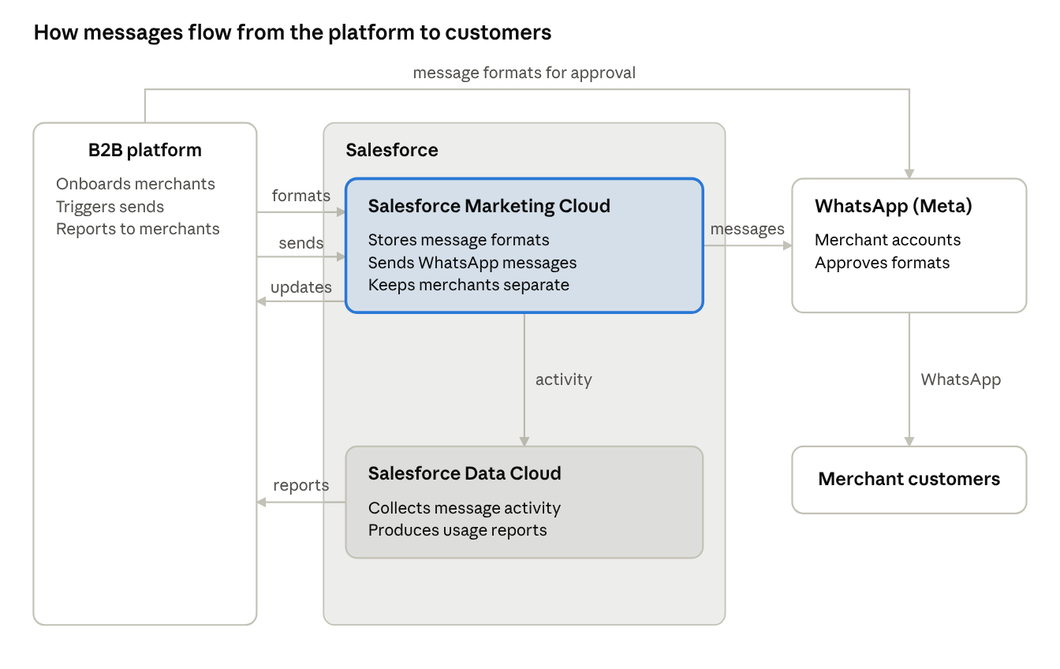
The platform initiates the process by telling Salesforce what message to send and to whom. Salesforce Marketing Cloud stores merchant message templates and sends WhatsApp messages. WhatsApp (Meta) manages merchant WhatsApp business accounts and approves templates. Message activity flows to Salesforce Data Cloud, which collects activity and produces usage reports for each merchant. The platform can then access updates and reports through its own systems.
1. Salesforce Marketing Cloud for Message Management and Delivery
Salesforce Marketing Cloud stores each merchant’s message templates and sends WhatsApp messages. The solution keeps merchants’ messages separate and enables the platform to trigger sends from its own systems. Promotional messages and service messages, including offers and order updates, are part of the described use case.
2. Salesforce Data Cloud for Message Tracking and Usage Reporting
Salesforce Data Cloud collects message activity and produces usage reports for individual merchants. The platform receives updates when messages are delivered and read, and it can request usage reports whenever they are needed. The case study describes these reports as a way to review activity across the merchant network.
3. Connecting the B2B Platform with Salesforce and WhatsApp
The B2B platform connects to Salesforce Marketing Cloud, Salesforce Data Cloud, and the WhatsApp business-account and template-approval process. This integration lets the platform manage routine messaging tasks through its own systems instead of carrying them out manually inside Salesforce.
Key Capabilities of the Automated WhatsApp Solution
Automated Syncing of Approved Message Templates
The team built a connector that makes approved WhatsApp message templates available in Salesforce automatically. Once WhatsApp approves a template, the connector removes the need for someone to add that approved template to Salesforce manually.
Platform-Triggered WhatsApp Messaging
The B2B platform’s own systems trigger messages through Salesforce Marketing Cloud. Messages are sent from the appropriate merchant’s WhatsApp account, supporting merchant-specific communication from a shared platform.
On-Demand Merchant Usage and Delivery Reports
The platform can receive message delivery and read updates and request usage reports for a merchant when needed. This provides visibility into message activity without requiring the platform team to compile each report manually inside Salesforce.
A Shared Foundation for New Merchant Onboarding
The core Salesforce components and connection were established as a shared foundation. New merchants can use this setup rather than requiring a separate build of the entire solution. However, merchant-specific registration and WhatsApp verification still need to be completed.
Exploring WhatsApp for your business?
Read: HeyDoot vs WATI vs AiSensy vs Interakt: Pricing, API Requirements, Setup Time & Features Compared
How We Implemented Automated WhatsApp Messaging on Salesforce
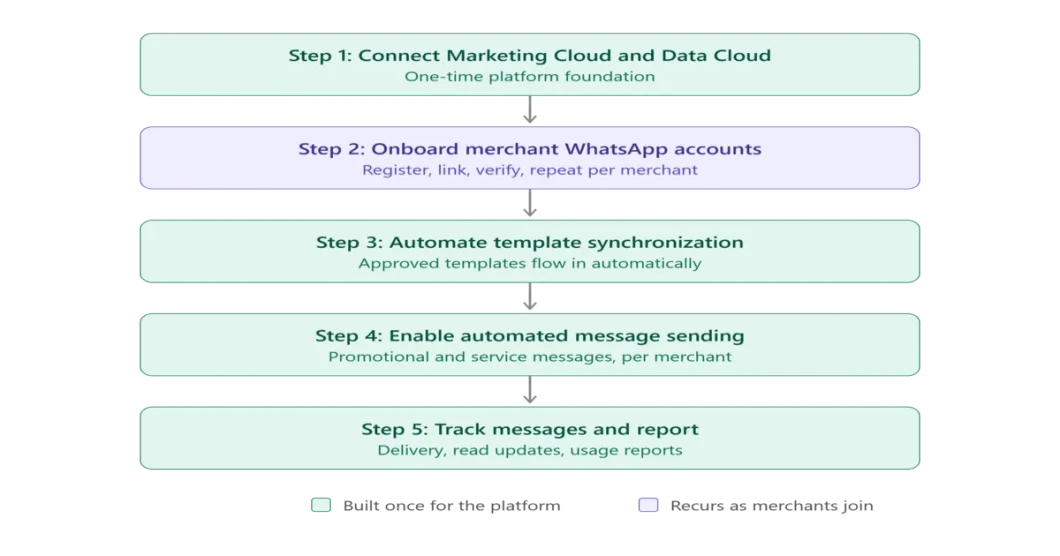
The IT team delivered the solution in five stages. The foundation was established once for the platform, while merchant onboarding and some related activities recur as merchants join.
Step 1: Connecting Salesforce Marketing Cloud and Data Cloud
The team connected Salesforce Marketing Cloud with Salesforce Data Cloud and configured the components needed for WhatsApp messaging and reporting. This one-time foundation was designed to support subsequent merchant onboarding.
Step 2: Onboarding Merchant WhatsApp Accounts
Each merchant’s WhatsApp number was registered, linked to Salesforce, and submitted through WhatsApp’s approval and verification process. The team worked with each merchant because some checks require human involvement. The case study reports that onboarding had been completed for the first merchants on the platform.
Step 3: Automating Message Template Synchronization
The team built a connector to move approved message templates into Salesforce automatically. This addressed a manual step in the standard setup and made approved templates available for use without someone adding each one by hand.
Step 4: Enabling Automated Message Sending
The platform was connected to Salesforce so that it could trigger promotional and service messages directly. Each message uses the correct merchant’s WhatsApp account. The platform team’s work on this sending connection ran in parallel with the remaining setup and reporting work, helping messages start flowing sooner.
Step 5: Implementing Message Tracking and Reporting
The solution passes message delivery and read updates back to the platform and makes merchant usage reports available on demand. Together, these capabilities help the platform review activity across its merchants.
Challenges and Lessons Learned During Implementation
Why a Merchant’s WhatsApp Business Account Must Be Migrated Completely
The team initially considered moving only part of a merchant’s existing WhatsApp setup into Salesforce. According to the case study, this was not possible: the WhatsApp business account had to be moved to Salesforce in full. The team therefore recommended a complete move for merchants using the solution.
Why Human Verification Is Still Required for Merchant Setup
WhatsApp verifies each business number before messages can be sent. This means onboarding cannot yet be completely hands-off. The team documented the process and is working on ways to automate more of the remaining setup, while keeping the required verification steps.
How Template Automation Reduces Repetitive Manual Work
Adding approved templates manually may be manageable for a small number of merchants, but it becomes repetitive when many merchants are involved. Automating template synchronization removed one of the main sources of manual effort identified by the team.
How Parallel Development Helps Move Implementation Forward
The platform’s team developed the sending connection while the Salesforce setup and reporting work continued. Running these activities in parallel meant that one workstream did not have to wait for the other to finish before making progress.
What’s Next for the Automated WhatsApp Messaging Solution?
The core WhatsApp channel is in place, and the next phase described by the team focuses on reducing the remaining manual work. These items are planned or in progress; they should not be presented as capabilities already delivered.
Simplifying Merchant Onboarding
- Reduce manual effort during new-merchant setup.
- Keep required WhatsApp verification steps in the process.
Exploring Message Template Creation Within Salesforce
- Explore creating WhatsApp message templates from within Salesforce.
- Treat this as a future improvement, not a capability required for the current rollout.
Bringing Merchant Setup, Messaging, and Reporting Into the Platform
- Make merchant onboarding more routine and reduce separate manual tasks.
- Bring merchant setup and template management closer to the platform’s own systems.
- Connect message sending and reporting in the same workflow.
Need Help With WhatsApp on Salesforce?
Let HashStudioz help you set up Automated WhatsApp messaging on Salesforce
Conclusion
This implementation shows that WhatsApp automation for B2B platforms involves more than message delivery. Merchant onboarding, template approval and synchronization, correct account selection, and merchant-level reporting all need to work together.
By extending Salesforce Marketing Cloud and Salesforce Data Cloud and connecting them to the B2B platform, HashStudioz created a shared foundation for automated WhatsApp messaging across merchants. The platform can trigger messages and access activity reporting through its own systems, while WhatsApp verification remains a step that can require human involvement. Further work is focused on simplifying onboarding and connecting the remaining tasks more closely with the platform.
FAQs
1. Does Salesforce Support Automated WhatsApp Messaging for Multiple Merchants?
Salesforce provides building blocks for WhatsApp messaging, but the case study notes that some tasks-such as making approved message templates available-were manual in the standard setup. Supporting multiple merchants without repeating those steps required a custom solution that connected Salesforce to the B2B platform.
2. Can Only Part of a WhatsApp Business Account Be Migrated to Salesforce?
According to the implementation team’s findings in this case study, the WhatsApp business account had to be moved to Salesforce in full, moving only part of the account was not possible in this setup.
3. Can Merchant WhatsApp Onboarding Be Fully Automated?
Not completely in the solution described. WhatsApp verifies each business number, and some checks require human involvement. The team is working to automate more of the surrounding onboarding process.
4. Can an External B2B Platform Trigger WhatsApp Messages Through Salesforce?
Yes. In this implementation, the B2B platform’s systems trigger promotional and service messages through Salesforce Marketing Cloud, without requiring someone to initiate each send inside Salesforce.
5. How Can Businesses Track WhatsApp Usage for Each Merchant?
In this solution, Salesforce provides delivery and read updates, while Salesforce Data Cloud collects message activity and produces usage reports on demand. The B2B platform can use those updates and reports to review activity for individual merchants.