


Manufacturers manage interconnected processes, including production planning, inventory control, quality assurance, equipment maintenance, and order fulfillment. Disconnected systems and manual data entry can make it difficult to coordinate these activities and maintain consistent operational information. Custom manufacturing software development addresses specific workflow requirements through applications tailored to a manufacturer’s processes.
However, custom software is not always the best choice. Manufacturers should evaluate their existing systems, operational challenges, integration needs, and long-term objectives before investing in development. A suitable solution should solve defined problems, work with relevant systems, and support future improvements.
This article explores manufacturing software solutions, development services, essential features, implementation steps, and expert tips for planning a successful project.
Table of Contents
What Is Custom Manufacturing Software Development?
Custom manufacturing software development involves designing, building, integrating, and maintaining software for a manufacturer’s operational requirements. Instead of relying entirely on standard software, businesses can develop applications or extensions that support specific workflows and data needs.
For example, a manufacturer may need production tracking software that connects work orders with quality inspection records. Another may require a supplier portal that exchanges order and delivery information with its enterprise resource planning (ERP) system. The right solution depends on the manufacturer’s processes and existing software capabilities.
Why Do Manufacturers Need Custom Software Solutions?
Manufacturers may consider custom software when existing tools cannot adequately support their workflows, reporting needs, or data exchange requirements.
1. Disconnected Systems and Data Silos
Manufacturers often use separate applications for inventory, production planning, purchasing, quality control, and order management. When these systems cannot exchange information effectively, employees may need to enter or reconcile the same data repeatedly.
Custom software development for the manufacturing industry can connect existing applications and establish consistent data flows. Before building a new platform, assess whether APIs, integration tools, or existing configuration options can solve the problem.
2. Specialized Production Workflows
Some manufacturers follow production sequences, approval processes, or product configuration rules that standard software cannot accommodate easily.
A tailored application can support specific requirements, including routing instructions, order-dependent production steps, inspection checkpoints, and customized approval rules.
3. Limited Production Visibility
When employees record production status manually or across separate systems, managers may struggle to maintain a consistent view of work in progress.
Manufacturing execution systems (MES) and manufacturing intelligence platforms can collect and present production information. Siemens describes manufacturing intelligence as combining data from operational and business systems for reporting, analysis, and manufacturing performance visibility.
4. Integration With Existing Equipment and Applications
Manufacturers may need to exchange information between business applications, shop-floor systems, sensors, and machines. Integration feasibility depends on equipment interfaces, communication protocols, data quality, security requirements, and existing system capabilities. A technical assessment should establish these requirements before development begins.
Types of Custom Manufacturing Software Solutions
Manufacturing software includes several system categories. Manufacturers do not necessarily need every type, and custom applications can complement existing products rather than replace them.
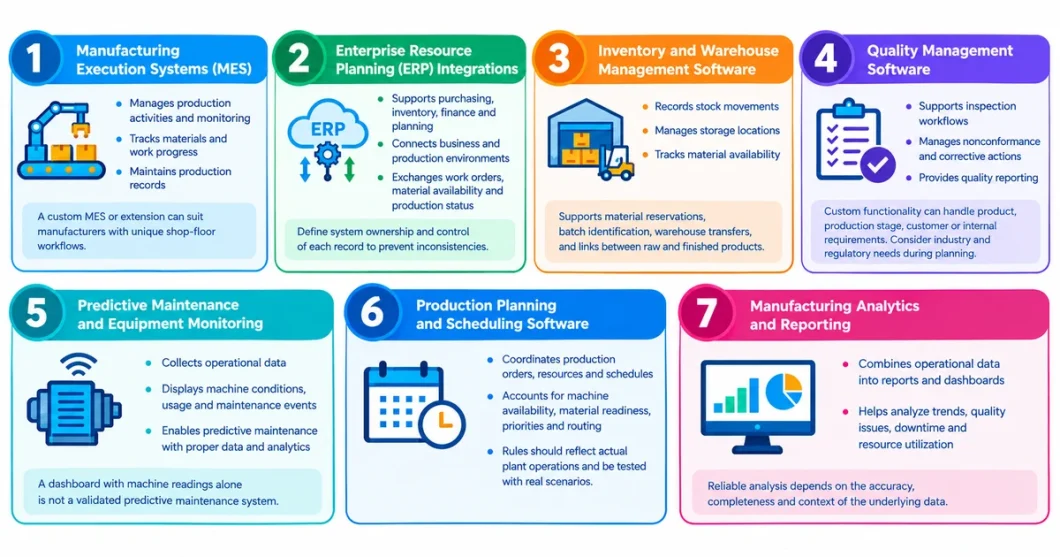
1. Manufacturing Execution Systems (MES)
- An MES supports manufacturing execution and monitoring. Depending on its implementation, it can manage production activities, record work progress, track materials, and maintain production records.
- A custom MES or extension may suit manufacturers whose shop-floor workflows exceed their current system’s capabilities.
2. Enterprise Resource Planning (ERP) Integrations
- ERP systems support business functions such as purchasing, inventory, finance, and planning. Manufacturing operations software can complement ERP by managing execution activities and connecting business and production environments.
- Custom integrations can exchange work orders, material availability, production status, and inventory transactions. Define which system owns each record and controls its updates to prevent inconsistencies.
3. Inventory and Warehouse Management Software
- Inventory and warehouse applications record stock movements, manage storage locations, and track material availability. Tailored solutions can support production-order material reservations, batch identification, warehouse transfers, and links between raw materials and finished products.
4. Quality Management Software
- Quality management software supports inspection workflows, nonconformance records, corrective actions, and quality reporting.
- Custom functionality can accommodate inspection requirements that vary by product, production stage, customer specification, or internal procedure. Identify applicable industry and regulatory requirements during planning rather than assuming the software covers them automatically.
5. Predictive Maintenance and Equipment Monitoring
- Equipment monitoring applications collect operational data and display information about machine conditions, usage, and maintenance events.
- Predictive maintenance requires suitable data, appropriate analytical methods, and validation under actual operating conditions. A dashboard displaying machine readings alone does not constitute a validated predictive maintenance system.
6. Production Planning and Scheduling Software
- Planning and scheduling tools coordinate production orders, resources, and schedules. Custom solutions can account for machine availability, material readiness, production priorities, and routing requirements.
- Scheduling rules should reflect actual plant operations and undergo testing against representative production scenarios.
7. Manufacturing Analytics and Reporting
- Manufacturing analytics combines operational data into reports, dashboards, and performance indicators. Depending on data availability, these tools can help teams investigate production trends, quality issues, downtime, and resource utilization.
- Reliable analysis depends on the accuracy, completeness, and context of the underlying data.
Key Features to Consider in Custom Software for Manufacturing
Select features according to business requirements rather than adopting a generic checklist.
- Production order tracking: Record order status, work progress, and production events.
- Inventory visibility: Track material availability, stock movements, and inventory records.
- Quality workflows: Document inspections, defects, nonconformances, and corrective actions.
- Reporting and dashboards: Present operational indicators using reliable data.
- System integration: Exchange information with ERP, MES, warehouse, quality, and other approved systems.
- User roles and permissions: Restrict access according to responsibilities.
- Audit trails: Record relevant changes and actions when traceability is required.
- Notifications and alerts: Notify users about defined events, exceptions, and workflow deadlines.
- Scalable architecture: Accommodate planned changes in users, sites, data volumes, and functionality.
- Security and backups: Protect operational data and establish recovery procedures appropriate to business risks.
Prioritize essential capabilities. Unnecessary features can increase complexity without solving the original problem.
Know More About : Custom Manufacturing Software vs. Off-the-Shelf Solutions: What’s Right for You?
Custom Manufacturing Software Development Services
Manufacturing software development services can cover the entire software lifecycle or specific parts of an existing system. Define the scope before work begins.
1. Business Analysis and Requirement Discovery
Development teams review workflows, identify operational problems, and document functional and technical requirements. Activities include stakeholder interviews, process mapping, integration discovery, data assessment, and defining measurable objectives.
2. Custom Software Design and Development
Developers build applications, modules, interfaces, and business rules according to approved requirements. Design should reflect users’ needs, the operating environment, and the systems the software must support.
3. Legacy Software Modernization
Modernization can improve older applications that are difficult to maintain or integrate. Services may include code improvements, interface updates, component replacement, and migration to a supported architecture. Identify dependencies and risks before modifying production-critical systems.
4. System Integration
Integration services connect applications and data sources through supported APIs, middleware, database interfaces, or suitable industrial communication methods. Define data ownership, synchronization frequency, error handling, and recovery procedures. Test integrations carefully because incorrect or delayed data can affect downstream processes.
5. Data Migration and Validation
Data migration transfers relevant records from legacy applications, spreadsheets, or other systems. The process should include field mapping, duplicate handling, validation rules, reconciliation, and business-user approval. Assess historical records for relevance, quality, and retention requirements before migrating them.
6. Testing, Deployment, and Training
Testing verifies functional, integration, security, and performance requirements. Deployment planning should cover user access, operational continuity, backups, rollback procedures, and support responsibilities. Train employees on the revised workflows so they can use the software correctly.
7. Maintenance and Ongoing Support
After deployment, software may need bug fixes, security updates, compatibility changes, monitoring, and new features. Establish support ownership, incident priorities, and procedures for testing changes before release. When evaluating custom manufacturing software development services, ask providers about relevant system experience, integration methods, security practices, testing procedures, and post-launch support.
Expert Tips for Successful Custom Manufacturing Software Development
Successful development starts with a defined business problem and a realistic understanding of the manufacturing environment.
1. Define the Problem Before Selecting the Technology
Identify the issue the software must address, such as limited production-order visibility, duplicate data entry, inconsistent quality records, or disconnected inventory and production planning.
Document current processes and limitations, then define measurable acceptance criteria.
2. Audit Existing Systems First
List the applications, databases, machines, spreadsheets, and reporting tools in use. Identify which systems own key data and which interfaces they support.
This assessment helps determine whether the best approach is a new application, an integration layer, a configured commercial product, or a combination.
3. Prioritize Features by Business Value
Separate essential requirements from optional enhancements. An initial release might focus on one production line, a specific workflow, or a critical integration.
An incremental approach lets users test the solution against real tasks before expanding its scope. Each release must still include appropriate testing, security controls, and operational safeguards.
4. Plan for Interoperability
Manufacturing environments often contain systems from different vendors and generations. NIST identifies interoperability across decentralized systems as an important manufacturing technology consideration.
Document interface requirements, data formats, communication methods, and failure-handling procedures early. Evaluate relevant standards and protocols with qualified technical specialists.
5. Include Shop-Floor Users in Design and Testing
Software suited to office users may not meet shop-floor needs. Involve operators, supervisors, quality teams, maintenance staff, and IT personnel in requirements gathering and usability testing.
Test interfaces under realistic conditions, including the devices, connectivity, and access restrictions employees will encounter.
6. Treat Security and Reliability as Requirements
Manufacturing software may handle sensitive business information and interact with operational systems. Security planning should cover identity management, permissions, secure communications, backups, monitoring, and incident response.
For operational technology integrations, assess how failures or unauthorized changes could affect safety and production. NIST highlights the need to consider manufacturing-specific requirements and their potential effects on safety, performance, quality, and cost.
7. Establish Metrics Before Launch
Choose measurements that reflect the original problem. Depending on the project, these may include:
- Production schedule adherence
- Work-order completion time
- Inventory record accuracy
- Defect or rework rates
- Equipment downtime
- Time required to locate production records
- Frequency of manual data corrections
Define each metric’s calculation, baseline, data source, and comparison period. Consider other operational changes before attributing improvements to the software.
8. Plan Training and Change Management
New software may change how employees enter data, approve work, report defects, or communicate production status. Explain the reasons for these changes, provide role-specific training, and gather feedback during rollout.
Assign responsibility for maintaining process documentation and helping employees resolve common issues.
Custom Software Development for the Manufacturing Industry: A Step-by-Step Process
A structured development process connects business requirements with technical decisions and measurable outcomes.
Step 1: Discovery and Feasibility Assessment
Document the business problem, stakeholders, existing applications, operational constraints, and desired outcomes. Assess technical feasibility, data availability, integration dependencies, and project risks.
Step 2: Requirements and Solution Architecture
Define functional requirements, user roles, workflows, interfaces, data models, security controls, and performance expectations. Choose an architecture that fits the operating environment and the organization’s support capabilities.
Step 3: Prototyping and User Feedback
Develop wireframes or prototypes for critical workflows. Ask representative users to review them before committing to full implementation.
Step 4: Development and Integration
Build the approved functionality in manageable increments. Follow documented interface specifications and validate data exchanges throughout development.
Step 5: Testing and Acceptance
Conduct functional, integration, security, performance, and user-acceptance testing as appropriate. Test failure scenarios, including unavailable interfaces, invalid data, and interrupted connections.
Step 6: Controlled Deployment
Follow an agreed rollout plan. Depending on operational risk, choose a pilot, phased rollout, or another controlled migration strategy. Before switching critical workflows, confirm backups, rollback arrangements, support coverage, and user readiness.
Step 7: Monitoring and Continuous Improvement
Review performance metrics, user feedback, incidents, and support requests. Use this evidence to prioritize changes rather than expanding functionality without a clear business reason.
Build Smarter. Manufacture Better with Custom Software Solutions.
Partner with HashStudioz to develop manufacturing software tailored to your workflows & business goals.
How to Choose a Custom Manufacturing Software Development Company?
Choose a partner based on its ability to understand manufacturing operations and deliver maintainable software, not simply its proposal or technology stack.
Evaluate these factors:
- Manufacturing domain experience: Ask about relevant projects involving production workflows, ERP, MES, inventory, quality management, or industrial data.
- Integration capability: Discuss the systems and equipment involved, including how the provider handles interface limitations, inconsistent data, and failed transactions.
- Security and testing: Request details about access control, secure development, testing, deployment safeguards, and incident handling.
- Project transparency: Confirm deliverables, milestones, assumptions, acceptance criteria, responsibilities, and scope-change procedures.
- Maintenance and ownership: Clarify software ownership, source-code access, documentation, infrastructure responsibilities, support terms, and future enhancements.
- Evidence of fit: Request relevant case studies or references, distinguishing verified outcomes from marketing claims.
Ask for a proposal based on documented requirements. A credible proposal should identify dependencies and risks rather than promise results without assessing the operating environment.
What Is the Cost of Custom Manufacturing Software Development?
There is no single reliable price because development costs depend on project scope and technical complexity.
Key cost drivers include:
- Number and complexity of features
- Integration with ERP, MES, machines, and other applications
- Data migration and cleaning
- Security, availability, and performance requirements
- User interfaces and device compatibility
- Testing and deployment complexity
- Training, maintenance, hosting, and ongoing support
A production dashboard connected to one data source differs substantially from a multi-site system coordinating production, inventory, quality, and machine data.
For a useful estimate, prepare a requirements document and ask vendors to separate discovery, development, integration, testing, deployment, and support costs. Clarify assumptions, exclusions, recurring fees, and change-request pricing. Avoid relying on generic online cost ranges before defining the project’s requirements.
Conclusion
Custom manufacturing software can support specialized workflows, connect existing applications, and improve access to operational information. Success depends on defining the right problem, documenting requirements, validating integrations, and planning for security, testing, training, and maintenance.
Before commissioning a new system, check whether configuration or integration of existing software can meet the requirement. If a genuine gap remains, choose a development partner who understands manufacturing operations and can explain the proposed solution, risks, and acceptance criteria.
A disciplined approach supports operational needs without assuming every process requires a bespoke application.
FAQs
1. What is custom manufacturing software development?
It involves designing, building, integrating, and maintaining software for a manufacturer’s specific workflows and technical requirements. Examples include production tracking, quality workflows, inventory integrations, and manufacturing analytics.
2. Which software is best for manufacturing?
The best manufacturing software depends on a company’s size, production processes, and operational needs. Popular options include SAP, Oracle NetSuite, Microsoft Dynamics 365, and custom manufacturing software. Manufacturers with unique workflows may benefit most from a custom solution tailored to their requirements.
3. What is an example of custom software?
An example of custom software is a custom manufacturing management system designed to track production, manage inventory, monitor machine performance, automate quality checks, and generate reports based on a manufacturer’s specific workflows.
4. Which is the best ERP for manufacturing?
The best ERP for manufacturing depends on a company’s size, production complexity, and specific requirements. Popular options include SAP S/4HANA, Oracle NetSuite, and Microsoft Dynamics 365. However, custom ERP software development can be the best choice for manufacturers with unique workflows, specialized production processes, or complex integration needs.
5. What types of custom software are used in manufacturing?
Examples include manufacturing execution systems, ERP integrations, inventory and warehouse applications, quality management systems, production planning tools, equipment monitoring applications, and analytics platforms.
6. Can custom manufacturing software integrate with existing ERP or MES systems?
Yes, when the systems’ interfaces, APIs, data formats, permissions, and technical constraints support integration. A feasibility assessment should define which information can be exchanged and how errors will be handled.