


Imagine waking up to find your European sales team using a completely different system than your North American office. Your customer in London is treated like a stranger by your support team in New York. Unfortunately, this is a daily reality for many growing companies.
When businesses scale fast, different regions tend to buy and build their own software. This leads to disconnected systems, scattered customer data, and slow growth.
To fix this, large companies are turning to global CRM consolidation. Bringing all regional teams into a single, unified system is no longer just an IT upgrade. It is a critical business priority. This guide will walk you through a clear, successful roadmap to unite your global business under one platform.
A multi-region Salesforce migration strategy is a structured approach to moving CRM data, users, workflows, and integrations across multiple geographic regions. It helps maintain compliance, minimize downtime, and ensure consistent customer experiences throughout the migration process.
Table of Contents
Understanding Multi-Region Salesforce Migration
A multi-region Salesforce migration involves consolidating customer data, business processes, and CRM operations from multiple geographic regions into a unified Salesforce environment. The goal is to create a centralized platform that supports both global visibility and regional business requirements.
As organizations expand through acquisitions, new offices, or international growth, they often end up with disconnected CRM systems. A multi-region migration helps eliminate data silos, improve reporting accuracy, standardize workflows, and provide teams with a consistent view of customers across markets.
The main benefits include:
- Real-time visibility into global sales pipelines.
- Drastic reductions in software licensing fees.
- Smooth, consistent experiences for customers across international borders.
Key Takeaways
Before diving into the detailed steps, here are the core pillars of a successful global migration:
- Executive Alignment: A global rollout will stall without strong backing from top leadership.
- Governance First: Set up a global committee to handle conflicting regional requests before building anything.
- Data Cleansing: Never migrate dirty or incomplete data; focus heavily on data deduplication and standardization.
- Compliance Mindset: Respect regional laws like GDPR right from day one of planning.
- Phased Approach: Avoid a single “Big Bang” release. Move region by region to control your risks.
The Reality of Enterprise CRM Growth: Industry Statistics
Global companies are spending more than ever on modernizing their digital tools. Let’s look at what the research reveals about global software management and data transformation:
- According to Gartner, enterprise software spending will grow 13-14% in 2026, driven largely by cloud CRM modernization strategies.
- A study by McKinsey indicates that data-driven companies are 23 times more likely to acquire customers and six times more likely to retain them.
- Studies from Harvard Business Review and multiple consultants indicate 70% of transformations fail, often due to cultural/neglect issues.
Why Do Global Enterprises Need a Multi-Region Salesforce Migration Strategy?
Why do large businesses end up with separate systems in the first place? It usually happens during mergers and acquisitions or rapid international expansion. A company buys a competitor in France, and that competitor uses a localized CRM. Meanwhile, the branch in Tokyo uses an old, on-premise system.
Over time, this creates severe pain points:
- Disconnected Data Silos: Headquarters executives cannot see real-time global revenue projections because data is trapped in separate regional systems.
- Broken Customer Experiences: A multinational client might receive completely different pricing and service terms from your UK team than from your US team.
- High Operational Costs: Paying for multiple software licenses, different hosting providers, and separate IT support teams drains corporate budgets.
- Compliance Risks: Scattered customer data makes it incredibly difficult to comply with strict regional data privacy laws.
Real-World Example: A global manufacturing giant with operations in 14 countries used five different regional versions of Salesforce and three legacy systems. Because sales managers could not see international pipelines, they lost a $50 million deal with a global logistics client who grew tired of dealing with fractured, regional account executives.
Migration Models
| Factor | Big Bang Migration | Phased Migration |
| Deployment Style | Single event | Region-by-region |
| Risk Level | High | Lower |
| Downtime | Higher | Minimal |
| Testing Time | Limited | Extensive |
| Rollback Capability | Difficult | Easier |
| Enterprise Suitability | Moderate | High |
What Challenges Do Enterprises Face During Global Salesforce Migration?
While the benefits of a unified Salesforce environment are significant, the migration process comes with its own set of challenges. Managing data, integrations, compliance requirements, and user expectations across multiple regions requires careful planning and execution.
Understanding these challenges early can help enterprises reduce risk and build a smoother path toward global CRM transformation.
1. Data Silos and Inconsistent Customer Records
Global enterprises often use multiple CRM systems across regions. Over time, each team develops its own way of storing customer data.
Different formats, naming conventions, and record structures make data consolidation difficult. Without proper standardization, organizations can face duplicate records, inaccurate reporting, and inconsistent customer experiences.
2. Poor Data Quality
Many organizations discover duplicate records, incomplete information, and outdated customer data during migration.
If these issues are not resolved before migration, they simply move into the new Salesforce environment. Poor-quality data can affect reporting, forecasting, and overall system performance.
3. Regional Compliance and Data Privacy Requirements
Different countries have different rules for storing and managing customer data.
Regulations such as GDPR and local data residency laws can add complexity to migration projects. Enterprises must ensure compliance while maintaining a unified global CRM system.
4. Complex System Integrations
Salesforce is typically connected to ERP systems, marketing platforms, finance software, and other business applications.
When regions use different technology stacks, integration planning becomes more challenging. Any overlooked dependency can disrupt critical business processes after migration.
5. User Adoption and Change Management
Even the best migration strategy can fail if employees do not adopt the new system.
Regional teams often have unique workflows and requirements. Clear communication, training, and stakeholder involvement are essential for driving adoption and maximizing ROI.
Single-Region vs. Multi-Region Salesforce Migration
Understanding the scale of your project is key. Here is how single-country migrations contrast with large-scale global consolidations:
| Migration Feature | Single-Region Migration | Multi-Region Salesforce Migration |
| Complexity | Low to Moderate | Extremely High |
| Cost | Predictable, Mid-Range | High initial investment; high long-term savings |
| Governance | Single local manager | Global steering committee |
| Risk Factors | Minimal business disruption | Potential regional operational downtime |
| Compliance Needs | Local laws only | Complex, multi-national laws (GDPR, etc.) |
| Timeline | 3 to 6 months | 12 to 36 months (Phased) |
| Scalability | Limited to local needs | Designed for large-scale global growth |
| Data Volume | Gigabytes | Terabytes |
The Step-by-Step Multi-Region Salesforce Migration Process
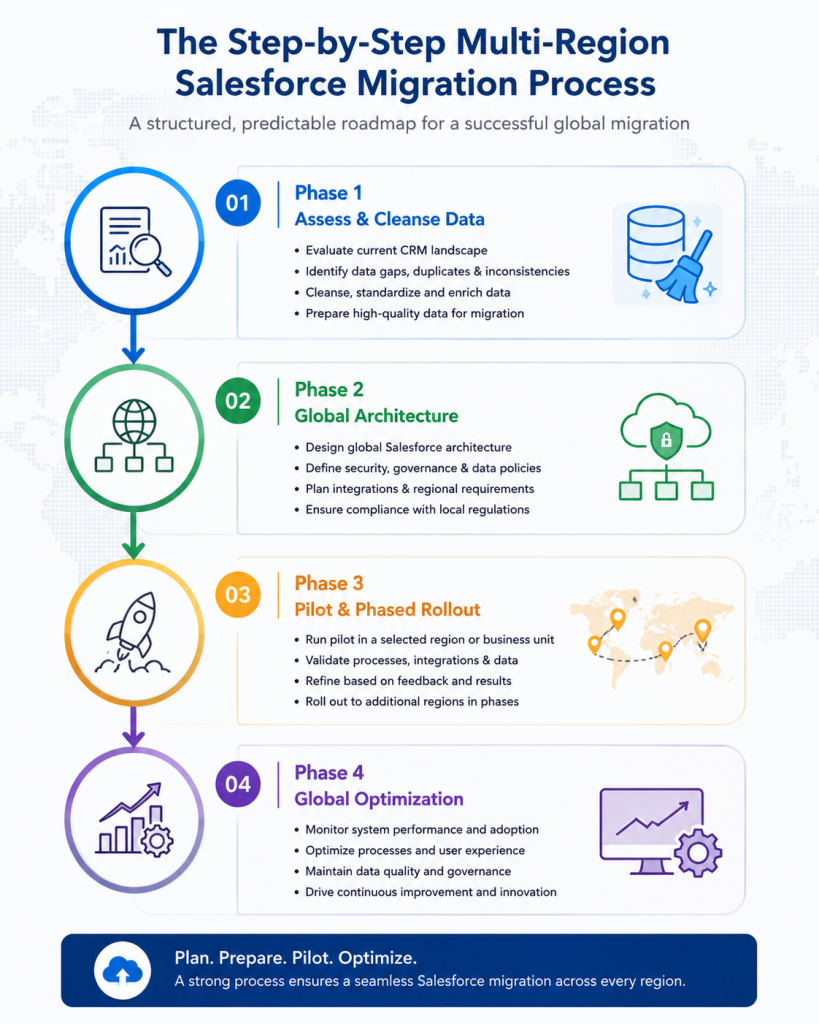
A successful multi-region Salesforce migration typically progresses through four major phases. Each phase contains several activities that help organizations reduce risk, maintain compliance, and ensure a smooth transition across regions.
Step 1: Assess Existing CRM Environments
Start by evaluating all CRM systems, databases, spreadsheets, and integrations used across different regions. This helps identify data sources, system dependencies, and potential migration challenges before the project begins.
Step 2: Define a Global Governance Framework
Create a governance structure that includes stakeholders from key regions. Establish clear rules for data management, security, customization, and decision-making to keep the migration aligned across global teams.
Step 3: Clean and Standardize Data
Review and clean existing customer records before migration. Remove duplicates, fix inconsistencies, and standardize data formats to improve accuracy and reduce issues after deployment.
Step 4: Design the Salesforce Architecture
Define how the new Salesforce environment will be structured. This includes user access, security controls, regional requirements, and reporting needs to support global operations.
Step 5: Build an Integration Strategy
Identify all systems that need to connect with Salesforce, such as ERP, finance, marketing, and support platforms. A well-planned integration strategy helps ensure smooth data flow across the organization.
Step 6: Execute a Pilot Migration
Begin with a smaller region or business unit before rolling out globally. A pilot migration helps validate the approach, uncover potential issues, and reduce implementation risks.
Step 7: Validate and Test
Conduct thorough testing to verify data accuracy, system performance, integrations, and user workflows. Involving business users during testing helps ensure the platform meets real operational needs.
Step 8: Train Global Teams
Provide role-based training and support for employees across regions. Early training and clear communication can improve user confidence and accelerate adoption.
Step 9: Roll Out in Phases
Deploy Salesforce gradually across regions instead of launching everywhere at once. A phased approach allows teams to resolve issues and apply lessons learned before the next rollout.
Step 10: Monitor and Optimize
After deployment, track system performance, user adoption, and data quality. Continuous monitoring and optimization help maximize the long-term value of the Salesforce investment.
Which Salesforce Migration Models Work Best?
Choosing how you deploy your new system defines your daily timeline and risk exposure. Let’s compare the core deployment models:
| Migration Model | Advantages | Disadvantages | Ideal Use Case |
| Big Bang Migration | Fast transition; no need to maintain old systems simultaneously. | High risk; any deployment issue stalls the entire global business. | Smaller companies operating in highly uniform markets. |
| Phased Migration | Controlled risk; lessons learned from early waves help later stages. | Requires temporary links to keep old and new systems talking. | Large enterprises with moderate business variations. |
| Region-by-Region | Tailored to local needs; minimal disruption to other global areas. | Prolonged overall timeline; delays global data unification. | Enterprises with starkly different regional divisions. |
| Hybrid Migration | Maximizes flexibility by blending immediate and gradual changes. | Highly complex to coordinate across IT teams. | Massive multinational conglomerates with mixed business structures. |
Salesforce Data Migration Across Regions: Key Considerations
Moving corporate records across oceans requires a highly disciplined data governance approach. Keep these factors top of mind:
- Data Mapping Alignment: Ensure fields translate correctly. A “Prospect” label in Asia must mean the exact same thing as a “Prospect” label in South America.
- Master Data Management (MDM): Determine which corporate platform owns the definitive record for a customer’s identity. Is it Salesforce, or is it your central ERP?
- Localization and Currency: The system must accurately display native characters, calculate real-time multi-currency conversions, and format dates based on regional preferences.
- Data Retention Policies: Different countries require you to purge or archive customer data after set periods. Your global system architecture must accommodate these distinct schedules smoothly.
Which Salesforce Migration Model Should You Choose?
| Business Scenario | Recommended Model |
| Single global business process | Single Salesforce Org |
| Multiple regulatory environments | Multi-Org Strategy |
| High-risk migration project | Phased Migration |
| Small user base | Big Bang Migration |
| Large enterprise with multiple regions | Regional Rollout |
| Strict data residency requirements | Hybrid Architecture |
How Do Compliance and Data Privacy Regulations Impact Migration?
Data privacy rules are changing rapidly across the globe. When executing an international CRM migration, you cannot treat compliance as an afterthought.
Under laws like the European Union’s GDPR, customer records must follow precise protection workflows. You must know exactly where data is stored physically and who can view it. For example, some countries mandate that citizen data cannot leave national borders.
To address this, design your Salesforce instance with robust role-based access controls. This ensures that while a global manager can see high-level sales trends, specific, sensitive customer details are visible only to locally authorized employees.
Best Practices for a Successful Global Salesforce Migration
Follow these proven strategic rules to keep your project running smoothly:
- Start with Governance: Build your cross-regional leadership team before writing any code or choosing platforms.
- Create Global Standards: Enforce uniform sales stages, pipeline terminology, and account naming metrics.
- Build a Detailed Roadmap: Clearly communicate your timeline so regional managers know exactly when their systems will switch over.
- Prioritize Data Quality: Invest heavily in deduplication and cleansing apps long before your scheduled migration date.
- Establish Clear Ownership: Appoint data stewards within each local office to maintain long-term information accuracy.
- Test Continuously: Run regular migration tests in sandbox environments to spot data errors early.
- Communicate Frequently: Share regular progress updates with everyday employees to calm anxiety about the new system.
- Focus on Real User Adoption: Design workflows that genuinely make a sales representative’s daily life easier, not harder.
- Use Phased Deployments: Protect your company by rolling out changes in manageable regional waves.
- Measure Business Outcomes: Track tangible improvements like reduced sales cycles or lower IT costs to prove project value.
Benefits vs. Challenges of Multi-Region Salesforce Migration
Let’s balance the business rewards against the operational hurdles of this journey:
| Core Business Benefits | Core Project Challenges |
| 1. One unified view of all global customer data. | 1. Extremely high initial planning complexity. |
| 2. Drastic drops in software licensing fees. | 2. High up-front technical and consulting costs. |
| 3. Highly accurate global executive reporting. | 3. Resentment from regional teams losing custom tools. |
| 4. Smoother internal collaboration across countries. | 4. Complex navigation of global data privacy laws. |
| 5. Standardized, high-quality sales workflows. | 5. Heavy demands on internal IT resources. |
| 6. Easier onboarding for new global employees. | 6. Risk of operational downtime during cutovers. |
| 7. Simplified compliance audits and tracking. | 7. Managing massive volumes of duplicate legacy data. |
| 8. Highly scalable infrastructure for future mergers. | 8. Coordinating timelines across global time zones. |
Common Mistakes Enterprises Should Avoid
What causes these large-scale digital transformations to fail? Watch out for these traps:
- Migrating Low-Quality Data: Moving cluttered, unverified lists into a clean platform instantly ruins user trust.
- Ignoring Local Compliance: Failing to check data residency laws can result in massive government fines.
- Underestimating Integration Needs: Forgetting to map minor regional software connections causes broken workflows post-launch.
- Lack of Executive Backing: Without clear support from senior leadership, regional divisions will drag their feet and delay timelines.
- Rushed Deployment Windows: Forcing a complex system live before it is thoroughly tested guarantees costly technical errors.
Tools That Support Global Salesforce Migration
You don’t have to build everything from scratch. These trusted tools simplify your data movement and integration tasks:
- Salesforce Data Loader: A reliable, native tool for importing, exporting, and deleting large batches of records.
- MuleSoft: A powerful enterprise platform that seamlessly connects your new Salesforce system to legacy applications.
- Informatica: Excellent for advanced data integration, cleansing, and complex multi-system mapping.
- OwnBackup: Provides vital backup protection, ensuring your historical records are completely safe if a migration step goes wrong.
Real-World Case Studies
Real-world examples provide valuable insights into how global enterprises plan, execute, and optimize Salesforce migrations across multiple regions.
1. Global Manufacturing Enterprise
A manufacturing company operated separate Salesforce instances across North America, Europe, and Asia. This created duplicate customer records and limited visibility into global sales opportunities.
The company consolidated its regional systems into a unified Salesforce environment through a phased migration approach. As a result, sales teams gained a single view of multinational accounts, improving collaboration and reducing administrative overhead.
2. International Financial Services Firm
A financial services organization struggled to share customer insights across regions while complying with strict privacy regulations.
By implementing a global Salesforce platform with region-specific security controls, the company successfully unified client data while meeting regulatory requirements. The new system improved reporting accuracy and enhanced collaboration between regional teams.
Industry-Specific Migration Priorities
Every sector focuses on different goals during a CRM transformation:
- Manufacturing: Focuses heavily on managing complex, multi-currency global supply chains and tracking long-term sales agreements.
- Retail: Prioritizes real-time inventory visibility and unifies customer loyalty profiles across physical and digital stores.
- Financial Services: Places ultimate focus on ironclad data security, audit tracking, and regional privacy compliance.
- Technology Companies: Focuses on managing automated software subscriptions and unifying global customer support desks.
Expert Strategic Insights
To ensure a smooth migration, always treat technology as a servant to your business processes, not the master.
Spend plenty of time aligning your people and refining your workflows before altering software code. If your internal teams do not agree on how to close a deal or handle a service case locally, configuring a global CRM will only amplify those disagreements.
Invest in deep discovery workshops, listen patiently to regional concerns, and build a system that actively helps your frontline workers hit their targets.
Why Enterprises Partner with HashStudioz for Salesforce Migration
Navigating a massive global CRM consolidation requires more than standard IT skills. It requires a deep blend of business strategy and platform expertise.
HashStudioz helps global enterprises design and execute secure, reliable multi-region Salesforce migration strategies. Our experienced consultants specialize in untangling messy legacy data, designing scalable system architectures, and ensuring your platform respects international data residency laws.
We work closely with your regional teams to build a unified system that drives consistent global growth while protecting your daily operations.
Planning a Multi-Region Salesforce Migration?
Our Salesforce experts help enterprises consolidate data, streamline integrations, and deploy scalable CRM solutions across global operations.
Conclusion
Migrating Salesforce across multiple international regions is a major strategic journey. It requires a clear balance of firm global standards and practical regional flexibility. By prioritizing strong governance and focusing on data cleansing, enterprises can reduce migration risks and improve data accuracy from the start.
A phased rollout approach further helps organizations minimize disruption while building a scalable Salesforce platform that supports long-term growth.
FAQs
1. What is a multi-region Salesforce migration?
It is a coordinated plan to combine multiple regional CRM platforms or separate Salesforce systems into a single, unified Salesforce environment. This gives global enterprises a shared data home for all international operations.
2. How long does a Salesforce migration take?
For large global enterprises, a multi-region migration typically takes anywhere from 12 to 36 months. The exact timeline depends heavily on the volume of records, system complexity, and your chosen rollout model.
3. What are the risks of global CRM migration?
The primary risks include temporary operational downtime, data corruption, resistance from regional users, and unexpected integration breaks with old legacy software.
4. How much does Salesforce migration cost?
Enterprise-level migrations vary wildly based on scope, but they generally range from several hundred thousand dollars to millions. This investment covers consulting fees, data cleaning tools, system integration setup, and global staff training.
5. Can Salesforce support multiple countries?
Yes, Salesforce is built natively for global business. It easily supports multiple languages, localized date-time formats, complex international tax structures, and real-time currency exchanges.
6. How do you manage data residency requirements during Salesforce migration?
Organizations must follow regional data storage and privacy laws. A migration strategy should identify where data can be stored, accessed, and transferred to maintain compliance.
7. What is the best Salesforce migration model for global enterprises?
Most global enterprises choose a phased migration approach because it reduces risk, minimizes disruption, and allows issues to be resolved before wider deployment.
8. How do you prevent data duplication during Salesforce migration?
Data duplication can be prevented through data cleansing, standardization, and validation before migration. Regular testing also helps identify duplicate records early.