


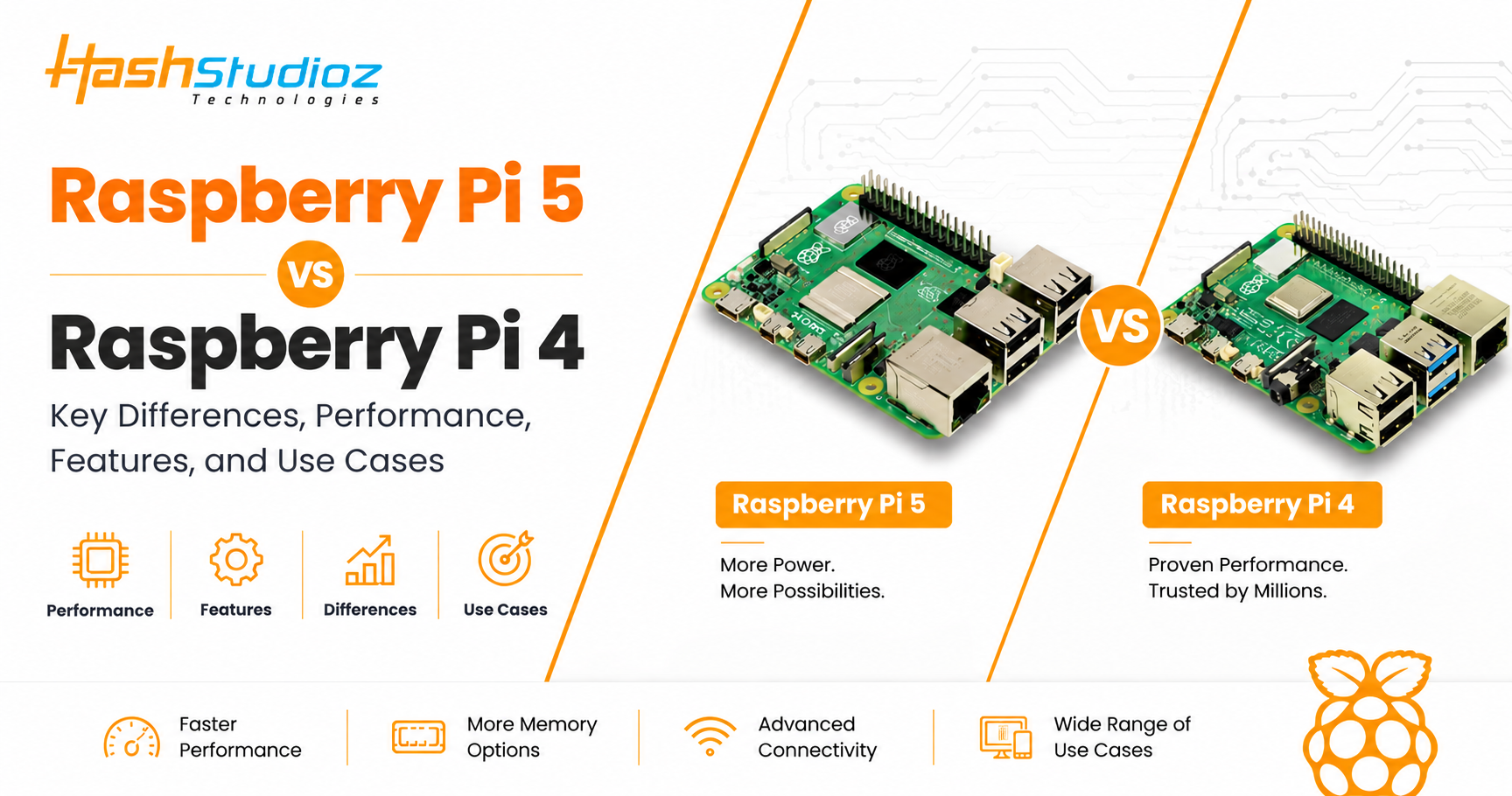
Raspberry Pi single-board computers have changed modern computing. They offer tiny, credit-card-sized systems for minimal costs. These boards run full Linux operating systems and feature flexible input/output pins. Over the years, they became the ultimate tools for builders, students, and engineers.
Today, choosing between the older workhorse and the new flagship is a common dilemma. Many buyers face the Raspberry Pi 5 vs Raspberry Pi 4 choice when starting a fresh project.
This detailed guide breaks down their technical details. It will help you see if you need an upgrade. Let us look closely at what these two powerful boards offer.
Table of Contents
What Is Raspberry Pi 4?
The Raspberry Pi 4 Model B arrived in 2019. It marked a massive leap forward for the series. It was the first model to offer true desktop-class performance.
Key Specifications
- Processor: Broadcom BCM2711 quad-core Cortex-A72 at 1.5 GHz (later updated to 1.8 GHz).
- Graphics: VideoCore VI GPU supporting OpenGL ES 3.1.
- Memory: 1GB, 2GB, 4GB, or 8GB LPDDR4 RAM options.
- Display: Dual micro-HDMI ports supporting up to 4K at 60Hz for a single screen.
Launch Purpose and Use Cases
The creators designed the board to replace entry-level desktop PCs. It added dual-display support and fast USB 3.0 ports. It also introduced a true Gigabit Ethernet port.
Popular use cases include:
- Building low-cost media centers.
- Running network storage drives (NAS).
- Creating smart home hubs.
- Learning Linux and python programming.
What Is Raspberry Pi 5?
The Raspberry Pi 5 is the newest flagship board. Released in late 2023, it delivers unprecedented speed. It focuses on solving old hardware bottlenecks.
Key Specifications
- Processor: Broadcom BCM2712 quad-core Cortex-A76 at 2.4 GHz.
- Graphics: VideoCore VII GPU supporting Vulkan 1.2 and OpenGL ES 3.1.
- Custom Silicon: RP1 Southbridge I/O controller chip.
- Storage Expansion: Single-lane PCIe 2.0 interface.
Major Improvements and Typical Use Cases
The board brings a 2× to 3× boost in processing speeds. The custom RP1 chip separates peripheral traffic from the main CPU. This means faster data transfers over USB and network channels. It also adds a real-time clock and a dedicated power button.
Typical use cases include:
- Local Edge AI and machine learning tasks.
- Heavy retro gaming emulation.
- Fluid dual-4K digital signage setups.
- High-speed NVMe solid-state drive storage systems.
Raspberry Pi Architecture Overview
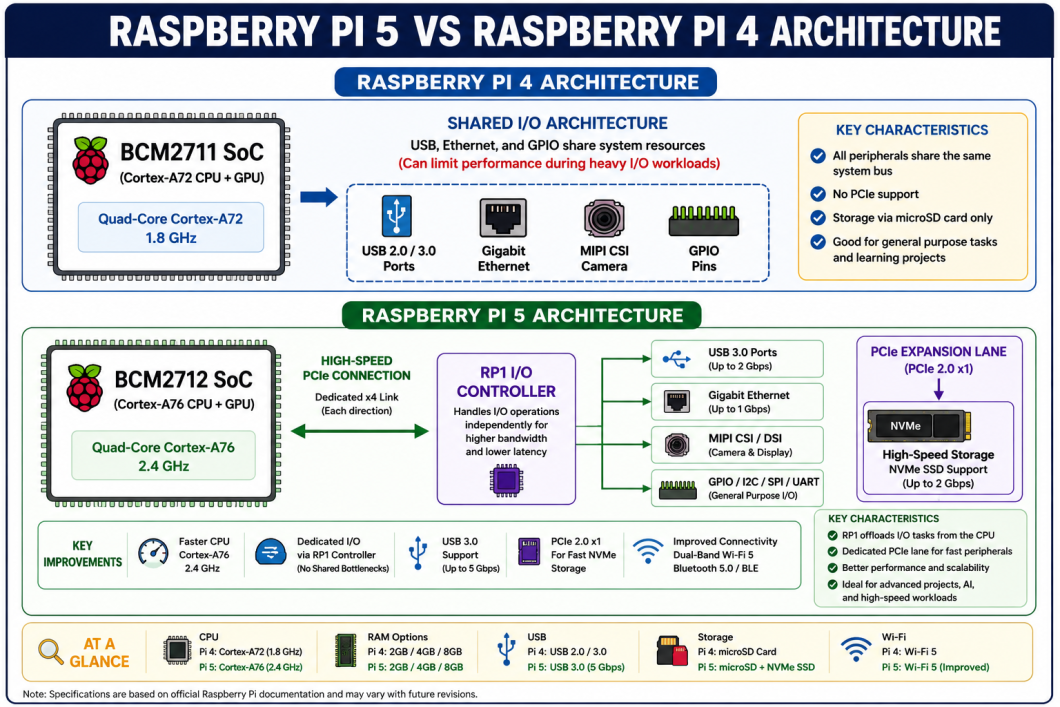
The internal designs of these two boards differ greatly. This architectural shift changes how they handle data workflows
CPU and GPU Architecture
The Raspberry Pi 4 utilizes older Cortex-A72 processor cores. It links peripherals through a shared bus system. This can slow down speeds when using multiple USB drives.
The Raspberry Pi 5 jumps three generations forward to Cortex-A76 cores. It features a wider instruction pipeline. This allows the CPU to finish more tasks in every clock cycle. The new VideoCore VII GPU handles complex 3D rendering with ease.
RAM and I/O Structure
The Raspberry Pi 4 uses LPDDR4 memory clocked at 3200 MT/s. The Raspberry Pi 5 upgrades to LPDDR4X running at 4267 MT/s.
More importantly, the Pi 5 moves peripheral management to its custom RP1 chip. This chip communicates over a fast, internal PCIe line. This frees the main processor to focus solely on running applications.
Raspberry Pi 5 vs Raspberry Pi 4 Comparison Table
| Feature | Raspberry Pi 4 Model B | Raspberry Pi 5 |
| Processor SoC | Broadcom BCM2711 | Broadcom BCM2712 |
| CPU Core Architecture | Quad-core Cortex-A72 (ARMv8) | Quad-core Cortex-A76 (ARMv8 with Crypto) |
| CPU Clock Speed | 1.5 GHz to 1.8 GHz | 2.4 GHz |
| GPU Model | VideoCore VI (500 MHz) | VideoCore VII (800 MHz) |
| RAM Options | 1GB, 2GB, 4GB, 8GB (LPDDR4) | 1GB, 2GB, 4GB, 8GB, 16GB (LPDDR4X) |
| MicroSD Speed Mode | Standard SDR50 (50 MB/s max) | High-speed SDR104 (104 MB/s max) |
| PCIe Support | None exposed externally | PCIe 2.0 x1 via flat flexible cable |
| USB Ports | 2× USB 3.0, 2× USB 2.0 (Shared) | 2× USB 3.0 (5Gbps total), 2× USB 2.0 |
| Networking | Gigabit Ethernet, Dual-band 802.11ac Wi-Fi, BT 5.0 | Gigabit Ethernet, Wi-Fi 5, Bluetooth 5.0 BLE |
| Camera/Display Ports | 1× CSI-2 (Camera), 1× DSI (Display) | 2× 4-lane MIPI Transceivers (Combined) |
| Power Input | 5V/3A (15W) via USB-C | 5V/5A (27W) with Power Delivery |
| Hardware Extras | None | Power button, RTC connector, Fan header |
| Release Year | 2019 | 2023 |
| Base Price | Starting at $35 | Starting at $45 |
Raspberry Pi 5 vs Raspberry Pi 4 Performance Comparison
The architectural shift translates directly into real-world speed. The following table highlights the performance differences.
| Benchmark Category | Raspberry Pi 4 Performance | Raspberry Pi 5 Performance |
| Single-Thread CPU | Baseline score | Approx. 50% to 70% faster |
| Multi-Thread CPU | Baseline score | Approx. 2× to 3× higher throughput |
| Web Browser Speed | Noticeable stutters on heavy scripts | Smooth desktop browser experience |
| MicroSD Storage Write | Capped around 45 MB/s | Reaches up to 100 MB/s |
| Cryptographic Tasks | Slow software encryption | Hardware cryptographic extensions significantly improve VPN, SSL, and encryption workloads compared to Raspberry Pi 4. |
| Object Detection AI | Suitable for basic AI inference tasks | Significantly faster AI inference and computer vision performance |
The Raspberry Pi 5 handles heavy multitasking flawlessly. Web pages load instantly because of the modern Cortex-A76 layout. MicroSD cards run at double their previous speeds. Cryptographic acceleration makes secure VPN networks run incredibly fast.
Advantages and Disadvantages
To better understand their real-world value, let’s examine the advantages and disadvantages of each board.
Advantages of Raspberry Pi 5
- Extreme Processing Power: Delivers desktop performance matching budget x86 mini PCs.
- Native PCIe Expansion: Connects NVMe SSD drives for ultra-fast storage speeds.
- Dedicated Power Button: Allows safe system shutdowns without pulling cables.
- Dual 4K60 Output: Drives two high-resolution screens smoothly at 60 frames per second.
Disadvantages of Raspberry Pi 5
- High Power Demands: Requires a specific 5V/5A USB-C power adapter.
- Runs Very Hot: Demands active cooling or large heatsinks under regular loads.
- No Analog Audio Jack: Removes the old 3.5mm composite headphone jack.
- Case Incompatibility: Port relocations mean it will not fit older cases.
Advantages of Raspberry Pi 4
- Excellent Thermal Profiles: Can run completely silent without any fans.
- Lower Power Draw: Uses common 5V/3A chargers and phone power banks.
- Rich Accessory Ecosystem: Thousands of existing cases, HATs, and tutorials exist.
- Includes Audio Jack: Features the classic 3.5mm audio and video jack.
Disadvantages of Raspberry Pi 4
- Slow Storage Speeds: Limited to MicroSD cards and slower USB-to-SATA adapters.
- Shared USB Bandwidth: External drives can choke if network traffic spikes.
- No Built-In Power Controls: Requires external inline switch cables to toggle power.
Raspberry Pi 5 vs Raspberry Pi 4 for IoT Projects
For Internet of Things (IoT) engineering, these boards serve different tiers. Choosing the right one depends on your deployment environment.
Edge Computing and AI Workloads
The Raspberry Pi 5 shines at the edge. Its cryptographic extensions secure data packets instantly. If your project processes live video streams or uses machine learning, choose the Pi 5. It handles local computer vision without needing cloud servers.
Sensor Networks and Automation
The Raspberry Pi 4 remains king for simple sensor networks. It draws less current when idling. This makes it perfect for solar-powered or battery-backed automation hubs.
Its 3.3V logic header handles relays and climate sensors easily. It also generates less heat. You can lock it inside sealed, dust-proof plastic enclosures without worrying about overheating.
Raspberry Pi 5 vs Raspberry Pi 4 Applications
| Application | Better Choice | Reason |
| Home Automation | Raspberry Pi 4 | Lower idle power, runs cooler in enclosed spaces. |
| Media Server (Plex) | Raspberry Pi 5 | Faster transcoding and better network throughput. |
| AI & Deep Learning | Raspberry Pi 5 | Faster CPU processing and PCIe neural accelerator support. |
| Robotics | Raspberry Pi 5 | Faster sensor math loops and dual camera inputs. |
| Industrial IoT | Raspberry Pi 4 | Longer market presence, proven stability, high reliability. |
| Learning Linux | Raspberry Pi 4 | Highly affordable, fewer cooling issues for students. |
| Programming Practice | Raspberry Pi 5 | Compiles code fast, runs heavy software IDEs easily. |
| Network Monitoring | Raspberry Pi 4 | Low continuous power use, true gigabit speed is enough. |
| Edge AI Video | Raspberry Pi 5 | Process raw frames at high frame rates. |
| Retro Gaming | Raspberry Pi 5 | Emulates newer 3D graphics consoles without lag. |
Which Is Better: Raspberry Pi 5 or Raspberry Pi 4?
The better choice depends on your budget, performance requirements, and intended use case.
Direct Buying Recommendations
- For Beginners: Raspberry Pi 4. It is more forgiving, runs cooler, and has countless online tutorials.
- For Students: Raspberry Pi 4 for electronics; Raspberry Pi 5 for computer science and compiling heavy code.
- For Developers: Raspberry Pi 5. The speed gains cut down compile times drastically.
- For Businesses: Raspberry Pi 5 for modern edge processing; Raspberry Pi 4 for stable, long-term industrial deployments.
- For IoT Projects: Raspberry Pi 4 for simple remote sensors; Raspberry Pi 5 for smart gateways using local AI.
- For AI Projects: Raspberry Pi 5. The native PCIe lane lets you attach fast hardware accelerators.
- For Budget Users: Raspberry Pi 4. The total setup costs stay low because you do not need special power bricks or coolers.
Data Summary Table
| Metric | Raspberry Pi 4 Model B | Raspberry Pi 5 |
| Core Power | Great for basic servers | Great for heavy workloads |
| Thermal Need | Optional passive case | Required active fan/cooler |
| Power Target | 15W (5V,3A) | 27W (5V,5A) |
| Storage Choice | MicroSD / USB 3.0 | NVMe SSD via PCIe / MicroSD |
| Audio Output | HDMI / 3.5mm Jack | HDMI Only |
Conclusion
The Raspberry Pi 5 vs Raspberry Pi 4 comparison highlights a clear generational shift. The Raspberry Pi 4 remains an efficient, cost-effective workhorse. It is perfect for lightweight tasks, silent servers, and budget-friendly electronics lessons.
In contrast, the Raspberry Pi 5 breaks performance barriers. Its modern processor, dedicated I/O controller, and PCIe expansion expand what single-board computers can achieve.
If you need raw speed, fast NVMe storage, or edge AI power, invest in the Raspberry Pi 5. If you prioritize low power draw, silent operation, and affordable accessories, the Raspberry Pi 4 will serve you well. Assess your project needs carefully before buying.
FAQ Section
1. Is Raspberry Pi 5 faster than Raspberry Pi 4?
Yes. The Raspberry Pi 5 is significantly faster than the Raspberry Pi 4. It delivers two to three times the CPU processing power. This boost comes from its modern Cortex-A76 architecture and higher 2.4 GHz clock speed. Graphics and storage speeds are also twice as fast.
2. Is Raspberry Pi 5 worth upgrading to?
It depends on your current bottlenecks. If your Raspberry Pi 4 stutters during web browsing, retro gaming, or compiling code, the upgrade is worth it. However, if you only run a basic file server or minor home automation scripts, the older board is sufficient.
3. Can Raspberry Pi 5 run Raspberry Pi 4 projects?
Yes, most software projects will run perfectly. However, the Raspberry Pi 5 requires newer versions of the operating system based on Debian Bookworm or Trixie. Older legacy OS images will not boot on the new hardware layout.
4. Which Raspberry Pi is best for IoT?
The Raspberry Pi 4 is ideal for simple, low-power sensor arrays because it runs cool without a fan. For advanced edge computing hubs that require on-site data processing, machine learning, and fast network encryption, the Raspberry Pi 5 is the superior choice.
5. Which Raspberry Pi is best for AI projects?
The Raspberry Pi 4 can only handle basic image recognition at low frame rates. The Raspberry Pi 5 is much better suited for AI projects. Its faster processor handles neural network math easily, and its PCIe port lets you attach dedicated AI accelerators.