


Businesses use digital platforms to manage IT services, automate workflows, and organize enterprise data. As requirements change, existing systems may need upgrading, consolidating, replacing, or moving. That is where ServiceNow migration comes in.
A migration project can move existing IT service management (ITSM) processes to ServiceNow, transfer data and applications between ServiceNow instances, or move away from ServiceNow to another platform. Each path needs its own strategy, technical assessment, and implementation plan.
A well-planned ServiceNow migration can improve process alignment and information management. The outcome still depends on scope, data quality, system dependencies, integrations, and testing.
This article covers the types of migration, the step-by-step process, data and application considerations, challenges, benefits, costs, best practices, and how to evaluate a migration partner.
Table of Contents
What Is ServiceNow Migration?
ServiceNow migration means transferring data, applications, configurations, workflows, or business processes from one technology environment to another, with ServiceNow involved. The exact meaning depends on the organization. A first-time adopter may migrate from a legacy ITSM system. An existing customer may transfer configurations and data between instances. Another organization may replace ServiceNow with a different platform.
A project may involve these components:
- Data migration: Transferring records, tables, and business information while preserving accuracy and relationships.
- Application migration: Moving applications and their configurations to another ServiceNow instance or environment.
- Workflow migration: Recreating or transferring processes, approvals, automation, and workflow configurations.
- Configuration migration: Moving platform customizations and settings.
- Integration migration: Reconfiguring connections between ServiceNow and external systems.
- Instance migration: Moving information and configurations between separate ServiceNow instances using suitable methods.
The approach depends on the source and destination environments, data volume and type, application dependencies, and operational requirements.
Migration differs from an upgrade. An upgrade moves an existing instance to a newer platform release. Migration transfers data, applications, configurations, or processes between environments or platforms.
Why Do Businesses Need ServiceNow Migration?
Businesses consider migration when existing systems no longer meet operational needs or when they want to consolidate service management. Common reasons include:
1. Replacing Legacy Systems
Older ITSM systems may limit automation, integration, reporting, or process management. Organizations may move their data and processes to ServiceNow to use its capabilities.
2. Improving Workflow Management
Approvals, service requests, and incidents often live in separate applications. Moving them to one platform can make workflows more consistent.
3. Consolidating Business Data
Information spread across systems makes consistent records hard to maintain. Migration lets organizations identify relevant data, map it to the target environment, and reduce duplication.
4. Supporting Business Growth
Growing organizations may need to accommodate more users, departments, services, integrations, and processes. Migration can prepare the environment for these needs, provided the target architecture and licensing are planned appropriately.
5. Modernizing Applications and Integrations
Businesses may need to replace outdated applications or update integrations that no longer meet technical requirements. Migrating to a suitable ServiceNow environment lets them reorganize those connections and configurations.
Why Should You Consider Moving Away from ServiceNow?
ServiceNow offers enterprise workflow and service management capabilities, but it may not fit every organization’s requirements, budget, or technical environment. Before migrating away, evaluate why you want to change and compare alternatives against your actual needs.
1. Licensing and Total Cost
Review subscription costs, licensing, implementation expenses, and ongoing administration. If the cost does not match the value or functionality you use, evaluating alternatives is reasonable. Switching also carries migration, integration, training, and operational costs, so weigh the complete cost first.
2. Complex Customizations
Heavy customization raises the effort of maintaining and upgrading an environment. If your configuration has become hard to manage, consider simplifying it or evaluating another platform.
3. Changing Business Requirements
New needs may involve specialized workflows, reporting, integrations, or application capabilities. First determine whether configuration, application development, or platform improvements can meet them before considering a full migration.
4. Integration Requirements
Multiple enterprise applications may require integrations that are difficult or costly to maintain. If your architecture no longer supports them, evaluate alternative integration approaches or platforms.
5. Preference for a Different Technology Environment
An organization may standardize on another enterprise platform because of existing contracts, internal expertise, application requirements, or long-term IT strategy.
Base the decision on a structured assessment, not a single limitation. Also decide how existing records, workflows, integrations, and historical information will be handled in the replacement environment.
Different Types of ServiceNow Migration
The term covers several scenarios. Understanding them helps you choose the right tools and approach.
1. Migration to ServiceNow from a Legacy Platform
This moves data and business processes from an existing system into ServiceNow. For example, an organization may transfer incidents, service requests, user information, and configuration data from an older ITSM solution. The work generally involves data discovery, field mapping, transformation, importing, and validation.
2. ServiceNow Instance-to-Instance Migration
This transfers data or configurations between two ServiceNow instances, for example when consolidating environments, establishing a new instance, or moving workloads. Depending on what must move, the approach may use instance cloning, update sets, application deployment, or data imports.
3. ServiceNow Application Migration
This moves applications and their configurations between ServiceNow environments. Deployment can use the Application Repository or update sets, depending on the application and requirements. Test applications in non-production environments before deploying to production.
4. ServiceNow Data Migration
This transfers records and business information from a source system or instance to a target environment. It may include user records, incidents, configuration items, and service requests. Scope depends on organizational requirements and the target data model.
5. Migration Away from ServiceNow
This moves data and processes from ServiceNow to another service management or enterprise platform. It requires assessing the replacement platform’s data model, workflow capabilities, integrations, and compatibility with existing processes. It may also mean rebuilding workflows and reconfiguring integrations instead of simply transferring records.
Platforms and Systems That Can Be Migrated to ServiceNow
Organizations can move information from many source environments into ServiceNow if the data can be accessed, transformed, and mapped to the target structure.
| Source environment | Examples of information that may be migrated |
| Legacy ITSM platforms | Incidents, service requests, problems, and change records |
| CRM platforms | Relevant customer, contact, and service-related information |
| Enterprise applications | Business records and operational information |
| Databases | Structured records and reference information |
| Spreadsheets and CSV files | User lists, asset records, and other structured data |
| Existing ServiceNow instances | Selected records, configurations, and application components |
Feasibility depends on the source system, export methods, data formats, field compatibility, and target ServiceNow tables. Moving incident records from an older ITSM platform, for example, requires mapping source fields to ServiceNow fields. The team must also consider record relationships, ownership, and status values.
Not everything transfers directly. Some workflows, integrations, and custom applications must be redesigned or recreated.
ServiceNow Migration Process: Step-by-Step
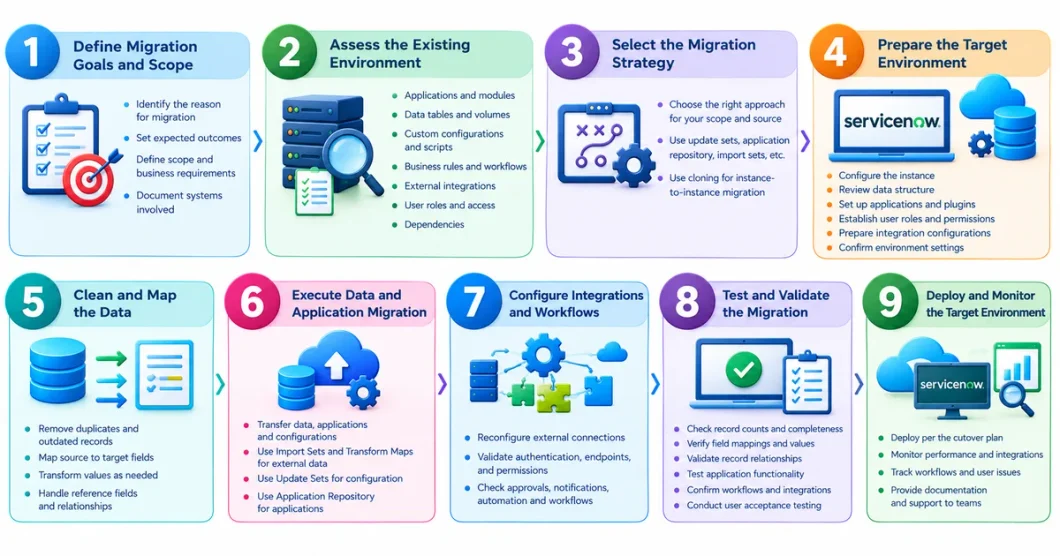
Step 1: Define Migration Goals and Scope
Identify why you need ServiceNow migration and what you expect from it. Determine whether the project moves to ServiceNow, transfers between instances, migrates applications, or replaces ServiceNow. Document scope, outcomes, business requirements, and systems involved. This prevents unnecessary data transfers and scope changes.
Step 2: Assess the Existing Environment
Review the source environment’s technical structure:
- Applications and modules
- Data tables and record volumes
- Custom configurations and scripts
- Business rules and workflows
- External integrations
- User roles and access requirements
- Dependencies between applications and records
This reveals migration requirements and potential compatibility issues.
Step 3: Select the Migration Strategy
Match the approach to scope and source. Update sets can transfer configuration changes, the Application Repository can deploy applications, and import sets or other methods can move business data. For instance-to-instance migration, cloning suits copying a database between environments. Cloning and selective data migration serve different purposes and are not interchangeable.
Step 4: Prepare the Target Environment
Before transferring anything, prepare the destination:
- Configure the ServiceNow instance
- Review the target data structure
- Set up required applications and plugins
- Establish user roles and access permissions
- Prepare integration configurations
- Confirm environment-specific settings
The target must be able to receive the data and support the required processes.
Step 5: Clean and Map the Data
Find duplicate, incomplete, outdated, or irrelevant records. Map source fields to destination fields and transform values to fit the target structure. If the source uses different status values than ServiceNow, define how they translate. Mapping must also cover reference fields and record relationships.
Step 6: Execute Data and Application Migration
Transfer the approved data, applications, and configurations. Import Sets and Transform Maps import external data and map source fields to target records. Update Sets transfer supported configuration changes between instances, and the Application Repository handles application deployment. Choose the method by content type.
Step 7: Configure Integrations and Workflows
Reconfigure connections to external systems where needed, and validate authentication, endpoints, permissions, and data exchange. Check that approvals, notifications, automation, and other process activities behave as expected.
Step 8: Test and Validate the Migration
Testing confirms the migrated environment meets requirements. Validate by:
- Checking record counts and data completeness
- Verifying field mappings and transformed values
- Checking relationships between records
- Testing application functionality
- Validating workflows and business rules
- Checking integration connectivity
- Conducting user acceptance testing
Resolve issues before moving to production.
Step 9: Deploy and Monitor the Target Environment
After testing and approval, deploy according to the cutover plan. Monitor performance, integrations, workflows, and user-reported issues. Give the relevant teams documentation and support.
ServiceNow Data Migration: Strategies and Considerations
Data is among the most important parts of a migration. Inaccurate or incomplete information can hurt reporting, workflows, service operations, and business decisions. A sound strategy defines what data moves, how it is transformed, and how accuracy is verified.
1. Identify the Data to Be Migrated
Review the source system and identify what the target needs. Depending on the project, this may include:
- User and group information
- Incident and problem records
- Change and service request records
- Configuration items
- Asset information
- Knowledge articles
- Reference and supporting records
Base scope on business requirements, data relevance, and the target system’s capabilities.
2. Map Source and Target Fields
Field mapping defines how source information appears in ServiceNow. Differences in field names, formats, or status values need mapping and transformation rules.
3. Use Import Sets and Transform Maps
An Import Set stages incoming data. A Transform Map defines how source fields are mapped and transformed into target records. Together they organize imports and support repeatable transformations.
4. Maintain Data Relationships
Records depend on other records. An incident may reference a user, assignment group, or configuration item. Make sure referenced records exist and are correctly mapped in the destination.
5. Validate Data After Migration
Compare source and destination records to find missing information, incorrect values, and relationship issues. Check record counts, required fields, reference values, and business-critical information. Run test migrations before the final production transfer to catch mapping and transformation problems early.
Application and Workflow Migration
Applications and workflows contain business logic that records alone cannot carry. Application migration requires assessing components, dependencies, configurations, and compatibility with the target.
Application Migration:
The Application Repository lets you publish applications and install them across your organization’s ServiceNow instances. Update Sets can move supported customizations when appropriate. Before deployment, review:
- Application scope and dependencies
- Required plugins and configurations
- Custom tables and fields
- Scripts and business rules
- Access controls and permissions
- Compatibility with the target environment
Test applications before deploying to production.
Workflow Migration:
Workflow migration transfers or recreates the processes behind business operations, such as:
- Incident management workflows
- Change approval processes
- Service request fulfillment
- Notification rules
- Automated task assignments
- Escalation processes
Verify that each workflow uses the correct data, permissions, integrations, and business rules. A workflow that works in the source may need adjustments in the target because of configuration, dependency, or setup differences.
ServiceNow Instance-to-Instance Migration
Organizations may move information between instances for consolidation, environment restructuring, or other operational needs. This is not a single operation. The right method depends on whether you need to copy an entire database, move selected records, or transfer application configurations.
Instance Cloning:
Cloning copies a database from one instance to another. It can synchronize environments and provide representative test data. Review the clone configuration beforehand, including data to include, exclude, or preserve. Cloning can overwrite information in the target, so assess both environments carefully first.
Update Sets:
Update Sets capture supported configuration changes for transfer between instances. They suit moving customizations through development, test, and production, but not large volumes of business data. Application order matters, because some changes depend on other configurations already being in place.
Import Sets:
Import Sets move external data into ServiceNow tables. They also work for instance-to-instance transfers when records are exported from one environment and imported into another. Plan field mapping, transformation, and record relationships first.
Application Repository:
The Application Repository supports application deployment between instances. Use it when publishing and installing applications, not transferring an entire database.
The right approach avoids unnecessary data movement and reduces the risk of overwriting important target configurations.
Common ServiceNow Migration Challenges and How to Overcome Them
Even careful migrations hit technical and operational problems. Spotting them early helps you prepare solutions.
1. Poor Data Quality
Challenge: Source systems may hold duplicate, outdated, incomplete, or inconsistent records, which degrade the target environment.
Solution: Profile and cleanse data before migration. Define validation rules and review key records after import.
2. Complex Customizations
Challenge: Scripts, business rules, custom tables, and configurations may not work the same way in the destination.
Solution: Document customizations and dependencies during assessment. Decide which components transfer and which need redesign or rebuilding.
3. Integration Failures
Challenge: Integrations may depend on specific endpoints, credentials, APIs, or data structures, causing connection or data exchange issues.
Solution: Inventory all integrations and document their configurations. Reconfigure for the target and test data exchange before deployment.
4. Data Relationship Issues
Challenge: Records may reference users, groups, applications, or other information that did not migrate correctly.
Solution: Sequence the migration around record dependencies. Validate reference fields and relationships after each relevant transfer.
5. Business Process Disruption
Challenge: Workflow and process changes may affect employees who rely on the existing system.
Solution: Involve process owners and end users in planning and testing. Schedule deployment carefully and announce changes before go-live.
6. Insufficient Testing
Challenge: A migration may look successful at the data-transfer level yet contain workflow, integration, or access issues.
Solution: Build a structured test plan covering data accuracy, application functionality, integrations, permissions, and user acceptance.
7. Migration Scope Changes
Challenge: New requirements can emerge mid-project, adding complexity and delaying timelines.
Solution: Document the scope, prioritize requirements, and use a formal process to review and approve changes.
Make Your ServiceNow Migration Smooth and Seamless
Partner with HashStudioz to plan a ServiceNow migration aligned with your business needs.
Benefits of Migrating to ServiceNow
When ServiceNow fits an organization’s needs, migrating to it can bring several operational advantages.
1. Centralized Service Management
A shared platform lets organizations manage service processes and information in a more coordinated environment.
2. Workflow Automation
The platform supports creating and managing workflows for approvals, service requests, and task assignments. Automation can reduce repetitive manual work when workflows reflect actual business requirements.
3. Improved Visibility
Centralized records and reporting help teams review service activities and monitor operations. Report quality depends on data accuracy and report configuration.
4. Integration Capabilities
ServiceNow integrates with external systems through its integration capabilities and APIs, helping organizations connect applications and exchange information.
5. Flexible Application Development
The Now Platform supports developing and deploying business applications, so organizations can create or extend applications to fit their operations.
6. Support for Business Process Standardization
Organizations can configure common processes and workflows across teams. This supports more consistent service delivery when governance, roles, and process requirements are clearly defined.
These benefits depend on implementation quality, platform configuration, licensing, and the organization’s ability to maintain the environment.
ServiceNow Migration Best Practices
Established practices help organizations manage complexity and keep control of the project.
1. Start With a Detailed Assessment
Document the source environment, business processes, applications, integrations, and data requirements before choosing tools.
2. Define a Clear Migration Strategy
Set the scope, sequence, responsibilities, tools, testing requirements, and deployment approach. A documented strategy shows teams how each component will transfer.
3. Prioritize Data Quality
Review data before migration and define how to handle duplicate, incomplete, and outdated records. Do not assume all source data needs to move.
4. Document Customizations and Dependencies
Keep an inventory of scripts, business rules, custom tables, integrations, and application dependencies. It highlights components needing extra configuration or redevelopment.
5. Use Appropriate Migration Tools
Match the tool to the content:
- Import Sets and Transform Maps for suitable data imports
- Update Sets for supported configuration changes
- The Application Repository for application deployment
- Instance cloning when copying an instance database is appropriate
6. Test in Non-Production Environments
Run migration trials and validate results in non-production environments before deploying. This surfaces issues without affecting live operations.
7. Plan the Cutover Carefully
Define the deployment schedule, responsibilities, data synchronization needs, and contingency arrangements. Tell stakeholders about planned changes beforehand.
8. Monitor and Improve After Deployment
Keep reviewing system behavior, data quality, integrations, and user feedback. Address issues from the initial operating period and document lessons learned.
ServiceNow Migration Cost and Timeline Factors
Cost and timeline depend on scope, source environment, technical complexity, and business requirements. No single estimate fits every migration. Evaluate these factors before budgeting and scheduling.
1. Data Volume and Complexity
Record counts, data structures, relationships, and transformation requirements all affect effort. Multiple data sources and complex relationships generally require more assessment and validation than a simple import.
2. Number of Applications and Workflows
Migrating several applications, scripts, business rules, and workflows adds development, configuration, and testing work.
3. Integration Requirements
The number of external systems and the complexity of their connections affect cost and timeline. Some integrations need endpoint changes, authentication updates, or data mapping adjustments.
4. Customization Requirements
Highly customized environments need more work to assess, transfer, rebuild, or validate existing functionality.
5. Testing and Validation
Testing is essential. The schedule should include test migrations, system integration testing, user acceptance testing, issue resolution, and final validation.
6. Downtime and Cutover Planning
Decide how the migration will affect operations. Data synchronization, deployment windows, rollback arrangements, and stakeholder communication all influence the timeline.
7. Migration Partner and Resource Requirements
Projects may need ServiceNow administrators, developers, data specialists, integration specialists, testers, and business process owners. Their availability and experience affect planning and delivery costs.
Before approving a budget, request a detailed scope assessment that identifies deliverables, assumptions, dependencies, resource requirements, and risks.
How to Choose the Right ServiceNow Migration Partner?
The right partner matters because projects involve business-critical information, complex configurations, and integrations. Evaluate candidates on these criteria.
1. ServiceNow Platform Knowledge
Look for a team that understands ServiceNow architecture, application deployment, data structures, configuration management, and platform administration.
2. Data Migration Experience
The partner should explain its approach to data discovery, field mapping, transformation, import, and validation. Ask how it handles record relationships and data quality issues.
3. Application and Integration Expertise
Assess its ability to evaluate application dependencies, migrate supported configurations, and reconfigure integrations.
4. Testing and Quality Assurance
A reliable approach includes a defined testing strategy covering data, workflows, applications, integrations, and user acceptance.
5. Project Planning and Communication
Expect a clear project plan, responsibilities, milestones, risk management approach, and communication process.
6. Post-Migration Support
Discuss post-deployment support, including issue resolution, environment monitoring, documentation, and knowledge transfer.
7. Transparent Scope and Cost
Request a proposal stating the scope, deliverables, assumptions, exclusions, estimated timeline, and cost structure. Comparing partners on these factors helps you find a team that understands both your technical requirements and business objectives.
Conclusion
ServiceNow migration can mean adopting the platform, transferring data and applications between instances, or moving business processes to another environment. Each scenario needs a clearly defined scope, suitable tools, and careful planning.
A structured process covers environment assessment, data mapping, application and workflow migration, integration configuration, testing, deployment, and post-migration monitoring.
Pay close attention to data quality, record relationships, customizations, security, and business continuity. The right approach and an experienced partner reduce avoidable risks and support a more controlled transition.
The best migration strategy meets your technical requirements while supporting your long-term business objectives.
FAQs
1. What is ServiceNow migration?
It is the transfer of data, applications, configurations, workflows, or business processes between systems or ServiceNow instances. It can also mean moving away from ServiceNow to another platform.
2. What are the different types of ServiceNow migration?
Common scenarios are legacy-to-ServiceNow migration, instance-to-instance migration, application migration, data migration, and migration away from ServiceNow.
3. What is the ServiceNow migration process?
It generally includes defining scope, assessing the source environment, selecting a strategy, preparing the target, cleaning and mapping data, transferring applications and records, testing, deployment, and monitoring.
4. What tools are used for ServiceNow migration?
It depends on requirements. Import Sets and Transform Maps handle data imports, Update Sets move supported configuration changes, the Application Repository deploys applications, and instance cloning copies instance databases.
5. How do you migrate data to ServiceNow?
Identify the required source records, review data quality, map source fields to target fields, transform values where needed, import the data, and validate the results. Import Sets and Transform Maps support this process.