


Companies usually evaluate enterprise platform switches on licensing cost and features, and the harder problem surfaces later: what happens to years of conversations, decisions, and files left behind in the old tool. A recent industry review put direct migration costs for a mid-sized organization between $15,000 and $50,000, and that figure does not include the cost of lost context when history does not make the trip. This case study covers how HashStudioz approached a Microsoft Teams to Slack migration for a client who needed the switch without losing what their teams had already built.
Table of Contents
What Is Teams to Slack Migration?
Teams to Slack migration is the process of moving an organization’s entire Microsoft Teams communication history, including channel conversations, one-to-one and group chats, files, and images, over to Slack while keeping that data accurate, attributed to the right people, and usable once it arrives. It is not the same as simply setting up a new Slack workspace and starting fresh. A proper migration preserves message order, formatting, threading, and file access, so employees can search and reference past conversations in Slack the same way they could in Teams.
Because the two platforms store and structure data differently, a real migration involves more than exporting and importing files. It requires mapping users and channels between the two systems, handling Slack’s own platform limits around posting speed and timestamps, and making sure nothing gets duplicated or lost if the process is interrupted partway through.
Existing Microsoft Teams Environment
The client had run on Microsoft Teams for several years as their primary collaboration hub, with multiple teams by department and project, a mix of public and private channels, and heavy direct and group messaging. Files shared in conversations sat across SharePoint and OneDrive, standard for Teams but not obvious to most users. The environment had grown organically, leaving inconsistent channel naming across departments, which shaped how discovery and planning were approached.
Business Challenges
The client’s day-to-day communication was tightly coupled to Teams, and several practical issues were pushing them toward a change.
- Licensing costs under their Microsoft 365 agreement were rising faster than their headcount, and Teams was bundled with tools the client was not using.
- Engineering and product teams found Teams’ interface slower for fast-moving technical discussion compared to Slack, which several new hires already preferred from previous roles.
- Third-party tool integrations the client wanted, particularly around developer workflows, were easier to build and maintain on Slack’s API.
Why Do Businesses Migrate from Microsoft Teams to Slack?
Businesses typically move from Microsoft Teams to Slack for a mix of cost, usability, and integration reasons. Common drivers include wanting a lighter, faster interface for technical and fast-moving teams, reducing licensing costs tied to bundled Microsoft 365 tools that are not actually being used, and gaining easier access to Slack’s wider ecosystem of third-party app integrations, particularly for developer and engineering workflows.
None of those reasons matter, though, if switching means starting from zero. For our client, the biggest hesitation was not Slack itself, it was the years of decisions, client conversations, and project history sitting inside Teams that people still searched through regularly. A move that abandoned that history was not a real option, so the ability to migrate that data accurately became the deciding factor in whether the platform switch could happen at all.
Migration Objectives
Before any work began, HashStudioz and the client agreed on what a successful migration actually meant, beyond simply moving data from one place to another.
- Every channel, team chat, and direct message needed to arrive in Slack complete and in the correct chronological order.
- The migration process preserved original sender attribution instead of using a generic migration account.
- Files and inline images needed to remain usable and searchable in Slack rather than turning into broken links.
- The migration needed to run without disrupting daily work, and without any risk of duplicate or lost messages if something interrupted the process.
Migration Scope
The scope covered the client’s full Teams environment: every team and channel, all one-to-one and group chats, and all associated files and inline media. We excluded Teams’ personal “notes to self” space from scope, since Microsoft does not expose that data to an organization-wide admin connection regardless of tooling, something we confirmed directly against Microsoft’s API and flagged to the client early.
What Data Can Be Migrated from Teams to Slack?
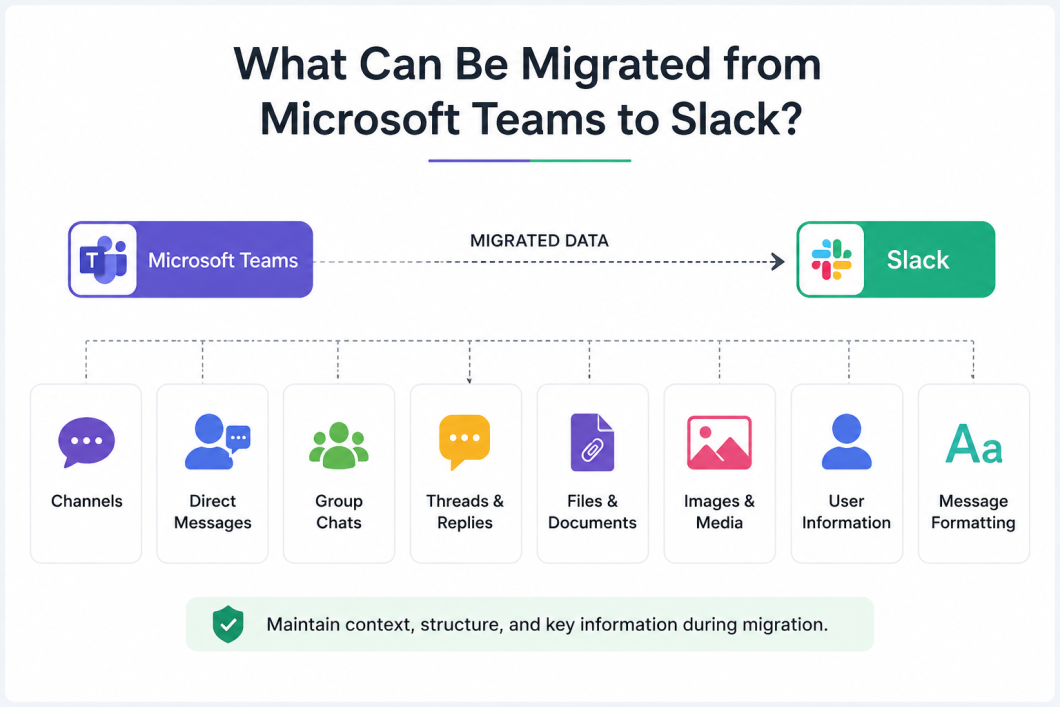
In a properly built Teams to Slack migration, the following data types can be carried across:
- Channel conversations, including public and private channels, with formatting, threads, and reply chains intact.
- One-to-one and group direct messages between employees.
- Files and documents shared inside conversations, including attachments stored in SharePoint and OneDrive behind the scenes.
- Inline images and pasted screenshots.
- Mentions of specific people, translated into working Slack mentions rather than plain text.
- Original message timestamps, preserved inside each migrated message even though Slack cannot backdate posts itself.
Some data is not accessible through an organization-wide migration regardless of the tooling used. Teams’ personal “notes to self” space is one example, since Microsoft does not expose that data to admin-level access, only to the individual account it belongs to.
High-Level Migration Assessment
Before committing to a full migration, we ran a read-only assessment to size the job: how many teams, channels, and chats existed, how far back history went, and how many employees needed identity mapping. This surfaced large file volumes in some channels and naming inconsistencies needing light cleanup after migration.
User & Channel Planning
We mapped Teams channels to their Slack equivalents, and Teams users to their Slack accounts, together with the client. We grouped channels by team and checked them against the current org structure, mapped employees to Slack accounts ahead of time, and the client chose to pilot the migration on a small set of channels before the full rollout.
Data Migration Approach
Moving message data between two differently structured platforms is not a straightforward copy operation. Our approach prioritized order, completeness, and data integrity over raw speed, with checks at every stage. The process was resilient by default: a paused or interrupted run could resume without gaps or duplicates, and it preserved formatting and reply threading throughout.
File & Document Migration
Teams does not store files inside the conversation itself, they live in SharePoint and OneDrive, with the chat message only linking to them. Migrating the message alone would have left broken links in Slack. Our approach ensured every file arrived as a genuine, native Slack attachment, and it handled inline images and screenshots to the same standard.
Team/Channel Transition
We migrated channels in a structured order agreed with the client, grouped by team, so completed departments could start using Slack while migration continued elsewhere in the organization, avoiding a single all-at-once cutover.
User Transition
Employees received a simple approval link, and once they accepted it, their historical messages appeared in Slack under their own name and photo. For employees who skipped this step, we still carried over their full history, clearly labelled to avoid misattribution.
High-Level Solution Architecture
At a high level, the migration relied on official Microsoft Graph and Slack API access, connecting through standard admin sign-in flows on both sides, and we engineered it to handle large-scale, long-running transfers reliably within both platforms’ limits. The specific internal processing logic and sequencing methods are proprietary to HashStudioz, and we do not detail them here.
Migration Phases
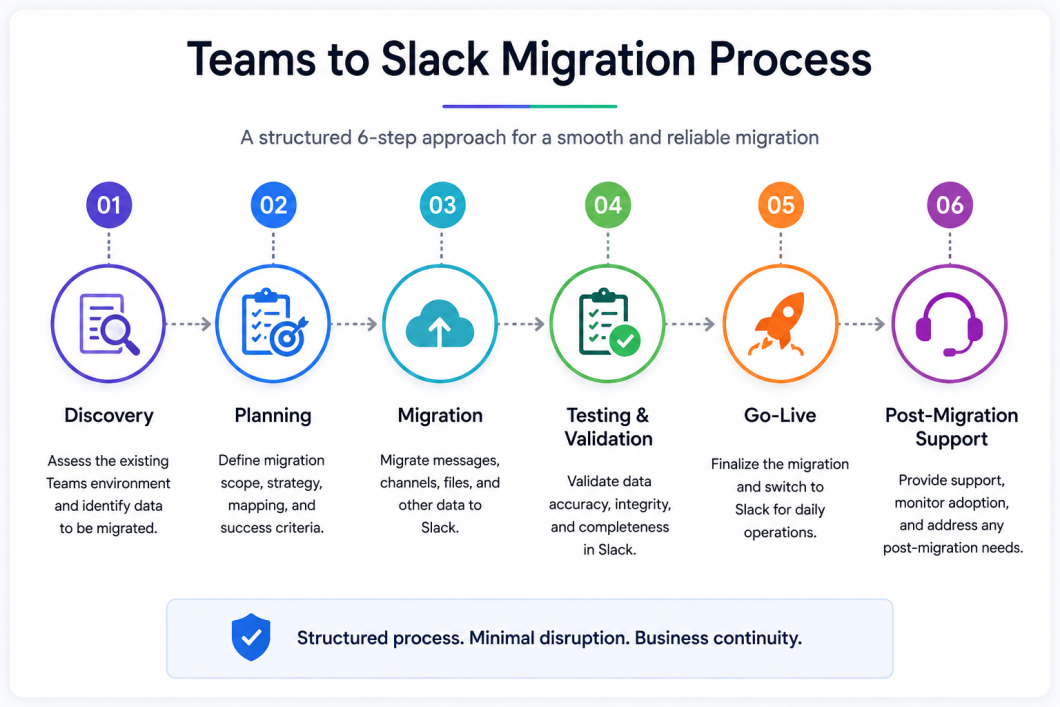
The project moved through four phases, each building on the results of the one before it:
- Discovery (Weeks 1 to 2): Environment review and assessment against the client’s actual Teams setup.
- Planning (Weeks 3 to 4): Channel and user mapping, sequencing, and pilot scope agreed with the client.
- Migration (Weeks 5 to 10): Pilot run followed by the full migration in staged batches by department.
- Testing & Validation (ongoing through each batch): Every completed batch checked against source data before sign-off.
- Go-Live (Weeks 9 to 11): Departments cut over to Slack progressively as each portion passed validation.
Exact timelines vary by organization size and data volume; this reflects the pace of this specific engagement, not a fixed benchmark.
Key Migration Challenges
A few problems only became visible once we worked against how the platforms behave: Slack does not allow backdated timestamps, its per-channel rate limit means large migrations take days, Teams stores mentions as structured tags and a naive copy breaks them entirely, and new messages kept arriving in Teams throughout the migration window as employees kept working normally.
How HashStudioz Addressed the Challenges
HashStudioz addressed each migration challenge with a dedicated approach rather than treating the issues as blockers. This helped the client maintain data continuity throughout the migration.
- Historical context remained intact despite Slack’s timestamp limitations.
- The migration process handled interruptions while reducing the risk of duplicate message delivery.
- The migration process converted supported mentions to maintain their context within Slack.
- The migration process monitored new activity during the migration window and accounted for relevant messages before the final cutover.
- HashStudioz kept the underlying implementation details proprietary to protect its migration methodology.
Risk Management
Given the volume of data and the business-critical nature of the conversations involved, HashStudioz integrated risk management into the migration process from the start.
- The pilot phase helped identify potential issues on a small, recoverable scope before they could affect the broader migration.
- The migration process captured failed messages along with their failure reasons and placed them in a retry queue instead of silently dropping them.
- Administrators could pause, resume, or cancel the migration at any stage. The team also tested these controls by deliberately interrupting live migration runs.
- The migration system generated a complete migration record, which the client could export for internal records and audit purposes.
Security Considerations During Teams to Slack Migration
Moving years of business conversations between platforms means handling sensitive data throughout the process, not just at the destination.
- We connected both platforms through standard, supported admin sign-in flows rather than shared credentials, keeping access auditable and revocable.
- We scoped access to what the migration actually needed.
- Identity mapping relied on individual employee consent before we linked any history to a real name and photo.
- Data moved directly between the two platforms’ official APIs, without unnecessary intermediate storage.
- A complete, exportable record gave IT and compliance teams an audit trail.
Business Outcomes
The migration let the client move onto Slack without the usual tradeoff of losing institutional history. Departments continued operating with minimal disruption, and employees searching for old decisions or files after cutover found their history intact and correctly attributed, rather than facing a wall of anonymous bot messages.
Actual Benefits
- Full conversation history preserved and searchable, including formatting, threads, and files.
- Employees retained ownership of their own message history.
- A staged, department-by-department rollout reduced the risk of a single hard cutover.
- A documented, auditable record of exactly what we migrated and when.
Technology Landscape
We built the migration using Python and React, and moved data through official Microsoft Graph and Slack API integrations, connecting both through standard, supported authentication flows.
How Much Does Teams to Slack Migration Cost?
There is no single fixed price for a Teams to Slack migration, and you should treat any price estimate without knowing your environment with caution. The actual cost depends on factors such as data volume, number of users, number of channels and teams, file and attachment volume, migration complexity, required integrations, and any post-migration validation or support needs. An organization with a small, tidy Teams environment and an organization with years of sprawling channel history will not land anywhere close to the same figure.
The most reliable way to get an accurate estimate is a discovery and assessment pass on your specific environment, which is exactly the first step HashStudioz runs before committing to any migration scope or timeline.
Ready to Migrate from Teams to Slack?
Get a clear, no-guesswork assessment of what a migration would actually take for your organization, before you commit to anything.
Key Takeaways
The hardest part of a chat migration is not moving the text, it is preserving what makes the history useful afterward: who said it, when, and with what attached. Getting the message count right while losing identity or context has not solved the problem.
Why HashStudioz
HashStudioz approached this as a repeatable capability rather than a one-off favor. We did not hard-code anything about the client’s specific organization into the process, so the same approach can support other organizations facing the same decision, with the lessons from this engagement already built in.
Conclusion
Platform migrations get judged by whether anything important got left behind. For this client, the measure of success was simple: could their teams open Slack on day one and find their history exactly where they expected it, attributed to the right people, with files that actually opened. HashStudioz delivered that outcome through a structured, phased approach that treated data integrity and business continuity as equally important as the migration itself.
Frequently Asked Questions About Teams to Slack Migration
1. Can you migrate Microsoft Teams chat history to Slack?
Yes. A Teams to Slack migration can include channel conversations, direct messages, group chats, files, images, and other supported communication data. The migration approach can also preserve important conversation context, formatting, and original message information where supported by the destination platform.
2. Will migrated Teams messages show the original sender’s name in Slack?
User attribution can be preserved through an appropriate user-mapping process. When users approve the mapping of their Teams identity to their Slack account, their historical messages can be associated with the corresponding Slack identity. Messages without an approved user mapping can still retain identifiable author information.
3. Can files and attachments be migrated from Teams to Slack?
Yes. Files associated with Teams conversations can be included in a migration. Since Microsoft Teams may store files through connected Microsoft 365 storage services, the migration process needs to account for those files separately from the conversation data.
4. How long does a Teams to Slack migration take?
The migration timeline depends on factors such as the number of users, channels, conversations, files, total data volume, and migration requirements. Larger environments may require more time and planning than smaller migrations.
5. What happens if a Teams to Slack migration is interrupted?
A properly managed migration can be designed to support recovery from interruptions. Migration progress can be tracked so that previously processed information does not need to be unnecessarily migrated again.
6. Is all Microsoft Teams data possible to migrate to Slack?
Not necessarily. Some Teams data may have platform or access limitations that affect whether it can be migrated. For example, certain Microsoft Teams data may only be accessible to the individual account associated with it rather than through an organization-wide administrative connection.
7. What factors affect the cost of Teams to Slack migration?
The cost depends on factors such as the number of users, channels, conversations, files, data volume, migration scope, integration requirements, and post-migration support needs. A detailed assessment of the existing Teams environment is recommended before estimating the migration effort.