Businesses often use Salesforce to manage customer relationships and sales activities while relying on Oracle applications for financial management, human resources, supply chain operations, and enterprise data. When these systems operate separately, employees may need to transfer information manually or work with incomplete records.
Salesforce Oracle Integration connects these platforms so they can exchange relevant business information through APIs, integration platforms, or custom-developed workflows. The integration approach depends on the Oracle application, data requirements, security policies, and synchronization frequency.
This article explains the Oracle applications businesses can connect with Salesforce, available integration methods, implementation considerations, and common use cases.
Table of Contents
What Is Salesforce Oracle Integration?
Salesforce Oracle Integration is the process of connecting Salesforce with Oracle applications to exchange customer, sales, financial, employee, inventory, or other business information.
For example, when a sales representative creates an opportunity in Salesforce, an integration workflow could transfer approved information to an Oracle application for further processing. Oracle can then return relevant information, such as order or invoice status, to Salesforce.
The connection can use REST or SOAP APIs, middleware, Oracle Integration Cloud (OIC), or custom integration services. The specific data flow and automation depend on the systems and interfaces configured.
What Is Salesforce?
Salesforce is a cloud-based customer relationship management (CRM) platform that helps businesses manage customer information, sales activities, service interactions, and related business processes.
Its platform provides APIs that external applications can use to access and work with Salesforce records. For example, Salesforce REST API supports operations on objects such as Accounts, Contacts, and Opportunities.
What Is Oracle?
Oracle provides enterprise software, cloud infrastructure, and database technologies. Its business applications include Oracle Fusion Cloud ERP, HCM, SCM, and CX, while Oracle E-Business Suite supports enterprise business processes.
Oracle Database provides data storage and management capabilities. These products serve different purposes, so the integration requirements depend on which Oracle system a business uses.
Why Integrate Salesforce with Oracle Applications?
Salesforce and Oracle often support different parts of an organization’s operations. Connecting them can help share information across these functions.
For example, Salesforce may hold customer and opportunity details, while Oracle ERP manages financial transactions and order-related processes. An integration can transfer selected information between the platforms, reducing the need for employees to enter the same data into separate systems.
Understanding Different Oracle Modules and Applications
Oracle offers multiple enterprise applications and database technologies. Businesses should identify the specific product and business processes involved before selecting an integration architecture.
Oracle ERP Cloud (Enterprise Resource Planning)
Overview of Oracle ERP Cloud:
Oracle Fusion Cloud ERP supports enterprise resource planning processes, including financial management, procurement, project management, and related operations. Its Financials capabilities include managing receivables and customer invoices.
Salesforce Integration with Oracle ERP Cloud:
Salesforce can exchange approved sales and customer information with Oracle ERP through supported APIs or an integration platform.
For example, when a sales opportunity becomes an approved order, an integration workflow can transfer the relevant customer, product, and order details to Oracle ERP. Oracle can subsequently return invoice or transaction status to Salesforce.
The exact workflow depends on the available Oracle ERP services, business rules, and field mappings.
Oracle ERP and Salesforce integration connects sales with business operations through synchronized data and streamlined workflows.
Oracle Fusion Cloud HCM supports human resource processes, including global HR, talent management, workforce management, and payroll.
Oracle provides REST APIs for accessing and managing worker information. Its documentation also identifies HCM Data Loader, HCM Extracts, and Atom feeds for specific data integration and change-detection requirements.
Salesforce Integration with Oracle HCM Cloud:
An organization may connect Salesforce with Oracle HCM to exchange approved employee or organizational information.
For example, a business could use an integration workflow to share selected employee details with a Salesforce application used by authorized teams. The integration must define which records and fields can be accessed, who can access them, and how changes are synchronized.
Employee information should only be transferred when there is a valid business requirement and appropriate authorization.
Oracle SCM Cloud (Supply Chain Management)
Overview of Oracle SCM Cloud:
Oracle Fusion Cloud SCM supports supply chain activities such as inventory management, manufacturing, order management, and logistics.
Oracle provides REST APIs for working with SCM data. Its documentation includes use cases for retrieving inventory quantities, managing inventory transactions, and processing shipment-related information.
Salesforce Integration with Oracle SCM Cloud:
Salesforce can exchange relevant order and product information with Oracle SCM through APIs or an integration platform.
For example, a sales representative may need product availability information while discussing an order with a customer. An integration can retrieve inventory information from Oracle SCM and make the relevant result available in Salesforce.
This workflow requires configuration of the appropriate Oracle resources, Salesforce records, and data synchronization rules.
Oracle CX (Customer Experience)
Overview of Oracle CX Applications:
It includes customer experience applications covering areas such as sales and service. Oracle CX Sales supports activities involving accounts, leads, and opportunities.
Oracle provides REST APIs for accessing and managing records in its Sales and Fusion Service applications.
Salesforce Integration with Oracle CX:
Salesforce and Oracle CX can exchange selected customer, account, lead, or opportunity information when an organization uses both platforms.
For example, a business may need to synchronize selected account details between Salesforce and Oracle CX Sales. The integration must define which system owns each record, how duplicate records are handled, and which updates should be transferred.
Because both platforms offer CRM-related capabilities, businesses should establish a clear reason for maintaining and connecting both systems.
Oracle E-Business Suite (EBS)
Overview of Oracle E-Business Suite:
Oracle E-Business Suite is an enterprise application suite that supports business functions such as financial management, procurement, order management, and human resources.
It should not be treated as the same product as Oracle Fusion Cloud ERP. EBS has its own integration framework, including Oracle E-Business Suite Integrated SOA Gateway.
Salesforce Integration with Oracle EBS:
Oracle EBS can expose supported integration interfaces as REST or SOAP web services through Integrated SOA Gateway.
Salesforce can communicate with these services through APIs, middleware, or custom integration components.
For example, an integration could transfer customer or order information from Salesforce to an exposed EBS service. The service processes the request according to its configured business logic and returns a response.
The required EBS interfaces must be enabled, deployed, and secured before they can be used.
Oracle Database
Overview of Oracle Database and Oracle Cloud Database Services:
It is a relational database management system used to store and manage structured business information. Oracle also offers database services through Oracle Cloud Infrastructure.
Oracle REST Data Services (ORDS) can expose database data and operations through REST APIs. It supports REST-enabled SQL and user-defined REST services using SQL and PL/SQL.
Salesforce Integration with Oracle Database:
Salesforce can exchange selected information with Oracle Database through an integration layer, database adapter, or REST services exposed through ORDS.
For example, a business may need to make selected customer or product information stored in Oracle Database available in Salesforce. An integration service can retrieve the permitted data and map it to the relevant Salesforce objects.
Direct database access should not be assumed. The architecture must use an approved interface, suitable authentication, and controlled data access.
Why Do Businesses Need Salesforce and Oracle Integration?
Businesses may integrate these platforms when customer-facing activities and back-office operations depend on information stored in different systems.
Common requirements include:
Disconnected business applications: Sales, finance, HR, and supply chain teams may work with separate applications.
Repeated data entry: Employees may need to enter similar customer or transaction details into multiple systems.
Delayed information: Teams may not have access to the latest order, invoice, or inventory status.
Limited cross-system visibility: Managers may need information from multiple applications to understand business performance.
Workflow coordination: Certain processes require information from Salesforce and Oracle before the next business activity can proceed.
Integration helps address these requirements by establishing controlled data exchange between the relevant systems.
Key Benefits of Salesforce and Oracle Integration
The outcomes depend on the integration design, data quality, and business processes being connected.
1. Centralized Customer and Business Data
Connecting customer and operational records can give authorized teams access to relevant information from different applications. This does not necessarily mean storing all data in one database; it means making selected information available where business users need it.
2. Improved Data Synchronization
Configured integration workflows can transfer new or updated records between systems. Depending on the business requirement, synchronization can happen through event-driven processes or scheduled jobs.
3. Automated Sales and Financial Workflows
Sales information can be transferred to Oracle financial applications for further processing. For example, approved transaction details may be used to initiate an invoice-related workflow, subject to Oracle’s business rules and required approvals.
4. Better Order and Inventory Visibility
Sales teams can access relevant order and inventory information from Oracle SCM through an integration. This helps them respond to customer enquiries using information from the operational system.
5. Improved Reporting and Business Insights
Combining selected information from Salesforce and Oracle can support broader reporting. The accuracy of these reports depends on consistent identifiers, data mapping, synchronization, and reporting design.
6. Reduced Manual Data Entry
Automated data exchange can reduce repeated entry of the same information across applications. It also helps limit errors associated with manual transfers, although validation and exception handling remain necessary.
Connect Salesforce and Oracle for Smarter Business Operations
Simplify data exchange, streamline workflows, and build a secure integration tailored to your business needs with HashStudioz.
Different Methods of Salesforce Oracle Integration
The right method depends on system capabilities, integration complexity, data volume, and operational requirements.
API-Based Integration
API-based integration connects Salesforce and Oracle through supported application interfaces.
Salesforce REST API supports operations on Salesforce records, while Oracle Fusion Cloud applications provide REST APIs for resources such as invoices, workers, accounts, and inventory.
This approach is suitable when developers need direct control over data exchange and integration logic.
Middleware-Based Integration
Middleware acts as an intermediary between applications. It manages connectivity, data transformation, routing, and workflow execution.
For example, middleware can receive an event from Salesforce, transform the record into the format expected by Oracle, and send it to the appropriate Oracle service.
This approach is useful when multiple applications or complex workflows need to be connected.
Oracle Integration Cloud (OIC)
It is formerly commonly referred to as Oracle Integration Cloud, provides a platform for connecting applications and managing integration workflows.
Oracle Integration 3 documents adapters for Salesforce, Oracle ERP Cloud, Oracle HCM Cloud, Oracle CX Sales and B2B Service, Oracle E-Business Suite, and database services.
Its capabilities include application connections, trigger and invoke configurations, visual data mapping, scheduled and event integrations, monitoring, and error management.
For example, an integration can use a Salesforce Adapter connection as the source and an Oracle ERP Cloud Adapter connection as the destination. The developer configures the required operations and mappings.
Adapter availability does not mean every business workflow is prebuilt. The integration still needs to be designed and configured for the specific requirements.
ETL-Based Integration
ETL stands for Extract, Transform, and Load. This approach extracts information from source systems, transforms it into the required structure, and loads it into a destination.
It is commonly considered for bulk data movement, migration, and scheduled data processing rather than every real-time operational workflow.
For example, a business may extract historical customer or transaction records, standardize selected fields, and load them into a reporting environment.
Custom Integration
Custom integration involves developing specific services, scripts, or applications to connect Salesforce and Oracle.
It may be appropriate when standard APIs or adapters do not fully support a required workflow, data transformation, or business rule.
However, custom development also introduces responsibility for maintaining authentication, API compatibility, monitoring, error recovery, and future changes.
How Does Salesforce Oracle Integration Work?
Although the architecture varies, most integrations follow a common technical flow.
Data Extraction and Event Capture
The integration identifies the information that needs to move between systems. It may retrieve records through APIs, receive event notifications, or process scheduled data extracts.
Salesforce Change Data Capture, for example, publishes change events for supported Salesforce records. Oracle applications also provide product-specific mechanisms, such as HCM Atom feeds.
Data Mapping and Transformation
The source and destination systems may use different field names, formats, and identifiers. Mapping rules convert the source information into the structure expected by the destination.
For example, a customer identifier in Salesforce may need to map to an Oracle customer account identifier.
API Communication Between Salesforce and Oracle
The integration sends requests to the relevant application interfaces. Salesforce and Oracle APIs require their respective authentication and authorization configurations.
The communication may use REST or SOAP, depending on the supported interface.
Data Synchronization and Workflow Execution
After a successful request, the integration processes the response and updates the relevant system or initiates the next configured activity.
Synchronization may be real-time, event-driven, or scheduled. The choice depends on API capabilities, business requirements, and system limits.
Data Validation and Error Handling
The integration checks whether required fields, identifiers, and business rules are satisfied. Failed requests should be logged and routed through a defined error-handling process.
Depending on the error, the workflow may retry the request, send an alert, or require manual correction.
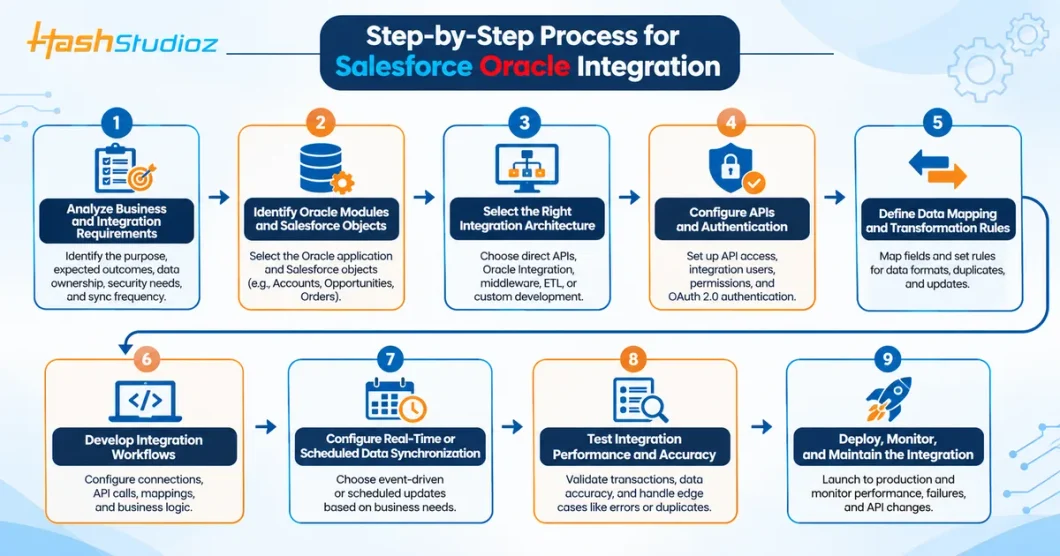
Step-by-Step Process for Salesforce Oracle Integration
A structured implementation process helps align the technical architecture with business requirements.
Nine essential steps for successful Salesforce and Oracle integration
Step 1: Analyze Business and Integration Requirements
Identify the business processes that need to be connected. Define the purpose, expected outcomes, data ownership, security requirements, and synchronization frequency.
Step 2: Identify Oracle Modules and Salesforce Objects
Select the Oracle application and the Salesforce objects involved. For example, an ERP integration may involve Salesforce Accounts, Opportunities, and Orders alongside Oracle customer and financial resources.
Step 3: Select the Right Integration Architecture
Choose direct API communication, Oracle Integration, another middleware platform, ETL, or custom development based on the required workflow and supported interfaces.
Step 4: Configure APIs and Authentication
Set up the required API access, integration users, permissions, credentials, and authentication flows.
Salesforce REST API supports OAuth 2.0 authorization through external client apps or existing connected apps. Oracle authentication requirements depend on the product and service being accessed.
Step 5: Define Data Mapping and Transformation Rules
Map source fields to destination fields and define how differences in formats, identifiers, and business values will be handled. Also establish rules for duplicate records, missing fields, and conflicting updates.
Step 6: Develop Integration Workflows
Configure connections, API calls, mappings, and business logic. If using Oracle Integration 3, this includes configuring the relevant adapters and integration endpoints.
Step 7: Configure Real-Time or Scheduled Data Synchronization
Select the synchronization approach for each data flow. Event-driven processes may suit updates that need prompt handling, while scheduled jobs may be more appropriate for periodic or bulk transfers.
Step 8: Test Integration Performance and Data Accuracy
Test successful transactions, invalid data, authentication failures, duplicate records, API limits, and interrupted connections. Verify that the destination records match the intended source information.
Step 9: Deploy, Monitor, and Maintain the Integration
Deploy the integration to the production environment and monitor execution, failures, and processing volumes. Review API changes, security requirements, and business rules regularly to keep the connection reliable.
Common Use Cases of Salesforce Oracle Integration
1. Salesforce and Oracle ERP Integration
Transfer approved customer, sales, and order information between Salesforce and Oracle ERP. Oracle can process the relevant financial or operational transactions and return selected status information.
2. Salesforce and Oracle Financials Integration
Exchange customer account and transaction information with Oracle Financials. For example, a configured workflow can send relevant data for invoice creation and return invoice status to Salesforce.
3. Salesforce and Oracle HCM Integration
Share approved employee or organizational information between Salesforce and Oracle HCM. Access should be limited to the fields and users required for the business process.
4. Salesforce and Oracle SCM Integration
Connect sales-related information with inventory and supply chain records. A Salesforce application, for example, can retrieve available inventory quantities from Oracle SCM.
5. Salesforce and Oracle CX Integration
Synchronize selected account, lead, opportunity, or service-related information when both CRM environments are used. Record ownership and duplicate-management rules are essential.
6. Salesforce and Oracle Database Integration
Make selected database information available to Salesforce through approved APIs, ORDS, or an integration platform. This can support access to product, customer, or operational data without assuming direct database connectivity.
Common Challenges in Salesforce Oracle Integration
Integration projects can face technical and operational difficulties, including:
Different data structures: Salesforce and Oracle may represent similar business information differently, requiring careful mapping.
Authentication and permissions: Incorrect credentials, roles, or API permissions can prevent requests from succeeding.
Data duplication: Records created independently in both systems can produce duplicate or conflicting information.
API limits and processing constraints: API quotas, request limits, and application-specific processing rules affect integration design.
Synchronization delays: Scheduled processing, event delivery, or failed requests can delay updates.
Legacy system complexity: Oracle EBS and customized database environments may require additional service configuration or custom development.
Error recovery: Without logging, retry rules, and monitoring, failed transactions may remain unresolved.
Best Practices for Salesforce Oracle Integration
To make the integration maintainable and reliable:
Define a clear system of record for each important data entity.
Use supported APIs and adapters rather than relying on undocumented database access.
Apply least-privilege access and secure credential management.
Establish consistent identifiers and field-mapping rules.
Choose synchronization frequency according to business requirements.
Implement validation, logging, error handling, and controlled retry mechanisms.
Test bulk operations and API limits before production deployment.
Monitor integration activity and review failures regularly.
Document data flows, dependencies, and ownership rules.
Reassess the integration when Salesforce or Oracle applications are upgraded or customized.
There is no single cost for every Salesforce–Oracle integration project. The estimate depends on the systems involved and the scope of implementation.
Important cost factors include:
Number of applications: Connecting Salesforce with one Oracle application differs from integrating several Oracle modules.
Integration architecture: API-based, middleware-based, and custom approaches have different development and platform requirements.
Data complexity: Extensive mapping, transformation, deduplication, and migration increase implementation effort.
Synchronization requirements: Event-driven and high-volume workflows may require additional design and infrastructure.
Security requirements: Authentication, access controls, and compliance requirements affect configuration and testing.
Customization: Custom objects, business rules, and legacy interfaces may require additional development.
Testing and maintenance: Validation, monitoring, upgrades, and ongoing support contribute to the overall project cost.
A reliable estimate should follow a technical assessment of the applications, interfaces, data flows, and business requirements.
Conclusion
Salesforce Oracle Integration connects customer-facing CRM activities with enterprise applications responsible for finance, HR, supply chain, customer experience, and database operations.
Businesses can use APIs, middleware, Oracle Integration, ETL processes, or custom development depending on their requirements. Successful implementation depends on selecting supported interfaces, defining clear data ownership, configuring secure access, and testing synchronization workflows.
A carefully planned integration can help teams access relevant information across applications while reducing manual transfers and improving coordination between business functions.
FAQs
1. What is Salesforce Oracle Integration?
It is the process of connecting Salesforce with Oracle applications to exchange business information through APIs, middleware, integration platforms, or custom workflows.
2. Can Salesforce integrate with Oracle ERP Cloud?
Yes. Salesforce can exchange information with Oracle Fusion Cloud ERP through supported APIs or an integration platform such as Oracle Integration 3. The required workflows and mappings must be configured.
3. Can Salesforce integrate with Oracle E-Business Suite?
Yes. Oracle EBS supports integration through its Integrated SOA Gateway, which can expose supported interfaces as REST or SOAP services. These services can then be connected to Salesforce through middleware or custom integration components.
4. Does Salesforce Oracle Integration support real-time data synchronization?
It can support event-driven or near-real-time workflows where the relevant APIs, events, and integration architecture allow them. Other processes may use scheduled synchronization.
Harshita Rawat is a digital marketing and SEO professional specializing in SEO content, Salesforce, CRM, and technology topics. She writes practical, research-driven content to help businesses understand emerging technologies and digital strategies.