


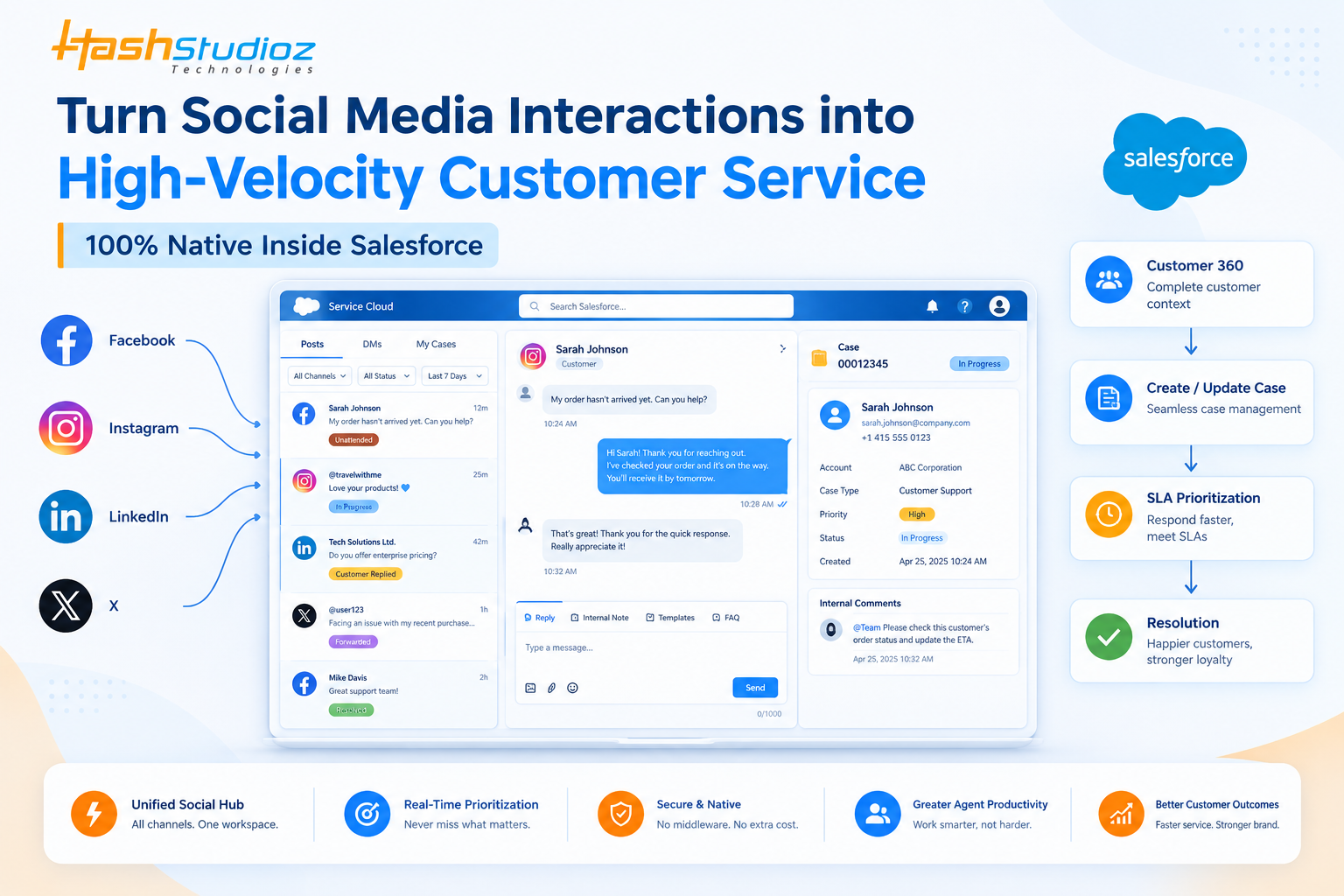
Our Social Media Console is an enterprise-grade, 100% Salesforce-native customer service and social engagement solution designed to help organizations manage customer interactions across major social media platforms directly within the Salesforce Service Cloud.
The solution integrates Facebook, Instagram, LinkedIn, and X (formerly Twitter) into a unified Salesforce Lightning workspace. Customer service teams can manage public posts, comments, mentions, and private direct messages (DMs) from a centralized three-pane interface.
By connecting social engagement with CRM and Case management, organizations can maintain better customer context, improve response efficiency, and manage social interactions through established Salesforce service processes.
Table of Contents
Customer Challenges and Solutions
| Current Challenge | How the Solution Addresses It |
| Tab Overload and Context Switching | Customer service agents often work across separate applications for Facebook, Instagram, LinkedIn, and X. A unified inbox brings all supported platforms into a single Salesforce workspace. |
| Disconnected Social Interactions | Social conversations can be connected with Salesforce Contacts, Accounts, and Cases, providing a more complete view of the customer relationship and service history. |
| SLA Risks and Delayed Responses | Real-time audio alerts, unread indicators, and visual prioritization help agents identify urgent interactions and respond more quickly. |
| Security and Credential Risks | Secure authentication and Salesforce-based access controls reduce the need for agents to access or share corporate social media credentials. |
| Lost Multimedia in Direct Messages | Images and screenshots shared by customers can be displayed directly within the conversation interface and associated with the relevant Case. |
Core Features and Capabilities
1. Unified 4-in-1 Social Hub
The platform consolidates interactions from four major social channels into a single Salesforce-based workspace.
Facebook and Instagram
- Real-time webhook support for feed posts and customer interactions.
- Management of nested comments and conversations.
- Support for private Messenger and Instagram DMs.
- Centralized monitoring of customer engagement.
- Monitoring of company page updates.
- Management of threaded customer comments.
- Support for direct organization-to-user messaging where available.
X (Formerly Twitter)
- Monitoring of public brand mentions and replies.
- Management of private direct messages.
- Support for multiple brand handles and associated accounts.
- Real-time webhook events and background synchronization.
2. High-Velocity 3-Pane Workspace
Built using Salesforce Lightning Web Components (LWC), the workspace provides a structured interface for managing social interactions and Cases.
Pane 1 – Unified Feed and Filters
Agents can filter interactions based on:
- Social media channel
- Status
- Priority
- Time range
- Assigned Cases
Agents can also switch between public Posts, private DMs, and My Cases.
Pane 2 – Thread and Chat Workspace
For public posts, agents can:
- View the original post.
- Review complete comment threads.
- Respond directly to customers.
- Use predefined FAQ and quick-response templates.
- Use emojis where appropriate.
- Monitor character limits.
For direct messages, agents can:
- View incoming and outgoing messages through a modern conversational interface.
- Preview supported images within the chat.
- Maintain complete conversation context.
- Follow applicable platform messaging policies, including the relevant Meta messaging window.
Pane 3 – Case Classification and Collaboration
Agents can manage Salesforce Case information directly from the workspace, including:
- Case Status
- Case Type
- Case Priority
An Internal Comments feed also enables internal teams to share notes, coordinate activities, and collaborate on customer issues.
3 Automated Visual SLA Color Engine
The visual status framework helps service teams identify the current state of each interaction and prioritize their workload effectively.
- Brown – Unattended: New comments or DMs awaiting the first agent response.
- Blue – In Progress: An interaction that has been assigned to an agent and is currently being handled.
- Yellow – Customer Replied: The customer has responded and the interaction requires immediate attention. Audio alerts and priority positioning help prevent these conversations from being overlooked.
- Violet – Forwarded: The interaction has been escalated to a specialized department such as Refunds, Baggage, Legal, or another internal team.
- Green – Resolved: The customer interaction has been successfully addressed and closed.
This visual prioritization approach helps teams manage high-volume social interactions more consistently while reducing the risk of important conversations being overlooked.
4 One-Click Comment-to-Case Conversion
Agents can convert an individual customer comment or public complaint into a dedicated Salesforce Case with a single action.
Relevant information, including the customer identity, timestamp, message, and available conversation history, can be associated with the Case.
This allows teams to move from social engagement to structured Case management while preserving the context of the original customer interaction.
Key Differentiator: Salesforce-Native Architecture
100% Salesforce Native. Zero Middleware. Zero Additional Hosting Layer.
Unlike traditional social media management approaches that require separate platforms or middleware, this solution brings social customer service directly into the Salesforce environment.
1. No External Data Middleware
Customer interactions and related service information can be managed within the organization’s Salesforce environment, reducing dependence on additional middleware or external data-storage platforms.
This architecture can simplify integration management while providing a centralized environment for customer service operations.
2. Lower Total Cost of Ownership
Organizations can manage social customer service activities within their existing Salesforce service environment rather than maintaining separate platforms for social engagement and Case management.
This can help reduce technology complexity and the operational costs associated with managing multiple customer service systems.
3. Enterprise-Grade Brand Protection
Agents can respond through authorized corporate social accounts without requiring direct access to corporate social media passwords or personal accounts.
Salesforce profiles and secure authentication mechanisms help organizations maintain appropriate access controls while protecting corporate social identities.
Business Value and Measurable ROI
1. Faster First Response Time
Visual prioritization, real-time alerts, and centralized conversations can help agents identify new and urgent interactions more quickly, supporting improvements in First Response Time (FRT).
2. Increased Agent Productivity
The three-pane workspace reduces the need to move between multiple social applications and Salesforce. Agents can review customer interactions, respond to conversations, and update Cases from a single interface.
3. Stronger Brand and Reputation Protection
Centralized monitoring and escalation capabilities help service teams identify complaints, negative feedback, and high-priority customer interactions before they develop into larger service or reputational issues.
4. Seamless Omnichannel Customer Experience
Customers can continue communicating through their preferred social platforms, while service teams manage these interactions within Salesforce. This supports a consistent customer experience while allowing organizations to maintain their existing CRM and service processes.
Conclusion
Our Social Media Console brings social customer engagement directly into Salesforce Service Cloud, enabling organizations to manage Facebook, Instagram, LinkedIn, and X interactions through a unified Salesforce-native workspace.
By bringing together social conversations, customer information, Case management, prioritization, and internal collaboration, the solution helps organizations reduce operational complexity and improve customer service efficiency.
For enterprises looking to integrate social engagement with their Salesforce service operations, the solution provides a centralized approach designed to support faster response times, improved agent productivity, stronger customer context, and a consistent omnichannel service experience.