


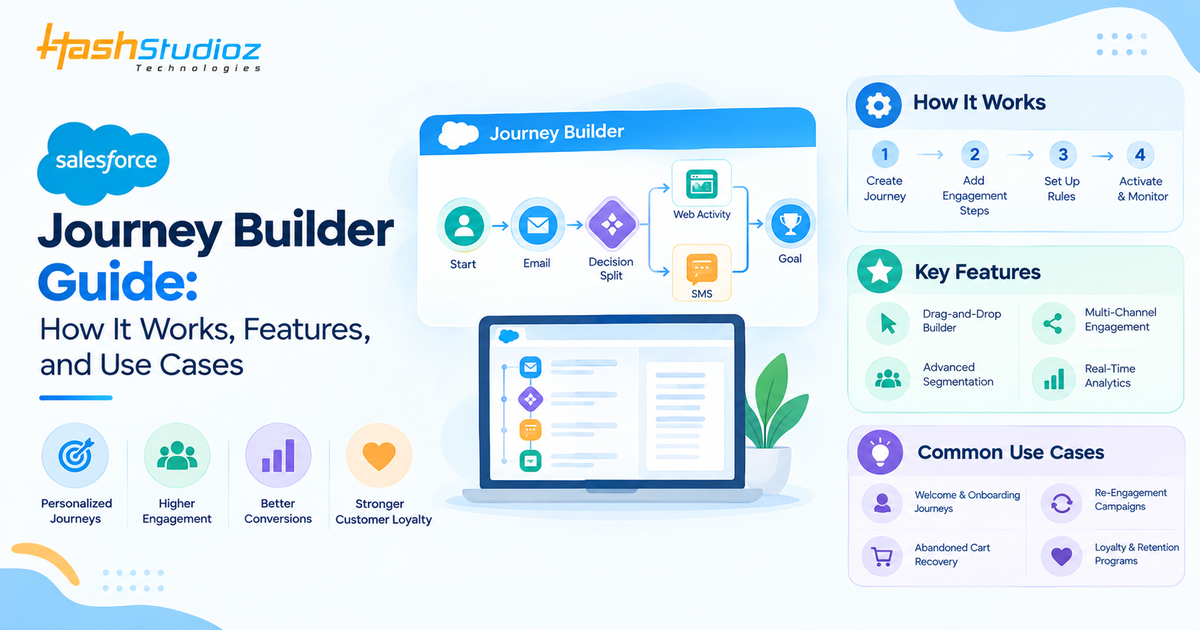
Modern customers interact with brands across multiple channels and expect businesses to understand their preferences, behavior, and previous interactions. Sending the same message to every customer is no longer enough.
Salesforce Journey Builder helps businesses create automated customer journeys based on customer data, behavior, and interactions. Instead of treating every campaign as a separate communication, marketers can design connected journeys that respond to where a customer is in their relationship with the brand. From onboarding and lead nurturing to abandoned-cart recovery and customer retention, Journey Builder can help businesses automate relevant interactions while creating more personalized experiences.
In this guide, we’ll explore what Salesforce Journey Builder is, how it works, its key features, practical use cases, benefits, implementation considerations, and best practices.
Table of Contents
What Is Salesforce Journey Builder?
Salesforce Journey Builder is a customer journey automation capability within the Salesforce Marketing Cloud that allows marketers to design, automate, and manage customer interactions across different stages of the customer lifecycle.
Rather than sending one-time campaigns, marketers can create a sequence of interactions triggered by customer information or behavior.
For example, an e-commerce business could create a journey where:
Customer signs up → receives a welcome email → browses products → receives a personalized recommendation → makes a purchase → receives a post-purchase message.
Each step can be connected through rules, timing, customer data, and engagement activities.
Journey Builder can therefore help marketers move from isolated campaigns toward more connected and personalized customer experiences.
How Does Salesforce Journey Builder Work?
Journey Builder works by combining customer data, entry events, activities, decision logic, and automation into a defined customer journey.
1. Identify the Target Audience
The first step is determining which customers should enter the journey.
Businesses can segment audiences based on information such as:
- Customer profile
- Purchase history
- Location
- Engagement
- Subscription status
- Lead status
- Previous interactions
- Website or application behavior
Accurate segmentation helps ensure customers receive messages that are relevant to their situation.
2. Choose a Journey Entry Source
A journey needs an event or data source that determines when a customer enters it.
Depending on the business process, customers may enter a journey based on a specific event, data record, or defined audience.
For example, a business could create a journey for customers who have recently registered for an account.
3. Build the Journey Path
Once the audience and entry point are defined, marketers can create the sequence of customer interactions.
A journey can include:
- Email messages
- Wait periods
- Decision splits
- Customer updates
- Engagement activities
- Other supported marketing activities
This allows marketers to create different paths based on customer behavior.
4. Add Decision Logic
Not every customer responds in the same way.
Journey Builder can use decision logic to create different paths based on customer information or interactions.
For example:
Email opened → Continue nurture journey
Email not opened → Send another message
This makes the journey more responsive than a fixed campaign sequence.
5. Monitor and Optimize
After launching a journey, marketers can monitor customer engagement and evaluate whether the journey is achieving its intended goal.
Performance data can help identify areas where customers drop out, fail to engage, or respond particularly well.
Key Features of Salesforce Journey Builder:
Journey Builder provides capabilities that support automated and personalized customer engagement.
1. Customer Journey Automation
One of the primary capabilities is the ability to automate customer interactions based on predefined conditions and events.
Instead of manually deciding when every customer should receive a communication, marketers can build the journey once and allow automation to manage appropriate interactions.
2. Customer Segmentation
Effective personalization starts with the right audience.
Journey Builder can work with customer data to help businesses create targeted journeys for different groups.
For example, a retailer could create separate journeys for:
- New customers
- Repeat customers
- High-value customers
- Inactive customers
- Customers who abandoned a cart
This allows communication to be aligned with customer needs rather than sending identical campaigns to everyone.
3. Personalized Customer Experiences
Personalization allows businesses to use relevant customer information within their marketing interactions.
Messages can be tailored based on factors such as customer profile, preferences, previous purchases, or engagement.
For example, a customer who previously purchased running shoes could receive content related to running accessories rather than generic promotional messaging.
4. Multi-Channel Engagement
Customer journeys aren’t limited to a single communication format.
Depending on the Salesforce Marketing Cloud products and configuration being used, businesses can coordinate customer interactions across channels such as email, mobile, messaging, and other supported touchpoints.
This can help create a more consistent customer experience across the customer lifecycle.
5. Decision Splits
Decision splits allow marketers to create different paths for customers based on defined criteria.
For example:
Customer purchased → Send confirmation and post-purchase content
Customer did not purchase → Continue promotional journey
This makes automated journeys more flexible and responsive.
6. Journey Analytics
Monitoring customer engagement is important for improving journey performance.
Marketers can evaluate engagement and identify opportunities to improve:
- Message timing
- Content
- Audience segmentation
- Journey paths
- Conversion opportunities
The goal isn’t simply to automate communication but to continuously improve the customer experience.
Salesforce Journey Builder Use Cases
Journey Builder can support multiple stages of the customer lifecycle.
1. Customer Welcome and Onboarding
When a customer signs up, businesses can automatically initiate a welcome journey.
A typical sequence might include:
Welcome message → Product education → Helpful resources → Follow-up communication
This gives new customers useful information without requiring marketers to manually manage each interaction.
2. Lead Nurturing
Not every lead is ready to make a purchase immediately.
Businesses can use Journey Builder to develop lead-nurturing journeys that provide relevant content over time.
For example:
New lead → Educational content → Product information → Engagement check → Sales follow-up
This can help businesses maintain communication with prospects until they become more sales-ready.
3. Abandoned Cart Recovery
E-commerce businesses can use customer behavior to create abandoned-cart journeys.
For example:
Product added to cart → No purchase → Reminder → Product recommendation → Follow-up offer
The timing and messaging can be adjusted based on the business’s customer engagement strategy.
4. Post-Purchase Engagement
The customer journey doesn’t end after a transaction.
Businesses can create post-purchase journeys that provide:
- Order-related communication
- Product education
- Usage recommendations
- Review requests
- Cross-sell opportunities
- Customer support information
This can help turn a one-time transaction into an ongoing customer relationship.
5. Customer Re-Engagement
Customers who haven’t interacted with a business for a specific period can be placed into re-engagement journeys.
For example:
Inactive customer → Reminder → Personalized content → Special offer → Final re-engagement message
Businesses can use engagement behavior to determine which customers should continue receiving communications.
6. Customer Retention
Journey Builder can also support retention strategies.
Businesses can create journeys based on customer behavior, purchase frequency, engagement, or other signals to identify opportunities for proactive engagement.
For example, a subscription business could create a journey for customers approaching renewal.
Salesforce Journey Builder vs Traditional Email Campaigns
Traditional email campaigns typically involve sending a specific message to a defined audience at a particular time.
Journey Builder takes a broader approach.
| Factor | Traditional Email Campaign | Journey Builder |
| Communication | Individual campaigns | Connected journey |
| Personalization | Usually segment-based | Can respond to customer data and behavior |
| Automation | Limited or campaign-specific | Journey-based automation |
| Decision logic | Limited | Multiple journey paths |
| Customer lifecycle | Often isolated | Can span multiple stages |
| Optimization | Campaign-focused | Journey-focused |
The main difference is that Journey Builder allows businesses to think about the complete customer experience rather than a single marketing message.
What Are the Benefits of Salesforce Journey Builder?
More Personalized Engagement
Businesses can create journeys based on customer profiles, behavior, preferences, and lifecycle stages. This helps marketers deliver more relevant messages to individual customers.
Reduced Manual Marketing Work
Automated journeys reduce repetitive campaign management and manual follow-ups. Marketing teams can focus more on strategy, content, and campaign performance.
Better Customer Experience
Customers receive communication that matches their current stage and interactions with the business. This creates a more relevant and timely customer experience.
Consistent Customer Communication
Journey Builder helps coordinate communication across different customer touchpoints. This ensures customers receive consistent and connected messages throughout their journey.
Better Marketing Efficiency
Marketing teams can automate recurring customer interactions and follow-ups. This allows them to manage larger audiences while reducing manual marketing tasks.
Improved Journey Optimization
Performance data helps marketers identify ineffective messages and touchpoints. Teams can use these insights to improve journey timing, content, and customer engagement.
How Journey Builder Connects With Salesforce Marketing Cloud?
Journey Builder does not operate in isolation. Its effectiveness depends heavily on the quality and availability of customer data. It can work alongside other Marketing Cloud capabilities, including:
Data Extensions
Data Extensions can store customer and campaign-related information that can support segmentation and journey activities.
Email Studio
Email Studio can support email-based communication within broader customer journeys.
Mobile and Messaging Capabilities
Businesses can coordinate supported mobile and messaging interactions as part of their customer engagement strategy.
Automation Studio
Automation Studio can support data preparation and recurring automation processes that complement journey-based marketing.
Salesforce CRM Data
Connecting Marketing Cloud with Salesforce CRM can help businesses use relevant customer and sales information within their broader marketing strategy.
How to Build a Salesforce Journey Builder Journey?
Creating a successful journey requires more than arranging marketing activities on a canvas.
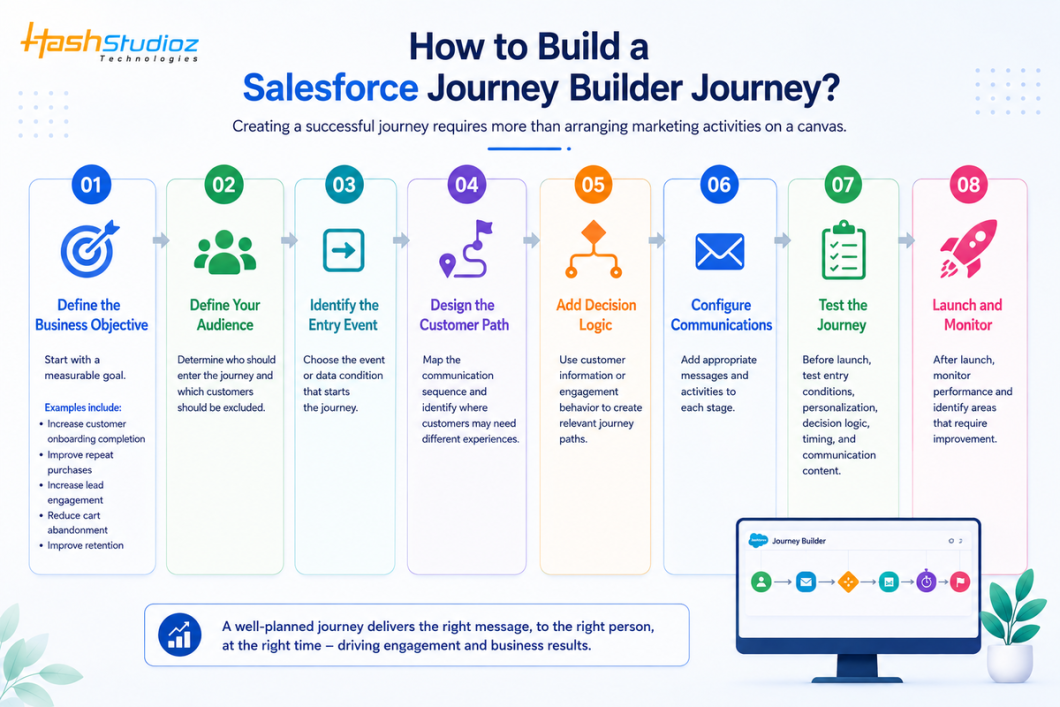
Step 1: Define the Business Objective
Before creating a journey, clearly identify what you want to achieve. The objective should be specific and measurable so you can evaluate the journey’s success after launch.
For example, instead of creating a journey to “engage customers,” define a measurable goal such as increasing onboarding completion by 15%.
Common Journey Builder objectives include:
- Increase customer onboarding completion: Guide new customers through registration, setup, or product adoption.
- Improve repeat purchases: Send personalized offers and product recommendations based on previous purchases.
- Increase lead engagement: Nurture prospects through emails, reminders, educational content, and relevant offers.
- Reduce cart abandonment: Remind customers about abandoned products and encourage them to complete their purchases.
- Improve customer retention: Identify customers showing reduced engagement and send targeted retention campaigns.
A clear objective also helps determine the right audience, entry criteria, activities, timing, and KPIs.
Step 2: Define Your Audience
he next step is determining who should enter the journey.
Salesforce Journey Builder can use customer data from sources such as Data Extensions and other connected Salesforce data sources. Your audience definition should include both eligible customers and customers who should be excluded.
For example, suppose you are creating a customer onboarding journey.
Your audience might include:
- Customers who recently created an account
- Customers with a valid email address
- Customers who have not completed onboarding
You may want to exclude:
- Customers who already completed onboarding
- Customers who have opted out of marketing communications
- Customers with invalid contact information
- Customers already participating in another onboarding campaign
Example
A simple audience rule could be:
Enter: Customers whose account was created within the last 24 hours.
Exclude: Customers whose onboarding status is already “Completed.”
Defining the audience correctly prevents irrelevant messages and reduces the risk of sending duplicate communications.
Step 3: Identify the Entry Event
The entry event determines how a customer enters your journey.
The entry source should match the business objective and the customer behavior you want to respond to.
Common entry scenarios include:
- New customer registration
- Product purchase
- Form submission
- Lead creation
- Abandoned cart
- Loyalty program enrollment
- Specific customer data changes
- Scheduled audience entry
Example: New Customer Journey
Suppose a customer creates an account on your website.
The account creation event can trigger the journey:
Customer registers → Customer enters Journey Builder → Welcome email is sent
You should also define rules around entry frequency.
For example, you may not want the same customer to enter a welcome journey every time their customer record is updated.
The entry configuration should therefore be tested carefully before activation.
Step 4: Design the Customer Path
Once the entry event is defined, design the customer’s journey from beginning to end.
Think about what the customer should experience after entering the journey.
For example:
Entry → Welcome Email → Wait 2 Days → Product Education Email → Wait 3 Days → Engagement Check → Personalized Message
The customer path should reflect the actual customer lifecycle rather than simply the order in which marketing messages are available.
Consider:
- What should the customer receive first?
- How much time should pass between communications?
- What action should the customer take?
- What happens if they engage?
- What happens if they do not engage?
- When should the journey end?
Example
For an onboarding journey:
Day 1: Welcome email
Day 3: Getting-started guide
Day 6: Product tips
Day 10: Engagement check
Day 12: Personalized follow-up
This creates a structured experience rather than sending several messages at once.
Step 5: Add Decision Logic
Not every customer behaves in the same way. Decision logic allows Journey Builder to create different paths based on customer information or behavior.
For example, customers who purchase a product should not receive the same message as customers who have not purchased.
You can create paths based on factors such as:
- Purchase history
- Customer type
- Location
- Loyalty status
- Product ownership
- Email engagement
- Website behavior
- Customer lifecycle stage
Example
Suppose a customer receives an email promoting a product.
You could create different paths:
Email sent → Did customer purchase?
Yes → Send thank-you message → Recommend complementary products
No → Wait 3 days → Send reminder → Provide additional product information
This type of decision logic makes the journey more responsive to customer behavior.
Step 6: Configure Communications
After designing the customer paths, add the appropriate communication activities.
Different stages of the journey may require different types of communication.
Examples include:
- Welcome emails
- Promotional emails
- Educational content
- Product recommendations
- Event reminders
- Customer notifications
- SMS messages
- Push notifications
The communication should match the customer’s position in the journey.
Example
For a new customer:
Stage 1: Welcome message
Stage 2: Product introduction
Stage 3: Educational content
Stage 4: Personalized recommendation
Stage 5: Follow-up communication
Personalization can also improve relevance.
For example:
Hello John, welcome to our platform.
Instead of sending the same generic message to every customer, customer data can be used to personalize the communication.
You should also verify that the appropriate consent and communication preferences are respected before sending messages.
Step 7: Test the Journey
Testing is one of the most important stages before activating the journey.
A journey can appear correct on the canvas while still containing problems with data, timing, personalization, or decision logic.
Test the following areas:
Entry Conditions
Verify that the correct customers enter the journey.
Personalization
Check that customer names, products, account information, and other dynamic values display correctly.
Decision Logic
Test different customer scenarios.
For example:
- Customer purchased
- Customer did not purchase
- Customer opened the email
- Customer did not open the email
Each scenario should reach the intended path.
Timing
Check wait periods and communication timing.
For example:
Email → Wait 3 Days → Decision Split
Make sure the next activity occurs at the expected time.
Communication Content
Check:
- Subject lines
- Links
- Images
- Personalization
- Mobile responsiveness
- Call-to-action buttons
- Spelling and grammar
A controlled test audience can help identify problems before the journey reaches real customers.
Step 8: Launch and Monitor
After testing is complete, activate the journey according to your campaign plan.
However, launching the journey is not the end of the process. You should continuously monitor its performance.
Important metrics can include:
- Number of contacts entering the journey
- Email delivery rate
- Open rate
- Click-through rate
- Conversion rate
- Unsubscribe rate
- Purchase rate
- Engagement by journey path
- Goal completion rate
Example
Suppose 10,000 customers enter an onboarding journey.
After several days, you discover:
- 9,700 emails were delivered
- 5,500 customers opened the first email
- 2,100 clicked the onboarding link
- 1,400 completed onboarding
This information helps you determine where customers are dropping out.
You might then improve the journey by changing the email content, timing, segmentation, or decision logic.
10 Zendesk Alternatives for 2026: Find the Right Customer Support Platform for Your Business
Salesforce Journey Builder Best Practices
Start With the Customer Journey
Don’t begin by choosing emails or activities. First understand what the customer needs at each stage.
Keep Journey Logic Manageable
Overly complicated journeys can become difficult to maintain and troubleshoot. Build clear paths wherever possible.
Maintain Clean Customer Data
Personalization and segmentation depend on reliable customer information. Poor-quality data can result in irrelevant communication.
Use Personalization Carefully
Personalization should provide value rather than simply inserting a customer’s name into an email.
Set Contact Rules
Businesses should establish appropriate communication frequency to avoid overwhelming customers.
Test Before Launch
Test different customer paths and edge cases before activating the journey.
Continuously Optimize
Customer behavior changes over time. Review journey performance and update content, timing, segmentation, and decision logic when needed.
Common Salesforce Journey Builder Challenges
Complex Journey Design
Large organizations may have multiple customer segments, products, regions, and communication rules that make journey design complicated.
Data Quality Issues
Incomplete or outdated customer data can affect segmentation and personalization.
Integration Requirements
Businesses may need to connect Marketing Cloud with CRM, e-commerce, ERP, or other systems to create more complete customer journeys.
Poor Segmentation
If the wrong customers enter a journey, even well-designed content may produce poor results.
Over-Automation
Automating every customer interaction can make communication feel repetitive or irrelevant. Automation should support customer needs rather than replace thoughtful journey design.
Conclusion
Salesforce Journey Builder provides businesses with a structured way to design and automate customer journeys across different stages of the customer lifecycle.
Its value goes beyond sending automated emails. Businesses can use journey logic, customer data, segmentation, personalization, and supported communication channels to create more connected customer experiences.
For organizations already using the Salesforce Marketing Cloud, Journey Builder can provide a powerful foundation for building personalized and automated customer journeys that scale with business needs.
If you need help planning or implementing Salesforce Marketing Cloud Journey Builder, HashStudioz can help align your journey automation strategy with your customer engagement and business goals.
FAQs
1. What is Salesforce Journey Builder used for?
Salesforce Journey Builder is used to create and automate personalized customer journeys based on customer data, behavior, and interactions across supported marketing channels.
2. What are the main features of Salesforce Journey Builder?
Key features include journey automation, customer segmentation, personalization, decision splits, multi-channel engagement, customer data integration, and journey performance tracking.
3. What is the difference between Journey Builder and Automation Studio?
Journey Builder focuses on designing and automating customer journeys, while Automation Studio is primarily used for data management, scheduled processes, and marketing automation workflows.
4. Can Salesforce Journey Builder integrate with Salesforce CRM?
Yes. Journey Builder can work with Salesforce CRM data and other Marketing Cloud capabilities, helping businesses use relevant customer information to create more connected marketing journeys.
5. What are common Salesforce Journey Builder use cases?
Common use cases include customer onboarding, lead nurturing, abandoned-cart recovery, post-purchase engagement, customer re-engagement, and retention campaigns.