



Salesforce is a powerful platform-but as your business grows, your org can become cluttered, slow, and inefficient if not properly maintained. What starts as a streamlined CRM can gradually turn into a complex system filled with unused data, redundant automations, and performance bottlenecks.
If you’re noticing inefficiencies or a drop in productivity, it might be time to optimize your Salesforce environment. Here are seven critical red flags that signal your Salesforce org needs immediate attention.
Table of Contents
Why Salesforce Optimization Matters?
Salesforce plays a central role in managing customer relationships, sales pipelines, and business operations, but its effectiveness depends on how well it is maintained and optimized. Over time, as data grows and processes evolve, the system can become slow, cluttered, and inefficient if not regularly reviewed. Optimization ensures that Salesforce continues to deliver accurate insights, fast performance, and a seamless user experience.
A well-optimized Salesforce org directly impacts productivity by enabling teams to work faster and make informed decisions based on reliable data. Clean data, streamlined automations, and efficient reporting allow businesses to respond quickly to opportunities and challenges. In contrast, a poorly optimized system can lead to delays, errors, and missed opportunities, ultimately affecting revenue and customer satisfaction.
Moreover, optimization plays a key role in user adoption. When the platform is easy to use and aligned with business workflows, employees are more likely to use it consistently. This leads to better data quality, improved collaboration, and higher return on investment. Regular Salesforce optimization remains a valuable and scalable asset as your business grows.
Key Red Flags at a Glance:
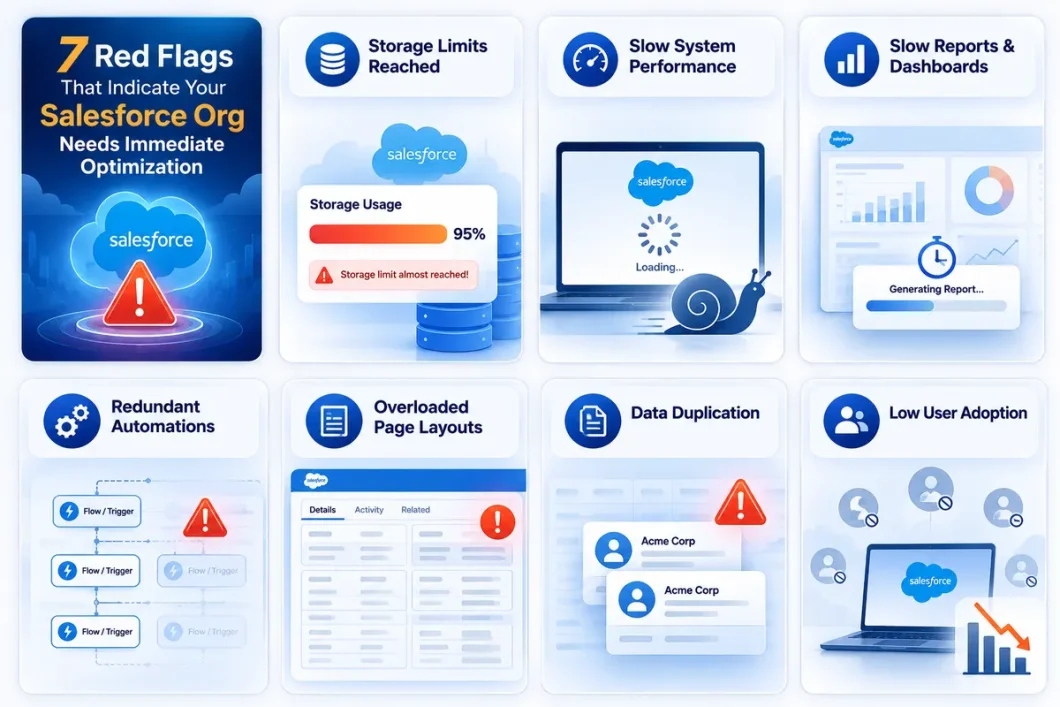
1. Slow System Performance
When your Salesforce org starts taking longer than usual to load pages, generate reports, or execute actions, it signals deeper performance issues within the system. This slowdown is often caused by a combination of factors such as large volumes of unarchived data, inefficient SOQL queries, excessive or poorly designed automations (Flows, Process Builder, Apex), and heavily customised or cluttered page layouts.
As data grows over time without proper management, queries take longer to fetch results, and reports become more resource-intensive. Similarly, multiple background automations running simultaneously can create processing delays or even conflicts. Complex page layouts with numerous fields, related lists, or components can significantly increase load times, particularly for users with slower internet connections.
To resolve this, businesses should regularly archive old data, optimize queries and reports, reduce unnecessary automations, and simplify page layouts. Proactive monitoring and periodic performance assessments are key to maintaining a fast and efficient Salesforce environment.
Over time, excessive data, complex automations, and heavy customisations can slow down your system. If not addressed, this can lead to reduced adoption and operational inefficiencies.
2. Data Duplication and Poor Data Quality
Occurs when multiple records exist for the same customer or when information is incomplete, inconsistent, or outdated. This typically happens due to manual data entry errors, a lack of validation rules, or improper system integrations that allow duplicate or incorrect data to enter the system.
These issues create confusion across teams, as users may not know which record is accurate. Sales and marketing efforts can become inefficient-teams might contact the same customer multiple times or target the wrong audience. Additionally, inaccurate data leads to unreliable reports and dashboards, ultimately affecting business decisions and forecasting.
Over time, poor data quality reduces trust in Salesforce, causing users to rely on external tools or manual processes. To fix this, organisations should implement duplicate management rules, enforce validation checks, and conduct regular data cleansing. Maintaining clean and accurate data is essential for better performance, reliable insights, and overall system efficiency.
3. Overloaded Page Layouts
When Salesforce record pages are filled with too many fields, sections, related lists, and components, the interface becomes cluttered and difficult to navigate. This usually happens over time as new requirements are added without removing outdated or unused elements.
As a result, users struggle to find relevant information quickly, which slows down their workflow and reduces overall efficiency. Additionally, heavier page layouts increase load times, especially when multiple components and dynamic elements are present, impacting system performance.
To improve this, it’s important to simplify layouts by removing unnecessary fields, organising content logically, and using dynamic or role-based views. A cleaner interface enhances user experience, speeds up daily tasks, and supports better Salesforce adoption.
4. Inefficient or Redundant Automations
Multiple workflows, flows, or processes are created to perform similar or overlapping tasks, and the system becomes unnecessarily complex and harder to manage. This often happens as new automations are added over time without reviewing or consolidating existing ones.
As a result, these automations can conflict with each other, cause delays in processing, or even trigger errors. It also increases system load, which can slow down overall performance and make troubleshooting more difficult for admins.
To address this, it’s important to regularly audit and consolidate automations, eliminate duplicates, and ensure each process has a clear purpose. Streamlining automation improves efficiency, reduces system strain, and ensures smoother operations within Salesforce.
5. Reports and Dashboards Take Too Long to Load
If generating reports and dashboards takes a long time to load, it usually indicates inefficiencies in how data is structured or queried. This often happens when reports pull large volumes of data, include too many fields, or use complex filters without proper optimisation.
As a result, users experience delays in accessing insights, which slows down decision-making and reduces productivity. In some cases, reports may even time out or fail to load, making it difficult for teams to rely on real-time data.
To improve performance, it’s important to optimize report filters, limit unnecessary fields, use indexed data where possible, and archive old or unused records. Streamlined reports and dashboards ensure faster insights and a more efficient Salesforce experience.
6. Storage Limits Are Nearing Capacity
Running out of storage usually means that large volumes of data and files have accumulated over time without proper cleanup or archiving. This includes old records, attachments, emails, and unused data that continue to occupy valuable space.
As storage fills up, it can lead to increased costs, restricted ability to add new data, and even performance issues in some cases. Teams may also face limitations in uploading files or creating new records, which can disrupt daily operations.
To manage this, it’s important to regularly monitor storage usage, delete or archive outdated data, and optimize file storage practices. Effective storage management helps control costs, maintain system performance, and ensure smooth business operations.
7. Low User Adoption
When users are not actively using Salesforce or rely on external tools instead, it indicates a gap between the system and their daily needs. This often happens due to a complex interface, slow performance, lack of proper training, or processes that don’t align with real workflows.
As a result, data becomes incomplete or inconsistent, reducing the reliability of reports and insights. It also lowers the overall return on investment, as the platform is not being used to its full potential.
To improve adoption, businesses should focus on simplifying the user experience, providing proper training, and aligning the system with actual business processes. A user-friendly and efficient system encourages consistent usage and better outcomes.
| Red Flag | What It Means | Impact on Business | Recommended Action |
| Slow System Performance | Pages and reports take too long to load | Reduced productivity and user frustration | Optimize queries, clean data, review automations |
| Data Duplication | Multiple records for the same customer | Inaccurate reporting and confusion | Implement deduplication tools and validation rules |
| Overloaded Page Layouts | Too many fields and components | Poor user experience and slower load times | Simplify layouts and remove unused fields |
| Redundant Automations | Multiple workflows doing similar tasks | System conflicts and slower processing | Consolidate and optimize automations |
| Slow Reports & Dashboards | Reports take time to generate | Delayed decision-making | Optimize filters, indexing, and data models |
| Storage Limits Reached | Data and files consuming space | Increased costs and system restrictions | Archive old data and manage storage efficiently |
| Low User Adoption | Users avoid Salesforce usage | Reduced ROI and data inconsistency | Improve UX, training, and system performance |
When to Consider a Salesforce Optimization Audit?
A Salesforce optimization audit becomes essential when you start noticing signs that the system is no longer performing as expected. This includes slow system performance, frequent data inconsistencies, low user adoption, or reports that take too long to generate. These issues indicate underlying inefficiencies that require a structured evaluation to identify root causes.
You should also consider an audit when your business undergoes significant changes, such as scaling operations, adding new integrations, or modifying workflows. As complexity increases, so does the risk of redundant processes, data silos, and performance bottlenecks. An audit helps ensure that your Salesforce org remains aligned with your current business needs and goals.
Additionally, if your team is spending more time fixing issues than focusing on strategic tasks, it’s a clear sign that optimization is overdue. A comprehensive audit provides actionable insights, highlights areas for improvement, and helps implement best practices. This proactive approach not only improves system performance but also enhances overall efficiency and long-term business success.
Don’t wait for small issues to turn into major roadblocks!
Investing in optimization now ensures long-term efficiency and success
How to Address These Red Flags?
Identifying these issues is the first step-but resolving them requires a structured approach. A comprehensive Salesforce optimization strategy should include:
- Data cleanup and deduplication
- Performance tuning and query optimization
- Automation review and consolidation
- Storage management and archiving
- User experience improvements
Regular assessments help ensure your Salesforce org remains efficient, scalable, and aligned with business goals.
Conclusion
Ignoring these warning signs can lead to reduced productivity, poor decision-making, and lost revenue opportunities. Salesforce optimization is not a one-time task-it’s an ongoing process that ensures your system continues to support your business effectively.
If you’re experiencing any of these red flags, it’s time to act. A proactive approach to optimization can transform your Salesforce org into a high-performing, scalable, and user-friendly platform that drives growth and success.
FAQs
1. What are the signs that my Salesforce org needs optimization?
Common signs include slow performance, duplicate data, low user adoption, excessive automations, and slow reports or dashboards.
2. How often should Salesforce optimization be done?
It’s recommended to review and optimize your Salesforce org at least once or twice a year, or whenever major changes occur.
3. How does poor data quality affect Salesforce performance?
Poor data quality leads to inaccurate reports, inefficient workflows, and unreliable insights, ultimately impacting decision-making.
4. Can automation impact Salesforce performance?
Yes, too many or poorly designed automations can slow down the system, cause conflicts, and increase processing time.
5. What is included in a Salesforce optimization audit?
An audit typically includes performance analysis, data quality checks, automation review, security assessment, and recommendations for improvement.