


Manufacturers often manage complex networks of distributors, dealers, wholesalers, and business buyers. These partners may need access to different product catalogs, negotiated pricing, inventory information, order histories, and self-service purchasing options. When these processes depend heavily on emails, phone calls, spreadsheets, or disconnected systems, order management can become slow and difficult to scale.
Agentforce Commerce, formerly Salesforce Commerce Cloud, provides manufacturers with a way to create connected B2B commerce experiences for distributors and dealers. Salesforce describes its B2B Commerce capabilities as supporting self-service purchasing, negotiated pricing, customized catalogs, large-volume orders, and connected commerce experiences.
For manufacturers, this means a distributor or dealer portal can become more than an online catalog. It can serve as a digital channel where partners discover products, access account-specific information, place orders, reorder products, and track order status.
Table of Contents
What Is a Distributor and Dealer Portal?
A distributor or dealer portal is a secure digital platform that allows business partners to interact directly with a manufacturer’s products, pricing, inventory, orders, and other business processes.
Instead of contacting a sales representative for every routine transaction, authorized partners can log in and perform many activities themselves.
A typical journey could look like:
Dealer Login → Personalized Catalog → Account Pricing → Product Selection → Bulk Order → Order Tracking → Reorder
This self-service approach can reduce repetitive administrative work while giving distributors and dealers faster access to the information they need.
Why Do Manufacturers Need Digital Partner Portals?
Manufacturers frequently work with different types of business partners, each with different requirements.
For example:
- One distributor may receive volume-based pricing.
- Another dealer may have a specific product catalog.
- A regional partner may require localized products.
- Some buyers may have purchasing limits or approval requirements.
- Large distributors may need bulk-ordering capabilities.
Managing these requirements manually can create operational challenges.
A digital B2B portal can centralize these interactions and provide each partner with a more relevant purchasing experience.
How Agentforce Commerce Supports Manufacturer Portals?
1. Account-Based Experiences
Manufacturers can create commerce experiences around business accounts rather than treating every buyer as an individual consumer.
A distributor or dealer can log in and access information relevant to its business relationship, including products, pricing, and purchasing options.
Salesforce B2B Commerce supports account and buyer entitlements, negotiated pricing, customized catalogs, and personalized experiences for business buyers.
This is particularly useful when manufacturers have hundreds or thousands of partners with different commercial agreements.
2. Personalized Product Catalogs
Manufacturers often have extensive product catalogs, but distributors may not need access to every product.
A portal can present products based on the partner’s account, market, or purchasing relationship.
For example:
Distributor A → Industrial Equipment Catalog
Dealer B → Automotive Parts Catalog
Distributor C → Regional Product Catalog
This makes product discovery easier and prevents partners from navigating irrelevant products.
3. Contract and Customer-Specific Pricing
Pricing is one of the most important elements of B2B commerce.
Manufacturers may negotiate different prices based on:
- Purchase volume
- Partner tier
- Contract terms
- Geography
- Product category
- Distributor agreements
Agentforce Commerce’s B2B capabilities support negotiated pricing and customized buyer experiences, helping manufacturers bring these commercial rules into the digital purchasing journey.
This can reduce the need for sales teams to manually communicate pricing for routine orders.
4. Bulk Ordering
Distributors and dealers often purchase products in large quantities.
A consumer-style shopping experience may not be suitable for these transactions.
A B2B portal can support workflows designed around high-volume purchasing, allowing partners to select quantities and place larger orders more efficiently.
Salesforce Agentforce Commerce Cloud specifically highlights support for large-scale B2B orders and complex buyer requirements.
5. Self-Service Reordering
Many distributors repeatedly purchase the same products.
Instead of contacting a salesperson every time, they can use their previous orders to identify products and reorder them.
Agentforce for Guided Shopping can help B2B customers discover products, view previous orders, reorder products, and check order status.
This can make recurring purchasing faster while reducing routine workload for sales and operations teams.
Traditional Dealer Ordering vs. Agentforce Commerce
| Traditional Ordering | Agentforce Commerce |
|---|---|
| Manual order processing | Self-service ordering |
| Pricing shared manually | Account-specific pricing |
| Limited product visibility | Personalized product catalogs |
| Email/phone-based reordering | Digital reordering |
| Manual order tracking | Online order tracking |
| Disconnected systems | Connected CRM, ERP, and commerce |
| Limited customer insights | Better partner purchasing visibility |
Using Agentforce for Guided Shopping
AI introduces another layer of functionality to distributor and dealer portals.
A dealer may not always know the exact product name or SKU they need. Instead, they may describe their requirements in natural language.
For example:
“I need replacement components compatible with our existing equipment.”
An Agentforce-powered guided shopping experience can help customers discover relevant products and navigate the purchasing process. Salesforce’s B2B Guided Shopping capabilities are designed to help buyers discover products, reorder, and check order status.
This can be particularly useful for manufacturers with large or technically complex catalogs.
Connecting the Portal With ERP
A distributor portal becomes much more valuable when it is connected to the manufacturer’s back-office systems.
Manufacturers may need to synchronize information such as:
- Product data
- Inventory
- Pricing
- Customer accounts
- Orders
- Shipment information
- Invoices
- Product availability
For example:
Dealer places order → Commerce receives order → ERP processes order → Inventory updates → Fulfillment begins → Dealer receives status
Without integration, employees may have to manually transfer information between systems.
Agentforce Commerce can be integrated with enterprise applications, while such MuleSoft integration platforms can help connect ERP, CRM, APIs, legacy applications, and other systems.
Connecting Commerce With Salesforce CRM
A manufacturer may already have extensive information about its distributors and dealers in Salesforce CRM.
Connecting commerce with CRM can help bring together:
- Account information
- Contact details
- Sales activity
- Customer interactions
- Order history
- Service information
- Commerce activity
This gives sales and service teams better context when working with partners.
For example, if a distributor contacts a sales representative about a new order, the representative can have greater visibility into the distributor’s existing relationship and purchasing activity.
Supporting Sales-Assisted Commerce
A dealer portal does not have to replace the manufacturer’s sales team.
Instead, it can handle routine transactions while allowing sales representatives to focus on strategic activities.
A distributor might:
Browse products online → Contact sales for a complex requirement → Receive assistance → Complete order digitally
This creates a hybrid model where self-service and sales-assisted commerce work together.
Salesforce positions B2B Commerce as connected to sales, bringing quotes, product configurations, commerce transactions, and order fulfillment together.
Dealer Portal Use Case: Automotive Manufacturer
Consider an automotive parts manufacturer that works with hundreds of dealers.
Previously, dealers may have contacted sales representatives to:
- Check product availability
- Request pricing
- Place orders
- Reorder parts
- Ask about shipment status
The manufacturer can create a B2B dealer portal where authorized dealers log in and access their relevant product catalog and pricing.
The dealer can then:
- Search for a product.
- View dealer-specific pricing.
- Check availability.
- Add products to a bulk order.
- Submit the order.
- Track fulfillment.
- Reorder previously purchased products.
The result is a more structured digital purchasing process that reduces dependency on manual order handling.
Distributor Portal Use Case: Industrial Manufacturer
An industrial manufacturer may sell complex equipment and components through regional distributors.
Different distributors may operate in different markets and have different product requirements.
A connected portal can provide:
- Region-specific catalogs
- Account-specific pricing
- Product specifications
- Bulk ordering
- Previous orders
- Reordering
- Order tracking
- AI-powered product assistance
Sales representatives can continue supporting complex configurations and high-value opportunities while distributors handle routine purchases through self-service.
Integrating Inventory and Order Management
Inventory visibility is particularly important for manufacturers.
A dealer may need to know whether a product is:
- Available
- Out of stock
- Available for backorder
- Available at another location
- Ready for shipment
Connecting commerce with inventory and order management systems can help provide more accurate information.
Salesforce also positions its commerce platform around connected order management and inventory capabilities across commerce channels.
Benefits of Agentforce Commerce for Manufacturers
- Improved Distributor and Dealer Experience: Partners can access products, pricing, orders, and account information without relying on manual communication.
- Reduced Manual Order Processing: Self-service ordering minimizes repetitive order-entry and information-request tasks.
- Faster Order Management: Connected commerce and enterprise systems help move orders efficiently from submission to fulfillment.
- Better Sales Productivity: Sales teams can focus more on strategic partner relationships instead of routine transactions.
- More Accurate Pricing: Account-specific pricing can be displayed according to applicable agreements.
- Better Product Discovery: Personalized catalogs, search, filters, and AI assistance make complex product catalogs easier to navigate.
- Improved Partner Visibility: Manufacturers can gain better insights into distributor and dealer purchasing activity.
- Scalable Partner Commerce: Digital portals can support the addition of new partners, products, regions, and business processes.
How to Implement an Agentforce Commerce Dealer Portal?
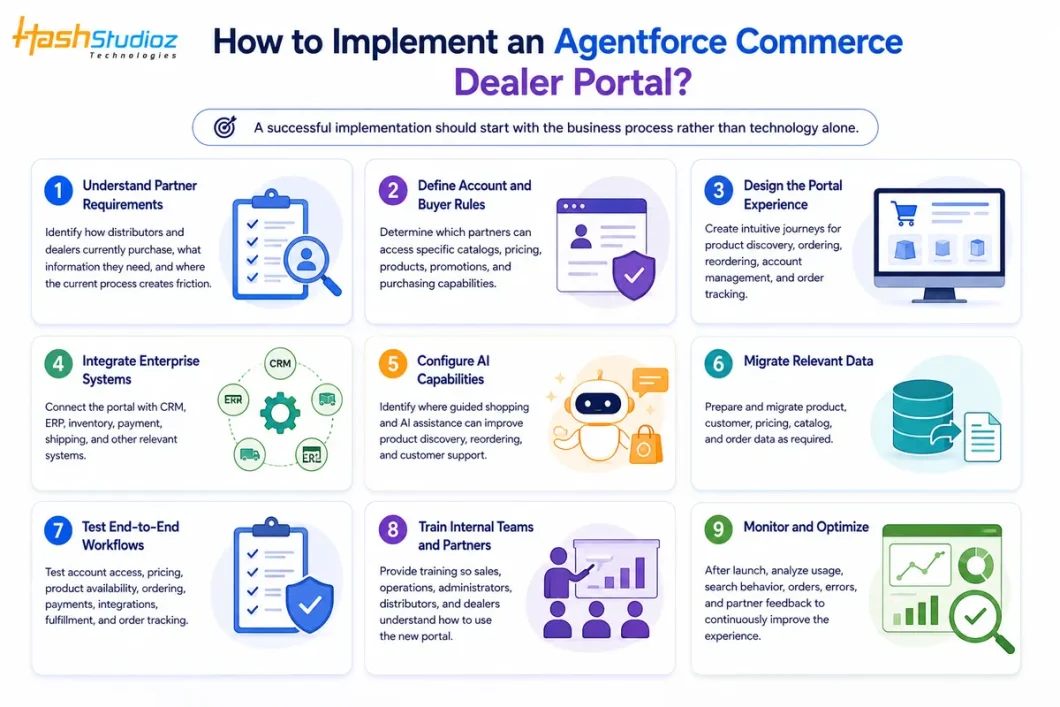
A successful implementation should start with the business process rather than technology alone.
1. Understand Partner Requirements
Start by understanding how distributors and dealers currently purchase products and interact with the manufacturer. Identify their purchasing workflows, common challenges, information requirements, and areas where manual processes create delays. This helps define the portal experience around actual partner needs rather than simply replicating existing processes digitally.
2. Define Account and Buyer Rules
Determine how different distributors, dealers, and users should access the commerce portal. Define account structures, user roles, permissions, product catalogs, pricing, promotions, and purchasing limits. Account-specific rules are particularly important in B2B commerce because different partners may have different contracts, pricing agreements, and product access.
3. Design the Portal Experience
Create a simple and intuitive journey for partners to find products, review pricing, place orders, reorder frequently purchased items, manage account information, and track orders. The portal should reduce the number of steps required for routine purchases while still supporting complex B2B requirements such as bulk ordering and approval workflows.
4. Integrate Enterprise Systems
Connect the commerce portal with the systems that support the manufacturer’s operations. This may include CRM, ERP, inventory management, payment platforms, shipping systems, and other business applications. Reliable integration ensures that product information, pricing, inventory, customer details, and order status remain synchronized across the technology ecosystem.
5. Configure AI Capabilities
Identify areas where Agentforce and AI-powered capabilities can improve the partner experience. AI can assist with product discovery, guided shopping, recommendations, reordering, and common customer questions. Manufacturers should focus on practical use cases where AI can reduce friction or improve efficiency rather than adding AI without a clear business purpose.
6. Migrate Relevant Data
Prepare the data required to operate the new portal, including product information, customer accounts, pricing, catalogs, contracts, and historical orders where appropriate. Before migration, businesses should review data quality and remove outdated, duplicate, or inconsistent information. Accurate data is essential for providing partners with reliable purchasing information.
7. Test End-to-End Workflows
Thoroughly test the complete purchasing journey before launch. This should include account access, product visibility, customer-specific pricing, inventory availability, cart and checkout, payments, integrations, order creation, fulfillment, and order tracking. Testing different distributor and dealer scenarios can help identify issues that may not appear during basic functional testing.
8. Train Internal Teams and Partners
Provide appropriate training to sales teams, administrators, operations teams, distributors, and dealers. Internal teams should understand how to manage accounts, catalogs, pricing, orders, and support requests, while partners should know how to search products, place orders, reorder products, and track their purchases through the portal.
9. Monitor and Optimize
Implementation does not end when the portal goes live. Monitor user adoption, search behavior, ordering patterns, system performance, integration errors, and partner feedback. These insights can help manufacturers identify areas for improvement, optimize the user experience, refine AI capabilities, and continuously enhance the portal as business and partner requirements evolve.
Best Practices for Manufacturer B2B Portals
- Keep the Experience Simple: B2B buyers want convenience, even when their purchasing process is complex.
- Maintain Accurate Data: Ensure pricing, product information, and inventory details remain accurate.
- Design for Repeat Orders: Make frequently purchased products and previous orders easy to access.
- Prioritize Integration: Connect the portal with CRM, ERP, inventory, and other essential systems.
- Use AI Where It Adds Value: Apply AI to product discovery, recommendations, reordering, and customer assistance.
- Make the Portal Scalable: Build the architecture to support new partners, products, regions, and business processes.
Conclusion
Manufacturers can use Agentforce Commerce, formerly Commerce Cloud, to transform distributor and dealer portals from basic ordering websites into connected B2B commerce channels.
Account-based experiences, negotiated pricing, personalized catalogs, bulk ordering, self-service reordering, AI-powered guided shopping, and integration with CRM and ERP can make partner purchasing more efficient. Salesforce’s current B2B Commerce capabilities specifically support personalized buyer experiences, negotiated pricing, self-service purchasing, and Agentforce-powered guided shopping.
For manufacturers, the goal is not simply to digitize ordering. It is to create a connected partner ecosystem where distributors and dealers can purchase efficiently while sales, service, operations, and fulfillment teams work with consistent information.
With the right Agentforce Commerce implementation, integration strategy, and ongoing optimization, manufacturers can reduce manual processes, improve partner experiences, and build a scalable digital foundation for distributor and dealer growth.
FAQs
1. What is an Agentforce Commerce distributor or dealer portal?
It is a B2B digital commerce portal that allows manufacturers to provide distributors and dealers with secure access to products, pricing, inventory, ordering, and order information.
2. How can manufacturers use Agentforce Commerce for dealer portals?
Manufacturers can use it to provide account-specific catalogs, negotiated pricing, bulk ordering, self-service reordering, order tracking, and personalized purchasing experiences.
3. Can Agentforce Commerce integrate with ERP systems?
Yes. It can be integrated with ERP and other enterprise systems to connect product, inventory, pricing, order, and fulfillment data.
4. How does Agentforce Commerce improve distributor and dealer experiences?
It reduces reliance on manual communication by allowing partners to independently search products, view pricing, place orders, reorder products, and track orders.
5. Can Agentforce support AI-powered product discovery?
Yes. Agentforce capabilities can assist B2B buyers with product discovery, guided shopping, reordering, and other purchasing-related tasks.